- Cisco Community
- Technology and Support
- Collaboration
- IP Telephony and Phones
- Configuring Speed Dials in CUCM
- Subscribe to RSS Feed
- Mark Topic as New
- Mark Topic as Read
- Float this Topic for Current User
- Bookmark
- Subscribe
- Mute
- Printer Friendly Page
Configuring Speed Dials in CUCM


- Mark as New
- Bookmark
- Subscribe
- Mute
- Subscribe to RSS Feed
- Permalink
- Report Inappropriate Content
10-24-2013 09:02 AM - edited 03-16-2019 08:03 PM
Hi
One of our secretaries has two 7914 expansion modules on her 7960 desk phone and I'm having some trouble setting the speed dials up on them again after her phone was deleted from CUCM to resolve a problem. I'm using CUCM v8.
Here's what I have managed to do:
-Create the phone
-Create a unique template and add all the extra speed dials using the 'Modify Button Items' window to add them on one at a time
-Enter the speed dial extension details
It's at this point that I hit probems. The first five speed dials - on the phone itself - appear correctly, but those on the expansion modules do not. As far as I can tell all the information is entered correctly, all the speed dials appear in the Association Information pane in CUCM, number 7 onwards underneath the 'On Addon Module(s)' header:
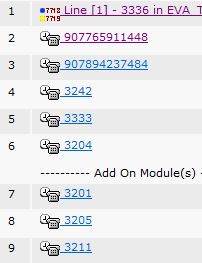
Unfortunately, while plaing around trying to find a phone configuration that works I now cannot add the speed dials in the 'Modify Button Items' window. I receive the below error:

Can somebody advise how I go about resolving this error and seting up the speed dials correctly?
Thanks
Alex
- Labels:
-
CUCM

- Mark as New
- Bookmark
- Subscribe
- Mute
- Subscribe to RSS Feed
- Permalink
- Report Inappropriate Content
10-30-2013 11:26 AM
Hi Alex,
Without seeing the phone configuration screen, I would have to say you are using a template that is not made for a 7960 model phone or the device you have built within Call Manager is possibly not a 7960. If you can include a screenshot of the phone config that may clear some things up.
Thanks,
Tony
Please rate helpful posts!
Thanks,
Tony


- Mark as New
- Bookmark
- Subscribe
- Mute
- Subscribe to RSS Feed
- Permalink
- Report Inappropriate Content
10-30-2013 11:40 AM
Make sure you selected 7914 module under Expansion Module Information on the device.
HTH,
Chris

Find answers to your questions by entering keywords or phrases in the Search bar above. New here? Use these resources to familiarize yourself with the community: