- Cisco Community
- Technology and Support
- Networking
- Wireless
- Wireless clients to external authentication server
- Subscribe to RSS Feed
- Mark Topic as New
- Mark Topic as Read
- Float this Topic for Current User
- Bookmark
- Subscribe
- Mute
- Printer Friendly Page
Wireless clients to external authentication server


- Mark as New
- Bookmark
- Subscribe
- Mute
- Subscribe to RSS Feed
- Permalink
- Report Inappropriate Content
01-08-2015 11:55 AM - edited 07-05-2021 02:14 AM
Sorry if this seems elementary to some, but I don't have experience in this area. Recently I was able to get clients to join the wireless network, but it was without any form of authentication.
In my current environment, we have an external authentication server and my management wants it to be the authentication source for all wireless clients. I'm having difficulty deciphering different links of instructions because I make out the instructions to place the WLC as the authentication source. I would like to know if any may have a link or may be able to post instructions as to how to set up an external authentication server for wireless clients to pull from. Or is this question not as in depth due to an unmentioned parameter?
Sincerely,
Sam
- Labels:
-
Wireless Security


- Mark as New
- Bookmark
- Subscribe
- Mute
- Subscribe to RSS Feed
- Permalink
- Report Inappropriate Content
01-08-2015 11:33 PM
External Web Authentication Process
With external web authentication, the login page used for web authentication is stored on an external web server. This is the sequence of events when a wireless client tries to access a WLAN network which has external web authentication enabled:
The client (end user) connects to the WLAN and opens a web browser and enters a URL, such as www.cisco.com.
The client sends a DNS request to a DNS server in order to resolve www.cisco.com to IP address.
The WLC forwards the request to the DNS server which, in turn, resolves www.cisco.com to IP address and sends a DNS reply. The controller forwards the reply to the client.
Client tries to initiate a TCP connection with the www.cisco.com IP address by sending the TCP SYN packet to the www.cisco.com IP address.
The WLC has rules configured for the client and hence can act as a proxy for www.cisco.com. It sends back a TCP SYN-ACK packet to the client with source as the IP address of www.cisco.com. The client sends back a TCP ACK packet in order to complete the three way TCP handshake and the TCP connection is fully established.
The client sends an HTTP GET packet destined to www.google.com. The WLC intercepts this packet, sends it for redirection handling. The HTTP application gateway prepares a HTML body and sends it back as the reply to the HTTP GET requested by the client. This HTML makes the client go to the default webpage URL of the WLC, for example, http://<Virtual-Server-IP>/login.html.
The client then starts the HTTPS connection to the redirect URL which sends it to the 1.1.1.1. This is the virtual IP address of the controller. The client has to validate the server certificate or ignore it in order to bring up the SSL tunnel.
Because external web authentication is enabled, the WLC redirects the client to the external web server.
The external web auth login URL is appended with parameters such as the AP_Mac_Address, the client_url (www.cisco.com) and the action_URL that the client needs to contact the controller web server.
Note: The action_URL tells the web server that the username and password is stored on the controller. The credentials must be sent back to the controller in order to get authenticated.
The external web server URL leads the user to a login page.
The login page takes user credentials input, and sends the request back to the action_URL, example http://1.1.1.1/login.html, of the WLC web server.
The WLC web server submits the username and password for authentication.
The WLC initiates the RADIUS server request or uses the local database on the WLC and authenticates the user.
If authentication is successful, the WLC web server either forwards the user to the configured redirect URL or to the URL the client started with, such as www.cisco.com.
If authentication fails, then the WLC web server redirects user back to the customer login URL.
Note: In order to configure external webauthentication to use ports other than HTTP and HTTPS, issue this command:
(Cisco Controller) >config network web-auth-port

<port>         Configures an additional port to be redirected for web authentication.
For more details please refer to the link-
http://www.cisco.com/c/en/us/support/docs/wireless-mobility/wlan-security/71881-ext-web-auth-wlc.html


- Mark as New
- Bookmark
- Subscribe
- Mute
- Subscribe to RSS Feed
- Permalink
- Report Inappropriate Content
01-09-2015 01:15 AM
Configure the WLC for RADIUS Authentication through an External RADIUS Server
The WLC needs to be configured in order to forward the user credentials to an external RADIUS server. The external RADIUS server then validates the user credentials and provides access to the wireless clients.
Complete these steps in order to configure the WLC for an external RADIUS server:
Choose Security and RADIUS Authentication from the controller GUI to display the RADIUS Authentication Servers page. Then click New in order to define a RADIUS server.
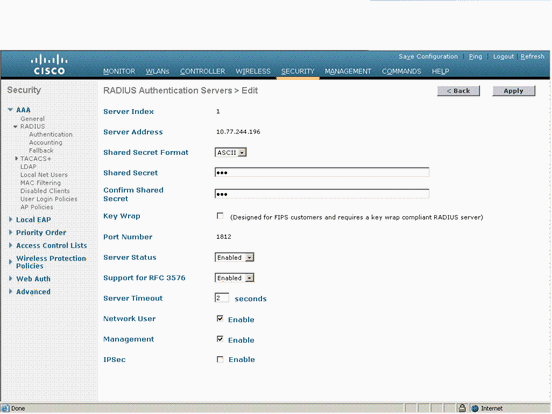
Define the RADIUS server parameters in the RADIUS Authentication Servers > New page. These parameters include the RADIUS Server IP Address, Shared Secret, Port Number, and Server Status.
The Network User and Management check boxes determine if the RADIUS-based authentication applies for WLC management and network users. This example uses the Cisco Secure ACS as the RADIUS server with IP address 10.77.244.196.
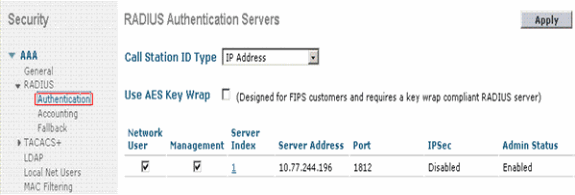
Radius server can now be used by the WLC for authentication. You can find the Radius Server listed if you choose Security > Radius > Authentication.
RFC 3576 is supported on the Cisco CNS Access Registrar (CAR) RADIUS server, but not on Cisco Secure ACS Server version 4.0 and earlier.
You can also use the local RADIUS server feature in order to authenticate users. Local RADIUS server was introduced with version 4.1.171.0 code. WLCs that run previous versions do not have the local radius feature. Local EAP is an authentication method that allows users and wireless clients to be authenticated locally. It is designed for use in remote offices that want to maintain connectivity to wireless clients when the backend system becomes disrupted or the external authentication server goes down. Local EAP retrieves user credentials from the local user database or the LDAP backend database to authenticate users. Local EAP supports LEAP, EAP-FAST with PACs, EAP-FAST with certificates, and EAP-TLS authentication between the controller and wireless clients.
Local EAP is designed as a backup authentication system. If any RADIUS servers are configured on the controller, the controller tries to authenticate the wireless clients with the RADIUS servers first. Local EAP is attempted only if no RADIUS servers are found, either because the RADIUS servers timed out or no RADIUS servers were configured.
Refer to Local EAP Authentication on the Wireless LAN Controller with EAP-FAST and LDAP Server Configuration Example for more information on how to configure Local EAP on Wireless LAN controllers.
http://www.cisco.com/c/en/us/support/docs/wireless-mobility/wlan-security/69730-eap-auth-wlc.html#c2

Discover and save your favorite ideas. Come back to expert answers, step-by-step guides, recent topics, and more.
New here? Get started with these tips. How to use Community New member guide
