- Cisco Community
- Technology and Support
- Networking
- Switching
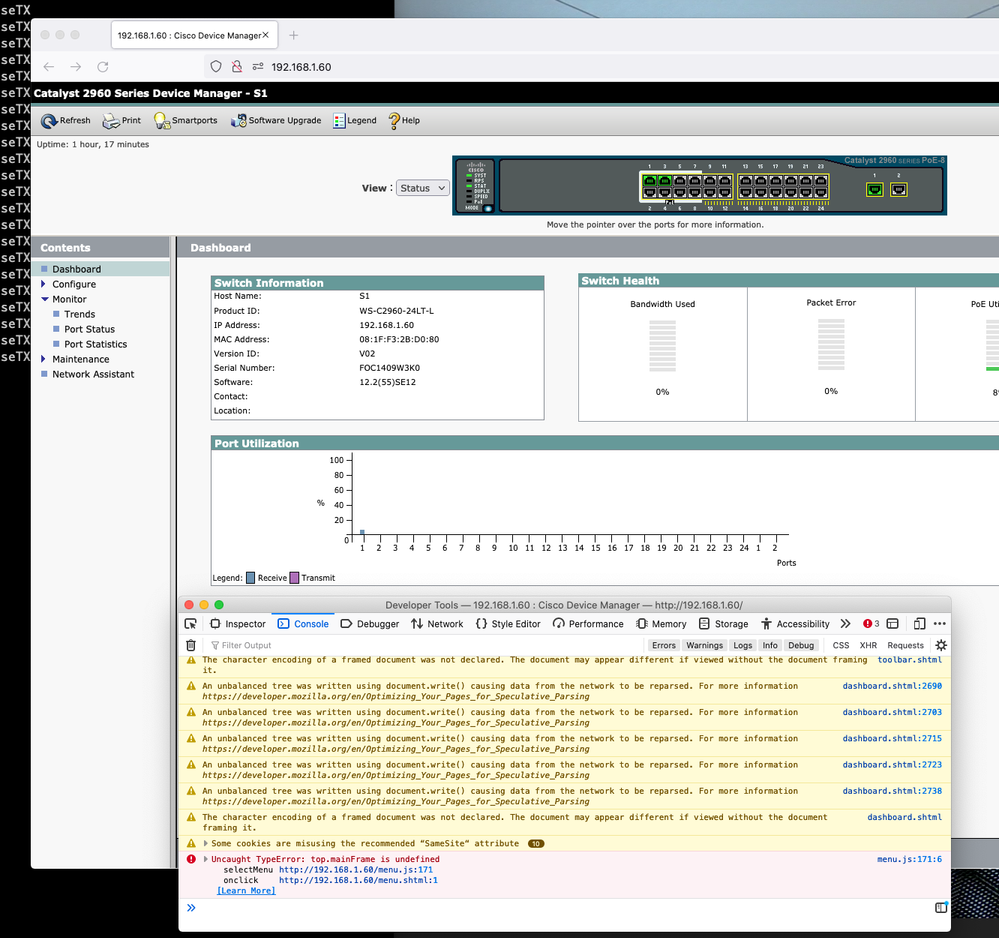
- http web error - top.mainFrame is undefined
- Subscribe to RSS Feed
- Mark Topic as New
- Mark Topic as Read
- Float this Topic for Current User
- Bookmark
- Subscribe
- Mute
- Printer Friendly Page
http web error - top.mainFrame is undefined

- Mark as New
- Bookmark
- Subscribe
- Mute
- Subscribe to RSS Feed
- Permalink
- Report Inappropriate Content
09-18-2021 08:12 AM
Hello,
I've upgraded my Catalyst to the latest firmware avaliable. But after that the webpage stopped working and I see this Javascript error when trying to see "Port Status" or other pages.
Do I need to configure something for this to work?
Switch Ports Model SW Version SW Image
------ ----- ----- ---------- ----------
* 1 26 WS-C2960-24LT-L 12.2(55)SE12 C2960-LANBASEK9-M
S1#sh boot
BOOT path-list : flash:c2960-lanbasek9-mz.122-55.SE12/c2960-lanbasek9-mz.122-55.SE12.bin
- Labels:
-
Catalyst 2000


- Mark as New
- Bookmark
- Subscribe
- Mute
- Subscribe to RSS Feed
- Permalink
- Report Inappropriate Content
09-18-2021 10:19 AM
Hello,
tough one, as this error is typically related to JavaScript and probably META tags. Make sure you have JavaScript enabled (assuming you are trying to access the switch GUI from a Windows machine)...

- Mark as New
- Bookmark
- Subscribe
- Mute
- Subscribe to RSS Feed
- Permalink
- Report Inappropriate Content
09-22-2022 05:48 PM
I'm having this problem as well on a 3560X. Georg's answer makes no sense. Javascript is obviously enabled or it wouldn't be able to throw a runtime error. Anyways, here's a greasemonkey script I wrote to fix the problem. Feel free to use it or modify it as you'd like.
// ==UserScript==
// @name     Cisco Device Manager Fix
// @version  1
// @grant    none
// ==/UserScript==

unsafeWindow.mainFrame = undefined;

window.onload = function() {
  for (var i = 0; i < frames.length; i++) {
    if (frames[i].frameElement.name === 'mainFrame') {
      unsafeWindow.mainFrame = frames[i];
    }
  }
}
- Mark as New
- Bookmark
- Subscribe
- Mute
- Subscribe to RSS Feed
- Permalink
- Report Inappropriate Content
05-12-2024 11:13 AM - edited 05-14-2024 03:42 PM
Having the same issue. Anybody knows where I should put this script?
UPD. Managed to normally use the webUI by opening it with Internet Explorer mode in Microsoft Edge.

Discover and save your favorite ideas. Come back to expert answers, step-by-step guides, recent topics, and more.
New here? Get started with these tips. How to use Community New member guide