- Cisco Community
- Technology and Support
- Cisco Software and Licensing
- Cisco Software Discussions
- WLC Setup Issue: Server Reset Connection
- Subscribe to RSS Feed
- Mark Topic as New
- Mark Topic as Read
- Float this Topic for Current User
- Bookmark
- Subscribe
- Mute
- Printer Friendly Page
WLC Setup Issue: Server Reset Connection

- Mark as New
- Bookmark
- Subscribe
- Mute
- Subscribe to RSS Feed
- Permalink
- Report Inappropriate Content
10-27-2020 06:47 AM
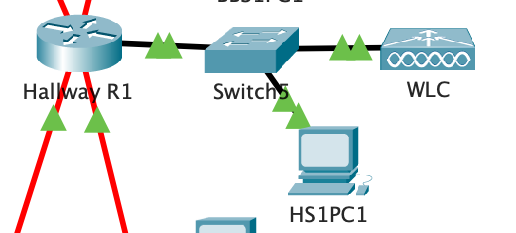
I am currently having trouble configuring my WLC from a nearby PC have a network setup as shown in the image file attached, where the network is on the 192.168.12.0 network. The PC has a DHCP assigned address of 12.4, the WLC at 12.2 (the DHCP connections start at 12.3 so WLC is out of the range), however when i attempt to access the WLC setup from the PC, i get a Server Reset Connection error. I can ping the WLC from the PC without error however, so the connection appears to be intact.
I have done some researching and i have not been able to find any solutions. This WLC does not have any CLI, and i have tried accessing it through both the HTTP and HTTPS protocols from the PC browser.
Any help would be appreciated thanks.
- Labels:
-
Cisco Software
- Mark as New
- Bookmark
- Subscribe
- Mute
- Subscribe to RSS Feed
- Permalink
- Report Inappropriate Content
07-01-2021 05:26 PM
Try prepending https:// in front of the WLC's IP address. Also wait a bit for the Packet Tracer file to "settle".
- Mark as New
- Bookmark
- Subscribe
- Mute
- Subscribe to RSS Feed
- Permalink
- Report Inappropriate Content
09-30-2021 04:21 AM - edited 09-30-2021 04:23 AM
same, but I shutdown the website when registering a account, and then I can't connect to that web anymore.

- Mark as New
- Bookmark
- Subscribe
- Mute
- Subscribe to RSS Feed
- Permalink
- Report Inappropriate Content
10-01-2025 04:31 AM
I had the problem so what i did is.
When you insert a new WLC on Packet Tracker for initial access you should use a Browser on PC but access WLC on HTTP and not HTTPS. It loads for almost 30s then load initial configuration page. After initial configuration and magbe assigning new Management IP you can access WLC only through HTTPS.
Initial Access - HTTP
Later On - HTTPS

Discover and save your favorite ideas. Come back to expert answers, step-by-step guides, recent topics, and more.
New here? Get started with these tips. How to use Community New member guide