- Cisco Community
- Technology and Support
- Security
- Security Analytics
- Stealthwatch CA Idendity Certificate
- Subscribe to RSS Feed
- Mark Topic as New
- Mark Topic as Read
- Float this Topic for Current User
- Bookmark
- Subscribe
- Mute
- Printer Friendly Page

- Mark as New
- Bookmark
- Subscribe
- Mute
- Subscribe to RSS Feed
- Permalink
- Report Inappropriate Content
05-12-2023 06:27 AM
Hi all,
I have a problem when I try to update the identity certificate of the Manager to a custom one of my own CA.
When I update it, I loose the connection to the appliance and I get "Config Channel Down"
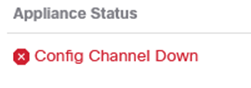
And according to the documentation, I should remove the appliance through the console. but when I do, I receive this error:
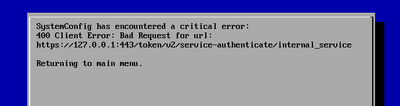
and the operation failed.
what should I do? anybody can help?
Thanks in advance,
Solved! Go to Solution.
- Labels:
-
Stealthwatch Enterprise
Accepted Solutions
- Mark as New
- Bookmark
- Subscribe
- Mute
- Subscribe to RSS Feed
- Permalink
- Report Inappropriate Content
06-06-2023 11:26 PM
The problem was in using a wrong template to create the certificate.
The template should be ((server authentication and client authentication))


- Mark as New
- Bookmark
- Subscribe
- Mute
- Subscribe to RSS Feed
- Permalink
- Report Inappropriate Content
05-12-2023 09:09 AM
What version are you running and what procedure did you follow in your attempt to replace the certificate?
- Mark as New
- Bookmark
- Subscribe
- Mute
- Subscribe to RSS Feed
- Permalink
- Report Inappropriate Content
05-12-2023 10:16 AM
I have the last version 7.4.2 in virtual platform.
I have received the Certificate from the CA authority containing the info and the URL.
I have added this certificate with CA certificate to the trust store in all the appliance.
Then I replaced it with the self signed one in the identity certificate tab.
I tried to follow the instruction in this file page 73:
- Mark as New
- Bookmark
- Subscribe
- Mute
- Subscribe to RSS Feed
- Permalink
- Report Inappropriate Content
05-15-2023 12:40 AM - edited 05-15-2023 12:40 AM
That's the correct procedure. The only thing I can guess is possibly you did not install all certificates in the chain (root, intermediate and issuing CA certificate, as applicable).
If you did that, then I would suggest opening a TAC case. They can guide you through the cli procedure to replace the non-working certificate with a self-signed one and then work with you to determine the root cause for the problem you're experiencing.
- Mark as New
- Bookmark
- Subscribe
- Mute
- Subscribe to RSS Feed
- Permalink
- Report Inappropriate Content
05-15-2023 01:24 AM
I already added the CA, CA issuing and the cert to the trust store. but as I explained I succeed to open the URL securely

but I lost the connection to the manager (config channel down)

I will see with Cisco.
Thanks a lot
- Mark as New
- Bookmark
- Subscribe
- Mute
- Subscribe to RSS Feed
- Permalink
- Report Inappropriate Content
06-06-2023 11:26 PM
The problem was in using a wrong template to create the certificate.
The template should be ((server authentication and client authentication))

Discover and save your favorite ideas. Come back to expert answers, step-by-step guides, recent topics, and more.
New here? Get started with these tips. How to use Community New member guide