- Cisco Community
- Technology and Support
- Security
- Network Access Control
- ISE 2.4: Wireless guest failed: 5400 Authentication failed
- Subscribe to RSS Feed
- Mark Topic as New
- Mark Topic as Read
- Float this Topic for Current User
- Bookmark
- Subscribe
- Mute
- Printer Friendly Page
ISE 2.4: Wireless guest failed: 5400 Authentication failed


- Mark as New
- Bookmark
- Subscribe
- Mute
- Subscribe to RSS Feed
- Permalink
- Report Inappropriate Content
08-09-2021 02:08 AM - edited 08-09-2021 02:09 AM
Hello Experts,
I am facing a issue with guest access authentication. Old AIROS wlcs are working but now I have a installed a new 9800 wlc and its creating an issue.
Requesting help to troubleshoot below authentication fail error messages seen for wireless guest users.
| Event | 5400 Authentication failed |
| Failure Reason | 15039 Rejected per authorization profile |
| Resolution | Authorization Profile with ACCESS_REJECT attribute was selected as a result of the matching authorization rule. Check the appropriate Authorization policy rule-results. |
| Root cause | Selected Authorization Profile contains ACCESS_REJECT attribute |
| Username | USERNAME |
Its not hitting the right Authentication policy.
Thanks in advance.
Best Regards
- Labels:
-
AAA



- Mark as New
- Bookmark
- Subscribe
- Mute
- Subscribe to RSS Feed
- Permalink
- Report Inappropriate Content
08-09-2021 02:34 AM
You need to check your authorization policy. Clearly you are not matching
the same rule after the change of WLC. The rule might be matching NAD
vendor or model, etc.
Check your rules.
**** please remember to rate useful posts
- Mark as New
- Bookmark
- Subscribe
- Mute
- Subscribe to RSS Feed
- Permalink
- Report Inappropriate Content
08-09-2021 02:52 AM
HI Mohammed,
Rules are same as before and NAD also has been update din ISE.
here are the rule:

Best Regards
- Mark as New
- Bookmark
- Subscribe
- Mute
- Subscribe to RSS Feed
- Permalink
- Report Inappropriate Content
08-09-2021 03:07 AM
authorization tab. Post the full output.
- Mark as New
- Bookmark
- Subscribe
- Mute
- Subscribe to RSS Feed
- Permalink
- Report Inappropriate Content
08-09-2021 04:13 AM
I hope that is what you asked:

Steps
| 11001 | Received RADIUS Access-Request | |
| 11017 | RADIUS created a new session | |
| 15049 | Evaluating Policy Group | |
| 15008 | Evaluating Service Selection Policy | |
| 15048 | Queried PIP | |
| 15041 | Evaluating Identity Policy | |
| 15013 | Selected Identity Source - | |
| 22043 | Current Identity Store does not support the authentication method; Skipping it | |
| 22064 | Authentication method is not supported by any applicable identity store(s) | |
| 22058 | The advanced option that is configured for an unknown user is used | |
| 22060 | The 'Continue' advanced option is configured in case of a failed authentication request | |
| 24715 | ISE has not confirmed locally previous successful machine authentication for user in Active Directory | |
| 15036 | Evaluating Authorization Policy | |
| 15048 | Queried PIP | |
| 15048 | Queried PIP | |
| 15048 | Queried PIP | |
| 15016 | Selected Authorization Profile - DenyAccess | |
| 15039 | Rejected per authorization profile | |
| 11003 | Returned RADIUS Access-Reject | |
| 5434 | Endpoint conducted several failed authentications of the same scenario |
Best Regards



- Mark as New
- Bookmark
- Subscribe
- Mute
- Subscribe to RSS Feed
- Permalink
- Report Inappropriate Content
08-09-2021 03:29 PM
There is not enough information on your policy or WLC configuration to provide much useful help here.
You mention that "Its not hitting the right Authentication policy". Is the session hitting the correct Policy Set? If not, you need to look at what your 'WLC_Web_Authentication' condition includes and determine what is not matching from the RADIUS traffic sent by the WLC.
Unless I'm mistaken, it looks like this is a separate Policy Set for the user auth that happens after the CWA redirect (not a common policy design). Is that correct?
If the session is hitting the correct Policy Set and passing Authentication but skipping your Authorization Policy, then you need to look at the matching conditions there. You're using the 'RADIUS Called Station ID' attribute in your AuthZ Policy. Is the 9800 WLC configured to send that? See the Step 5 in the following configuration guide showing how this can be configured.
Central Web Authentication (CWA) on Catalyst 9800 Wireless Controllers and ISE Configuration Example
As always, if this is an urgent issue please open a case with TAC to investigate further.
- Mark as New
- Bookmark
- Subscribe
- Mute
- Subscribe to RSS Feed
- Permalink
- Report Inappropriate Content
08-10-2021 01:24 AM
Hi Greg,
Its not hitting the correct Guest policy set. Its hitting Default (Deny) POLICY.
I am using authentication on ISE and custom webauth portal is on WLC itself. AirOS WLCs are working normally ...only 9800 series WLC is creating issue.
here are the overview of the policies:

Authentication:
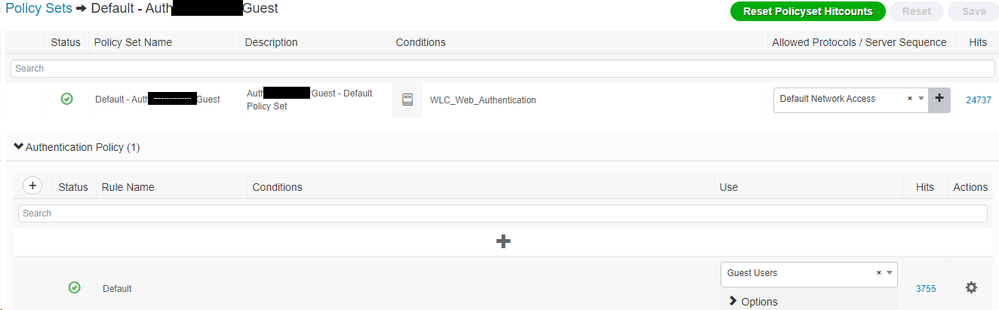
AuthZ:
Best Regards
- Mark as New
- Bookmark
- Subscribe
- Mute
- Subscribe to RSS Feed
- Permalink
- Report Inappropriate Content
08-10-2021 01:24 AM - edited 08-10-2021 01:26 AM
AuthZ Policy:

Called Station ID is also matching on cisco wlc 9800:

- Mark as New
- Bookmark
- Subscribe
- Mute
- Subscribe to RSS Feed
- Permalink
- Report Inappropriate Content
08-10-2021 03:50 PM
The default condition for 'WLC_Web_Authentication' uses the following attributes and is mainly used to simplify multi-vendor environments.
Radius:NAS-Port-Type = Wireless - IEEE 802.11
Radius:Service-Type = Login
If you're using Local Web Auth (LWA) on the WLC, have you configured the service type 'login' as per the Configure a Web Authentication SSID on Catalyst 9800 Wireless Controllers guide?
If so, there may be some other issue with the Normalised RADIUS match on the WLC 9800 traffic.
You could take a packet capture from the WLC RADIUS traffic to ensure the above av-pairs are sent or try changing your Policy Set matching conditions to something more generic like:

- Mark as New
- Bookmark
- Subscribe
- Mute
- Subscribe to RSS Feed
- Permalink
- Report Inappropriate Content
08-10-2021 10:25 PM
HI Greg,
I cant change in Policy set as at least 20 other locations are working fine with same config.
I suspect we we have to change config on 9800 WLC.
Here is the WLAN config on 9800:
wlan CorpGuest 1 CorpGuest
peer-blocking drop
no security wpa
no security wpa wpa2
no security wpa wpa2 ciphers aes
no security wpa akm dot1x
security dot1x authentication-list ISE --> Under AAA Tab of the WLAN
security web-auth
security web-auth authentication-list ISE_Login ---> Under Layer 3 Tab
security web-auth parameter-map global
I am missing something here or ?
Regards
- Mark as New
- Bookmark
- Subscribe
- Mute
- Subscribe to RSS Feed
- Permalink
- Report Inappropriate Content
08-10-2021 11:57 PM
As per the last guide I shared, if you're using LWA with an external RADIUS server, you need to ensure the login authentication type is configured.
# aaa authentication login <login-local-name> local
If this is how you have it configured, I suggest opening a case with TAC.
- Mark as New
- Bookmark
- Subscribe
- Mute
- Subscribe to RSS Feed
- Permalink
- Report Inappropriate Content
08-12-2021 05:12 AM
Still same issue....Please find my complete config here:
---------------------------------------
aaa new-model
!
!
aaa group server radius ISE
server name ISE1
server name ISE2
deadtime 5
mac-delimiter hyphen
!
aaa group server radius CLOUD
server name CLOUD1
server name CLOUD2
deadtime 5
!
aaa authentication login ISE_Login group ISE
aaa authentication dot1x ISE group ISE
aaa authentication dot1x CLOUD group CLOUD
aaa authorization network ISE group ISE
aaa authorization network CLOUD group CLOUD
aaa accounting identity ISE start-stop group ISE
aaa accounting identity CLOUD start-stop group CLOUD
!
!
aaa attribute list wlan_lobby_access
!
!
!
!
aaa server radius dynamic-author
client 10.18.21.14 server-key 7 <key>
client 10.18.21.15 server-key 7 <key>
client 188.166.194.133 server-key 7 <key>
client 67.207.78.164 server-key 7 <key>
!
parameter-map type webauth global
type webauth
sleeping-client
virtual-ip ipv4 192.0.2.1 virtual-host guest.corp.com
redirect for-login guest.corp.com
redirect portal ipv4 192.0.2.1
intercept-https-enable
trustpoint TP-self-signed-1227611375
webauth-http-enable
!
radius server ISE2
address ipv4 10.18.21.15 auth-port 1812 acct-port 1813
key 7 <key>
!
radius server CLOUD1
address ipv4 188.166.194.133 auth-port 1866 acct-port 1867
key 7 <key>
!
radius server CLOUD2
address ipv4 67.207.78.164 auth-port 1866 acct-port 1867
key 7 <key>
!
wireless aaa policy Called_Station_ID
nas-id option1 ssid
!
wireless profile policy Guest
aaa-policy Called_Station_ID
accounting-list ISE
description Guest
ipv4 dhcp required
ipv4 dhcp server 172.18.80.1
vlan CorpGuest
no shutdown
!
wlan CorpGuest 1 CorpGuest
peer-blocking drop
no security wpa
no security wpa wpa2
no security wpa wpa2 ciphers aes
no security wpa akm dot1x
security web-auth
security web-auth authentication-list ISE_Login
security web-auth parameter-map global
no shutdown
---------------------------------------
Can you please suggest now, what is wrong in this config.
Best Regards

- Mark as New
- Bookmark
- Subscribe
- Mute
- Subscribe to RSS Feed
- Permalink
- Report Inappropriate Content
08-13-2021 10:48 PM
Check the Other Attributes section of ISE auth detail report for Called-Station-ID and see what is captured.
Usually the default suffices. If changed in the AAA Advanced Settings under Configuration > Security > AAA > AAA Advanced, they would be shown as radius-server attribute wireless; e.g.,
radius-server attribute wireless accounting call-station-id
radius-server attribute wireless authentication call-station-id ap-macaddress-ssid
Wireless AAA policy appears for NAS-ID but not for called-station, per Cisco Catalyst 9800 Series Wireless Controller Software Configuration Guide, Cisco IOS XE Bengaluru 17.6.x > WLAN > Network Access Server Identifier.
- Mark as New
- Bookmark
- Subscribe
- Mute
- Subscribe to RSS Feed
- Permalink
- Report Inappropriate Content
08-16-2021 07:28 AM
Hi,
Here are the radius attribite sin my config:
WLC1#sh run | in radius-server attribute
radius-server attribute wireless accounting mac-delimiter hyphen
radius-server attribute wireless accounting username-delimiter none
radius-server attribute wireless accounting username-case lower
radius-server attribute wireless accounting call-station-id ap-macaddress-ssid
radius-server attribute wireless accounting callStationIdCase upper
radius-server attribute wireless authentication callStationIdCase upper
radius-server attribute wireless authentication mac-delimiter hyphen
radius-server attribute wireless authentication call-station-id ap-macaddress-ssid
Best Regards
- Mark as New
- Bookmark
- Subscribe
- Mute
- Subscribe to RSS Feed
- Permalink
- Report Inappropriate Content
08-17-2021 10:13 PM
Check the auth detail reports and see whether they have the attributes that you intend to match in your policy conditions.

Discover and save your favorite ideas. Come back to expert answers, step-by-step guides, recent topics, and more.
New here? Get started with these tips. How to use Community New member guide