- Cisco Community
- Technology and Support
- Security
- Network Security
- Cisco IPS Global Colleration Health and License not updated automatically
- Subscribe to RSS Feed
- Mark Topic as New
- Mark Topic as Read
- Float this Topic for Current User
- Bookmark
- Subscribe
- Mute
- Printer Friendly Page
Cisco IPS Global Colleration Health and License not updated automatically


- Mark as New
- Bookmark
- Subscribe
- Mute
- Subscribe to RSS Feed
- Permalink
- Report Inappropriate Content
06-01-2017 01:05 AM - edited 03-10-2019 06:51 AM
Hello Any one,
Global Correlation health is not updated and its showing disable in our Cisco IPS manager , kindly guide how can updated.
Also Please confirm how to updated license in my IPS.
IGSBRDSBIIPS# sh statistics global-correlation
Network Participation:
Counters:
Total Connection Attempts = 0
Total Connection Failures = 0
Connection Failures Since Last Success = 0
Connection History:
Updates:
Status Of Last Update Attempt = Disabled
Time Since Last Successful Update = 2245 minutes
Counters:
Update Failures Since Last Success = 0
Total Update Attempts = 19611
Total Update Failures = 288
Update Interval In Seconds = 300
Update Server = update-manifests.ironport.com
Update Server Address = 208.90.58.5
Current Versions:
config = 0
drop = 0
ip = 0
rule = 0
Warnings:
Unlicensed = Global correlation inspection and reputation filtering have been disabled because the sensor's license has expired.
Action Required = Obtain a new license from http://www.cisco.com/go/license.
Details:
Last fail log = 2017-05-29 00:25:01(GMT): Starting a global correlation update cycle.
2017-05-29 00:25:01(GMT): Sending client manifest:
2017-05-29 00:25:01(GMT): data=li10013e128:0bb93985f42d941e50dc8f022350d1a8033958cdc7050750aa5c503d0ad5e71e61e087db7fe5f54c7ed2d81cf1e108fa680966324f707cf3298c6e3469e300fei3e1320:<?xml version="1.0" encoding="UTF-8" standalone="yes"?>
<client_manifest version="2">
<capabilities>
<capability>2</capability>
</capabilities>
<applications>
<application name="ibrs" version="1.1" list_versions="0">
<components>
<component display_version="1236210407" environment_version="default" file_version="1236210407" last_updated="1490286474" name="config">
<integrity_check md5="e8b6e92d7e5034f1df5b1791f444f154"></integrity_check>
</component>
<component display_version="1496013676" environment_version="default" file_version="1496013676" last_updated="1496013906" name="drop">
<integrity_check md5="594b304db4c696b9dea7caab80075701"></integrity_check>
</component>
<component display_version="1496016727" environment_version="ips1g" file_version="1496016727" last_updated="1496017204" name="ip">
<integrity_check md5="0196e34a990edc968c47be59bd7b150e"></integrity_check>
</component>
<component display_version="1495962967" environment_version="default" file_version="1495962967" last_updated="1495964413" name="rule">
<integrity_check md5="471ce5c1ce38bb0d534306a7579cbb39"></integrity_check>
</component>
</components>
</application>
</applications>
</client_manifest>
e
2017-05-29 00:25:08(GMT): A global correlation update failed: openConnection: Caught IpAddrException badAddrString. Unable to use the Global Correlation HTTP proxy and DNS settings. Verify connection and try again.
Regards,
Sohel Jujara
- Labels:
-
IPS and IDS


- Mark as New
- Bookmark
- Subscribe
- Mute
- Subscribe to RSS Feed
- Permalink
- Report Inappropriate Content
06-01-2017 04:42 AM
As the output says:
Unlicensed = Global correlation inspection and reputation filtering have been disabled because the sensor's license has expired.
This product is past end of sales and nearing end of life. It is no longer eligible for a new license as they are not sold anymore. If you have let the old one expire then you can no longer get updates.
The classic IPS should really be replaced with a new FirePOWER service module. It will do a much more thorough job at providing protection against current threats and be fully supported.
- Mark as New
- Bookmark
- Subscribe
- Mute
- Subscribe to RSS Feed
- Permalink
- Report Inappropriate Content
06-01-2017 09:56 PM
Thanks for your support....
But After installing the license, All updates will take automatically or Not ?
Regards,
Sohel
- Mark as New
- Bookmark
- Subscribe
- Mute
- Subscribe to RSS Feed
- Permalink
- Report Inappropriate Content
06-01-2017 10:23 PM
Global Correlation should work ok with an unexpired IPS license.
Automatic signature updates will not work. That service is discontinued as the product is almost at end of life.
You will need to monitor the signature downloads and install them manually to stay current.
https://software.cisco.com/download/release.html?mdfid=286129615&flowid=49062&softwareid=282549755&release=S984&relind=AVAILABLE&rellifecycle=&reltype=latest
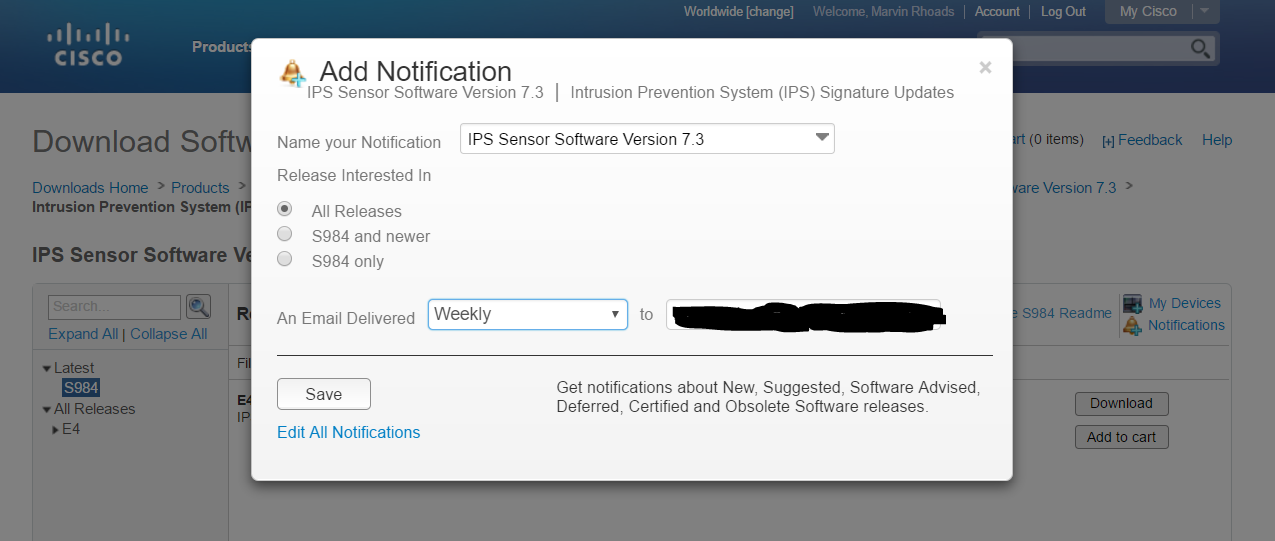
If you click on the "Add notification" icon you can get automatic emails regarding updated signatures.

Discover and save your favorite ideas. Come back to expert answers, step-by-step guides, recent topics, and more.
New here? Get started with these tips. How to use Community New member guide
