- Cisco Community
- Technology and Support
- Networking
- Routing and SD-WAN
- so it should look like this?
- Subscribe to RSS Feed
- Mark Topic as New
- Mark Topic as Read
- Float this Topic for Current User
- Bookmark
- Subscribe
- Mute
- Printer Friendly Page


- Mark as New
- Bookmark
- Subscribe
- Mute
- Subscribe to RSS Feed
- Permalink
- Report Inappropriate Content
02-09-2017 12:55 AM - edited 03-05-2019 08:00 AM
Hi Cisco Community,
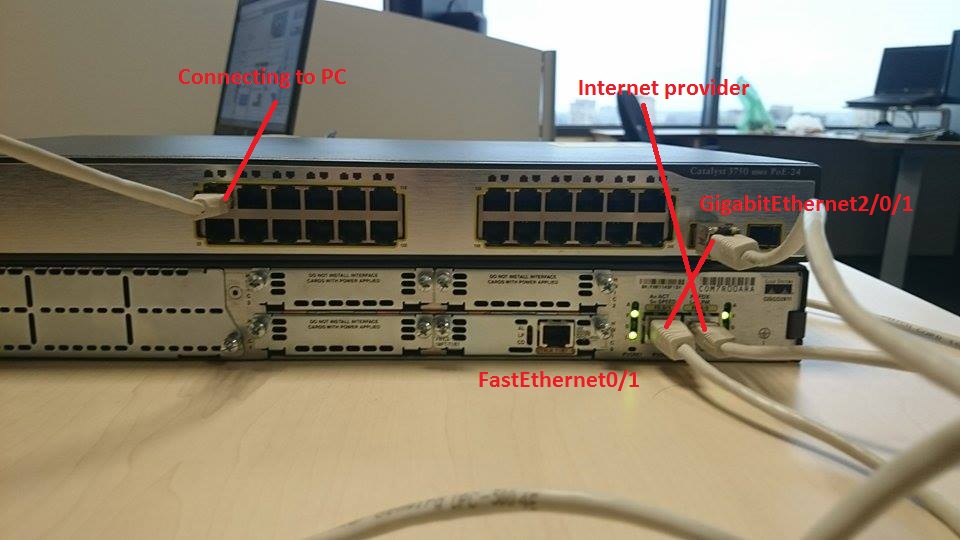
I'm having a problem with no internet connection on switch ports 9-16 17-24
But internet works well on Default vlan 1-8 ports
i added subnet and nat i don't understand what i'm missing any effort of helping is appreciated
Kind Regards,
Rokas Daunoras
Solved! Go to Solution.
- Labels:
-
LAN Switching
Accepted Solutions


- Mark as New
- Bookmark
- Subscribe
- Mute
- Subscribe to RSS Feed
- Permalink
- Report Inappropriate Content
02-09-2017 04:18 AM
Hi [@badaro292@gmail.com] ,
I have created a LAB in GNS3 specific to your problem. I would suggest that disable routing from switch. I have attached configuration file & LAB screen shot for your review. If you have any other question do lets me know.
Regards'


- Mark as New
- Bookmark
- Subscribe
- Mute
- Subscribe to RSS Feed
- Permalink
- Report Inappropriate Content
02-23-2017 09:43 AM
Thank you for the updated config. If all 3 PC are able to ping to Internet but not to ping each other I wonder if the issue might be a security policy on the PC that does not allow ping to the PC. One way to test this would be to try to ping from the router to each PC.
HTH
Rick
Rick
- Mark as New
- Bookmark
- Subscribe
- Mute
- Subscribe to RSS Feed
- Permalink
- Report Inappropriate Content
02-09-2017 01:38 AM
Hi [@badaro292@gmail.com] ,
After seeing the configuration, i come to know that you are going to achieve Router on a Stick (RoAS) scenario. If it is yes, please reply.
Regards'
- Mark as New
- Bookmark
- Subscribe
- Mute
- Subscribe to RSS Feed
- Permalink
- Report Inappropriate Content
02-09-2017 03:58 AM
Hey @azibnaseem ,
Something like that i'm not sure though i'm new at switch & routers but probably it's router on stick since i'm able to use one IP address.
- Mark as New
- Bookmark
- Subscribe
- Mute
- Subscribe to RSS Feed
- Permalink
- Report Inappropriate Content
02-09-2017 04:11 AM
I see a DHCP pool for vlan 1 but I do not see any DHCP pool for either vlan 50 or 70. Are the devices connected on vlan 50 and 70 getting an IP address? If so what address are they getting and where are they getting it from?
HTH
Rick
Rick
- Mark as New
- Bookmark
- Subscribe
- Mute
- Subscribe to RSS Feed
- Permalink
- Report Inappropriate Content
02-09-2017 04:20 AM
Hey,
Yes it was one of the problems reload page there should be pools by now for both vlans.
- Mark as New
- Bookmark
- Subscribe
- Mute
- Subscribe to RSS Feed
- Permalink
- Report Inappropriate Content
02-09-2017 04:25 AM
Yes I now do see the DHCP pools. The default router specified in the new pools is not correct.
HTH
Rick
Rick
- Mark as New
- Bookmark
- Subscribe
- Mute
- Subscribe to RSS Feed
- Permalink
- Report Inappropriate Content
02-09-2017 04:38 AM
so it should look like this?
Default-router 10.100.50.1
Default-router 10.100.70.1
- Mark as New
- Bookmark
- Subscribe
- Mute
- Subscribe to RSS Feed
- Permalink
- Report Inappropriate Content
02-09-2017 04:25 AM
Hi [@badaro292@gmail.com] ,
You can achieve this scenario using two ways, one is Router on a stick & other ways is to make Point to Point link between your router & switch then configure Router & switch accordingly.
I have posted full Router on a Stick configuration in my previous reply. Using this lab I can ping to internet from all three pc's. Please make your configuration similar to that & let me know if there is any problem.
Regards'
- Mark as New
- Bookmark
- Subscribe
- Mute
- Subscribe to RSS Feed
- Permalink
- Report Inappropriate Content
02-15-2017 02:18 AM
Hey azibnaseem
I can ping to internet from all three pc's but what i also want is them to be able to communicate.
- Mark as New
- Bookmark
- Subscribe
- Mute
- Subscribe to RSS Feed
- Permalink
- Report Inappropriate Content
02-15-2017 06:48 AM
It is good to know that now all 3 PC can ping the Internet. This is significant progress. Are you saying that all 3 PC can ping to outside but that any PC can not communicate with other PC? If that is the case then please provide this information:
- IP address and subnet mask of each PC.
- where each PC is connected.
- what kind of communication are you testing with. Is this ping between PC or some other type of communication between PC?
HTH
Rick
Rick
- Mark as New
- Bookmark
- Subscribe
- Mute
- Subscribe to RSS Feed
- Permalink
- Report Inappropriate Content
02-17-2017 01:35 AM
Hey,
Yes, all 3 PC from any port can ping outside but can't communicate.
IP address and subnet mask of each PC
1. 10.100.100.2 255.255.255.0
2. 10.100.50.3 255.255.255.0
3. 10.100.70.4 255.255.255.0
PC are connected to Switch each of are at different Vlan
1. 10.100.100.2 connected to Port 5
2. 10.100.50.3 connected to Port 15
3. 10.100.70.4 connected to port 20
Yes i only tried ping between PC.
Regards
- Mark as New
- Bookmark
- Subscribe
- Mute
- Subscribe to RSS Feed
- Permalink
- Report Inappropriate Content
02-17-2017 02:28 PM
Thank you for the additional information. I believe that your problem may be due to these static routes
ip route 10.100.50.0 255.255.255.0 10.100.100.2 name TO-VLAN-50
ip route 10.100.70.0 255.255.255.0 10.100.100.2 name TO-VLAN-70
I suggest that you remove them and test again and let us know if the behavior changes.
HTH
Rick
Rick
- Mark as New
- Bookmark
- Subscribe
- Mute
- Subscribe to RSS Feed
- Permalink
- Report Inappropriate Content
02-22-2017 02:48 AM
- Mark as New
- Bookmark
- Subscribe
- Mute
- Subscribe to RSS Feed
- Permalink
- Report Inappropriate Content
02-23-2017 09:43 AM
Thank you for the updated config. If all 3 PC are able to ping to Internet but not to ping each other I wonder if the issue might be a security policy on the PC that does not allow ping to the PC. One way to test this would be to try to ping from the router to each PC.
HTH
Rick
Rick
- Mark as New
- Bookmark
- Subscribe
- Mute
- Subscribe to RSS Feed
- Permalink
- Report Inappropriate Content
02-24-2017 03:32 AM
Hey azibnaseem
The problem was firewall i removed McAfee and disabled firewall and it start'd to work i guess it was blocking connection between those computers communicating Thank you for helping.
Regards.

Discover and save your favorite ideas. Come back to expert answers, step-by-step guides, recent topics, and more.
New here? Get started with these tips. How to use Community New member guide