- Subscribe to RSS Feed
- Mark as New
- Mark as Read
- Bookmark
- Subscribe
- Printer Friendly Page
- Report Inappropriate Content


- Subscribe to RSS Feed
- Mark as New
- Mark as Read
- Bookmark
- Subscribe
- Printer Friendly Page
- Report Inappropriate Content
11-18-2016 04:21 AM - edited 03-01-2019 06:45 AM
| Task Name | SSH task with ssh key usage |
| Description | |
| Prerequisites |
|
| Category | Workflow |
| Components | vSphere 5.x |
| User Inputs | |
| Output | ID |
Instructions for Regular Workflow Use:
- Download the attached .ZIP file below to your computer. *Remember the location of the saved file on your computer.
- Unzip the file on your computer. Should end up with a .WFD file.
- Log in to UCS Director as a user that has "system-admin" privileges.
- Navigate to "Policies-->Orchestration" and click on "Import".
- Click "Browse" and navigate to the location on your computer where the .WFD file resides. Choose the .WFD file and click "Open".
- Click "Upload" and then "OK" once the file upload is completed. Then click "Next".
- Click the "Select" button next to "Import Workflows". Click the "Check All" button to check all checkboxes and then the "Select" button.
- Click "Submit".
- A new folder should appear in "Policies-->Orchestration" that contains the imported workflow. You will now need to update the included tasks with information about the specific environment.
A big thank you goes out to Russ Whitear in creating all of these ssh with key options.
#1 Option s a OA (open automation) option to load a module into UCSD (Administration -> open Automation). This will create a ssh task. UCSD application will have to be re-started on shelladmin session:
The code can be found here:
https://github.com/rwhitear42/PublicKeyAuth
Attached file is:
feature-PublicKeyAuth.zip
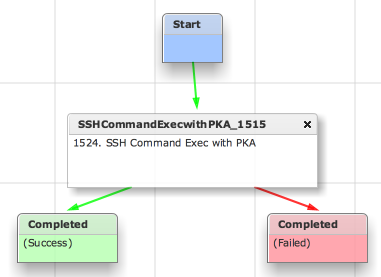
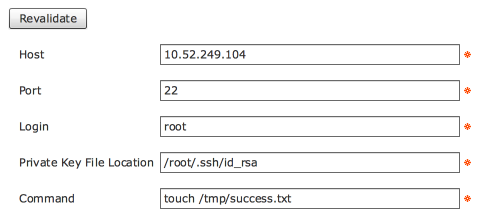
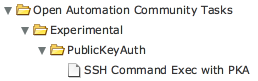

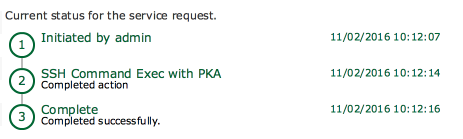
Nov 02, 2016 10:12:13 UTC Executing custom action PKA_Test (SSH Command Exec with PKA)
Nov 02, 2016 10:12:13 UTC Executing custom action PKA_Test (SSH Command Exec with PKA)
Nov 02, 2016 10:12:14 UTC Host: 10.52.249.104
Nov 02, 2016 10:12:14 UTC Port: 22
Nov 02, 2016 10:12:14 UTC Login: root
Nov 02, 2016 10:12:14 UTC PKA File: /root/.ssh/id_rsa
Nov 02, 2016 10:12:14 UTC Command: touch /tmp/success.txt
Nov 02, 2016 10:12:14 UTC Connecting to host: 10.52.249.104
Nov 02, 2016 10:12:14 UTC Running command: 'touch /tmp/success.txt'
Nov 02, 2016 10:12:14 UTC Task #2 (PKA_Test (SSH Command Exec with PKA)) completed successfully in 0 seconds
Nov 02, 2016 10:12:14 UTC Input/Output values for Task #2 (PKA_Test (SSH Command Exec with PKA)):
Nov 02, 2016 10:12:14 UTC [Local Input: Host = 10.52.249.104]
Nov 02, 2016 10:12:14 UTC [Local Input: Port = 22]
Nov 02, 2016 10:12:14 UTC [Local Input: Login = root]
Nov 02, 2016 10:12:14 UTC [Local Input: Private Key File Location = /root/.ssh/id_rsa]
Nov 02, 2016 10:12:14 UTC [Local Input: Command = touch /tmp/success.txt]
Nov 02, 2016 10:12:14 UTC Completed workflow item number 2, with status Completed
SSH Log on 10.52.249.104:
Nov 2 10:12:14 centos7 sshd[26426]: Accepted publickey for root from 10.52.249.103 port 50159 ssh2: RSA 8f:8b:be:3a:f7:d6:7d:15:7c:69:41:88:23:f8:36:39
Nov 2 10:12:14 centos7 sshd[26426]: pam_unix(sshd:session): session opened for user root by (uid=0)
Nov 2 10:12:14 centos7 sshd[26426]: pam_unix(sshd:session): session closed for user root
…and result of the command:
[root@centos7 ~]# ls -l /tmp/s*
-rw-r--r--. 1 root root 0 Nov 2 10:12 /tmp/success.txt
#2 Option
And in CloupiaScript:
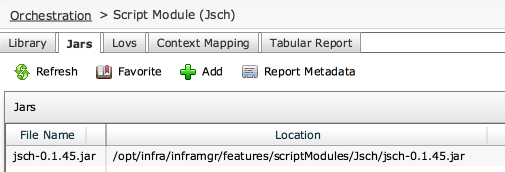
1. Create a script module called Jsch.
2. Add the attached Jarfile (jsch-0.1.45.jar) to the module.
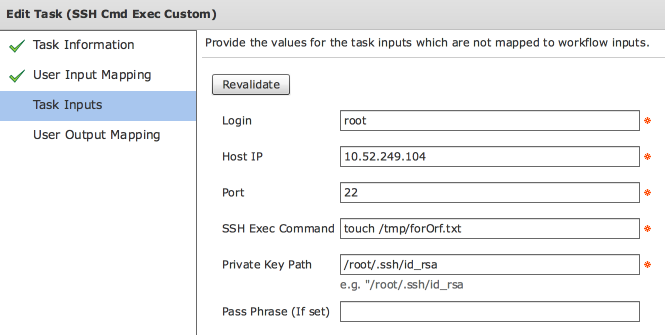
3. Import the attached workflow and modify the values for your environment.
Jar file
loadJar("Jsch/jsch-0.1.45.jar");
importPackage(java.lang);
importClass(com.jcraft.jsch.JSch);
var privateKey = input.privateKey;
var passphrase = input.passphrase;
var login = input.login;
var host = input.host;
var portStr = input.port;
var port = parseInt(portStr);
var command = input.command;
// main();
var jsch = new JSch();
jsch.addIdentity(privateKey, passphrase);
var session = jsch.getSession(login, host, port);
session.setConfig("StrictHostKeyChecking", "no");
//logger.addInfo("Connecting to host: " + host );
session.connect();
var channel=session.openChannel("exec");
channel.setCommand(command);
channel.setInputStream(null);
channel.connect();
channel.disconnect();
session.disconnect();
4. Run the workflow.
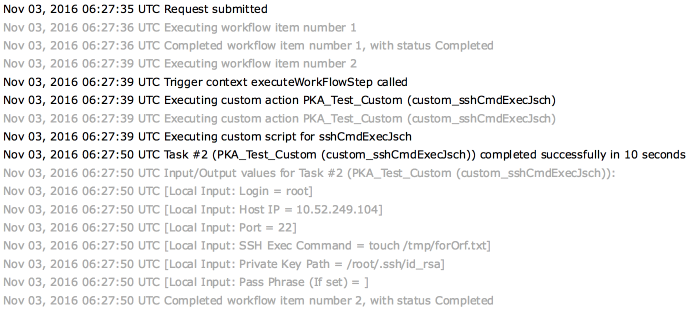
Verification on the target machine:
tail of /var/log/secure:
Nov 3 06:27:50 centos7 sshd[27907]: Accepted publickey for root from 10.52.249.103 port 51007 ssh2: RSA 8f:8b:be:3a:f7:d6:7d:15:7c:69:41:88:23:f8:36:39
Nov 3 06:27:50 centos7 sshd[27907]: pam_unix(sshd:session): session opened for user root by (uid=0)
Nov 3 06:27:50 centos7 sshd[27907]: pam_unix(sshd:session): session closed for user root
New file created:
[root@centos7 ~]# ls -l /tmp/f*
-rw-r--r--. 1 root root 0 Nov 3 06:27 /tmp/forOrf.txt
Files for option #2
jsch-0.1.45.jar (unzip)
SSH_PKA_Custom.wfdx (unzip)
For illustration the text file SSH_PKA_Custom_CloupiaScript.txt
#3 Option
Here’s a version where the passphrase (If used) is masked.
Exporting the custom workflow task also includes the JAR library! Which is nice.
File: SSH_PKA_CUSTOM.wfdx (unzip)
Side Notes:
Store the public key on the destination host.
Find answers to your questions by entering keywords or phrases in the Search bar above. New here? Use these resources to familiarize yourself with the community:
