- Cisco Community
- Technology and Support
- Data Center and Cloud
- Application Centric Infrastructure
- Re: unable to access APIC simulator.
- Subscribe to RSS Feed
- Mark Topic as New
- Mark Topic as Read
- Float this Topic for Current User
- Bookmark
- Subscribe
- Mute
- Printer Friendly Page
unable to access APIC simulator.


- Mark as New
- Bookmark
- Subscribe
- Mute
- Subscribe to RSS Feed
- Permalink
- Report Inappropriate Content
05-04-2018 04:57 PM - edited 03-01-2019 05:32 AM
Hi
I have a APIC simulator installed on vmware but i cant able to ping my gateway. Any help wold be much apprecited.
I have also place another test machine on the same port group, it can ping the default gateway but cant ping aci simulator.
PING error is operation not permitted

- Labels:
-
Cisco ACI


- Mark as New
- Bookmark
- Subscribe
- Mute
- Subscribe to RSS Feed
- Permalink
- Report Inappropriate Content
07-01-2019 11:22 AM
Hi Syedumairali,
did you resolve this issue? I have the same issue

- Mark as New
- Bookmark
- Subscribe
- Mute
- Subscribe to RSS Feed
- Permalink
- Report Inappropriate Content
06-12-2020 12:32 PM
Has anyone determined a solution for this?

- Mark as New
- Bookmark
- Subscribe
- Mute
- Subscribe to RSS Feed
- Permalink
- Report Inappropriate Content
06-26-2020 04:31 AM
Hi, were you able to get this resolved? Also what version of the simulator are you running? I see this on 5.0 and Im tempted to download 4.2
- Mark as New
- Bookmark
- Subscribe
- Mute
- Subscribe to RSS Feed
- Permalink
- Report Inappropriate Content
11-07-2020 05:38 PM
Having the same issue. Downloaded and installed 5.1-1h. I go through and accept all defaults except for the management interface. I specify an IP on the network and correct default gateway. While other VMs on the same network work, I cannot ping the mgmt IP specified in the simulator setup.
When going into the APIC for my physical ACI environment, I see the MAC addresses assigned in VMWare to the simulator VM. Basically this is telling me the simulator is NOT communicating with anything outside the simulator.


- Mark as New
- Bookmark
- Subscribe
- Mute
- Subscribe to RSS Feed
- Permalink
- Report Inappropriate Content
11-08-2020 12:09 AM - edited 11-08-2020 12:11 AM
Hi @dmcquestion,
Ae you enabling Promiscuous Mode on the VMware vSwitch to which the ACI simulator is connected? (NOTE: if this is a production environment, make sure you understand the impact of this setting before modifying it).
Have a look at Step 2 under "Installing ACI Simulator Virtual Machine" in this doc: https://www.cisco.com/c/en/us/td/docs/switches/datacenter/aci/apic/sw/3-x/simulator/install_vm/b_Cisco_ACI_Simulator_VM_Install_Guide.html
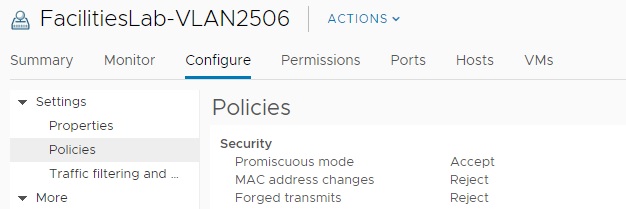
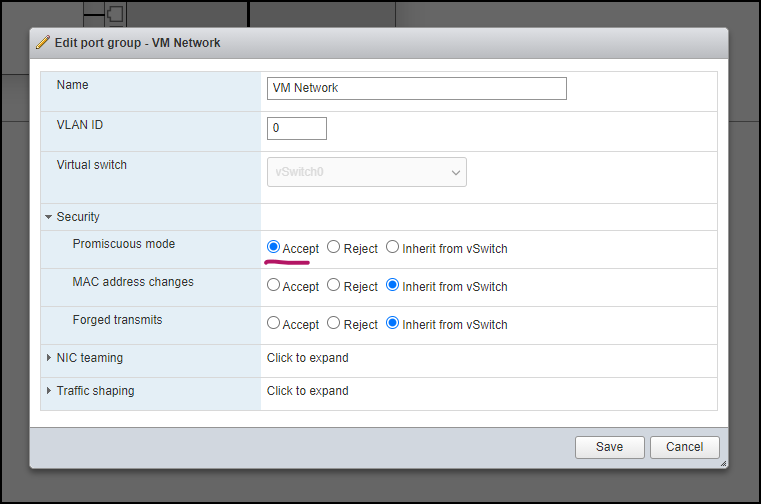
In my VMware vCenter lab, I have the ACI Simulator's Network adapter 1 assigned to VM Network port group part of Standard Switch: vSwitch0. If in the Standard Switch settings I set Promiscuous mode to Reject, I lose access to my ACI Simulator (I lose access to ACI Simulator APIC's GUI and a ping from my laptop to ACI Simulator's mgmt IP breaks) as soon as I set Promiscuous mode to Accept (screenshot attached), I can again communicate with my ACI Simulator.
One more thing, a ping performed from the ACI simulator's CLI seems to be prohibited but you can do a traceroute after entering bash mode.
apic1# bash
admin@apic1:~> traceroute 8.8.8.8
traceroute to 8.8.8.8 (8.8.8.8), 30 hops max, 60 byte packets
I hope this helps.
Regards.
- Mark as New
- Bookmark
- Subscribe
- Mute
- Subscribe to RSS Feed
- Permalink
- Report Inappropriate Content
11-12-2020 10:14 AM
@Hector Gustavo Serrano Gutierrez
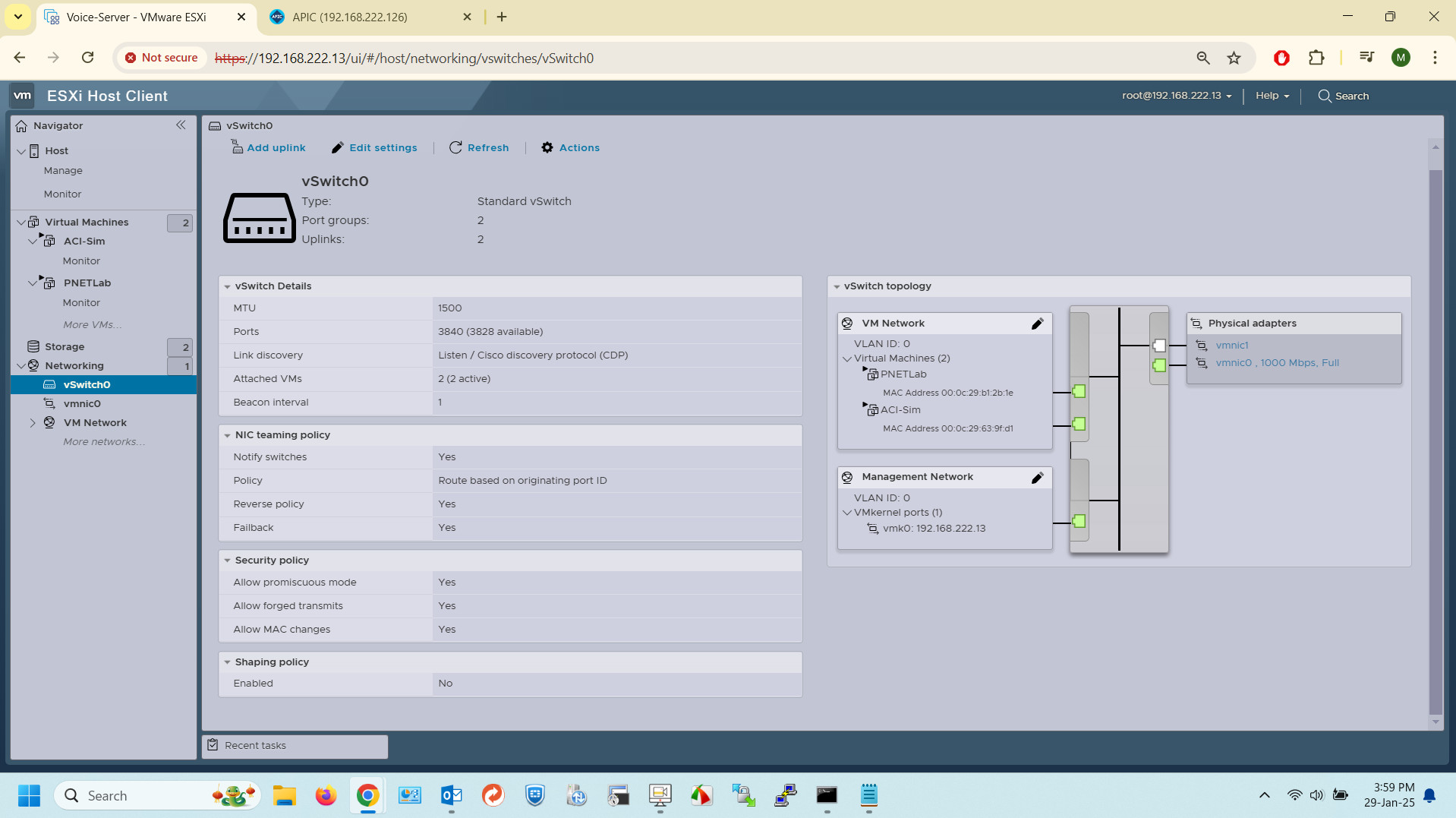
Thank you for the reply! I compared your screen shot to what I had configured (see screen shot). I set Promiscuous mode to Accept but I did NOT set MAC Address Changes and Forged Transmits to Accept. When I set those to Accept, I was able to ping the simulator. I am pretty literal so I only changed the Promiscuous Mode as called out in the documentation. Mentioning the other two settings in the documentation or adding a screen shot of the settings in the documentation couldn't hurt. 🙂
If you have not already done so, check your vSwitch in VMware and set MAC Address Changes and Forged Transmits to Accept.
- Mark as New
- Bookmark
- Subscribe
- Mute
- Subscribe to RSS Feed
- Permalink
- Report Inappropriate Content
01-29-2025 03:00 AM
Thanks @Hector Gustavo Serrano Gutierrez
This really helped me and I was able to get the GUI of my APIC first time ever.


- Mark as New
- Bookmark
- Subscribe
- Mute
- Subscribe to RSS Feed
- Permalink
- Report Inappropriate Content
08-18-2021 03:55 AM
In EXSI, I succeeded by changing the port-group of network to Promiscuous mode as it is shown in pic.

Discover and save your favorite ideas. Come back to expert answers, step-by-step guides, recent topics, and more.
New here? Get started with these tips. How to use Community New member guide