- Cisco Community
- Technology and Support
- Networking
- Network Management
- It can be both depending on
- Subscribe to RSS Feed
- Mark Topic as New
- Mark Topic as Read
- Float this Topic for Current User
- Bookmark
- Subscribe
- Mute
- Printer Friendly Page

- Mark as New
- Bookmark
- Subscribe
- Mute
- Subscribe to RSS Feed
- Permalink
- Report Inappropriate Content
04-18-2017 02:34 PM
Hello com,
I have a Cisco 2960X-24Ts-L switch and i have set up three vlans, 136/137/138.
Ip vlan 136: 10.10.36.0 /24
Ip vlan 137: 10.10.37.0 /24
Ip vlan 138: 10.10.38.0 /24
So far so good.
Now im getting the message:
%SW_MATM-CLUSTER_MEMBER_4-4-MACFLAP_NOTIF: Host 0800.069d.3841 in vlan 138 between port Gi1/0/19 and port Gi1/0/21
%SW_MATM-CLUSTER_MEMBER_4-4-MACFLAP_NOTIF: Host 0800.069d.3841 in vlan 138 between port Gi1/0/21 and port Gi1/0/17
%SW_MATM-CLUSTER_MEMBER_4-4-MACFLAP_NOTIF: Host 0800.069d.3841 in vlan 138 between port Gi1/0/17 and port Gi1/0/18
%SW_MATM-CLUSTER_MEMBER_4-4-MACFLAP_NOTIF: Host 0800.069d.3841 in vlan 138 between port Gi1/0/18 and port Gi1/0/16
%SW_MATM-CLUSTER_MEMBER_4-4-MACFLAP_NOTIF: Host 0800.069d.3841 in vlan 138 between port Gi1/0/16 and port Gi1/0/15
MAC 0800069 is a device from Siemens.
I checked all cables going from each port which is mentioned and the port is dedicated to each device.
Each device is connect with two networkcards.
One card goes to vlan 137.
One card goes to vlan 138.
Still there is one host which is having the same mac. This host is flapping between port 15/16/17/18/19/21
So i checked with an ip-scan each subnet by its own.
There is defenetly no matching mac address!
each device connected to the ports mentioned above has a unique mac!
First vendor bits are 00:60:65 and 00:13:95.
My question:
Can you tell me the reason why my switch is telling me that there is another Mac flapping between this ports?
Solved! Go to Solution.
- Labels:
-
Network Management
Accepted Solutions


- Mark as New
- Bookmark
- Subscribe
- Mute
- Subscribe to RSS Feed
- Permalink
- Report Inappropriate Content
04-19-2017 06:32 AM
Ok good so its owned by that interface , what is connected to it that's broadcasting the MAC , is it a Siemens device too ?
Is this device linked physically at all to another device or another switch at all on the network
- Mark as New
- Bookmark
- Subscribe
- Mute
- Subscribe to RSS Feed
- Permalink
- Report Inappropriate Content
04-19-2017 07:48 AM
It can be both depending on what's happening error or just a warning , im not 100% how those devices you have in place work so I cant say that for sure its not causing your issue
Think if something is trying to communicate with that at layer 2 , that's why you may be seeing intermittence , some frames may be forwarded to port 15 while some are being forwarded to 17 depending at the time where the mac is been seen on the switch , so you got traffic being bounced around like duplicate ip addresses on network same scenario but at layer 2
I would bring the vendor in on live troubleshooting call and share your screen and show them what your seeing , this cant be new to them , usually issues like this have existed before for someone else
From a switch perspective try the static mac or rule out the software by upgrading but if your seeing the issue in other switches/areas too I wouldn't think its the switch
- Mark as New
- Bookmark
- Subscribe
- Mute
- Subscribe to RSS Feed
- Permalink
- Report Inappropriate Content
04-19-2017 01:12 AM
Hi what are these devices are they wireless at all ? mac flapping occurs after its learned in through a port but the cam table has already seen it come from another port , so its being learnt in twice , this can occur usually with Wi-Fi devices or users using Wi-Fi and moving around the building and connecting back to each ap while they were already connected through 1 as there mac has already been learnt in
MAC flapping can also occur from looped network , did you trace the mac at layer 2 to see where it resides
- Mark as New
- Bookmark
- Subscribe
- Mute
- Subscribe to RSS Feed
- Permalink
- Report Inappropriate Content
04-19-2017 05:37 AM
Hi Mark,
no they are all wired.
The interesting thing is: I can see the Mac flapping in the loggs, i have some timeouts, did an ip scan on all subnets seperated but i cant find an IP matching to the mac....
- Mark as New
- Bookmark
- Subscribe
- Mute
- Subscribe to RSS Feed
- Permalink
- Report Inappropriate Content
04-19-2017 05:54 AM
Hi I did see an issue before with faulty NIC causing something like this
instead of port scan try and trace the mac at layer 2 see where its coming from on the switch itself , where its being learnt in , if its on the CAM table and logs it has to be somewhere on the switch or devices
example
#sh mac address-table address f01f.af60.9730
Legend: * - primary entry
age - seconds since last seen
n/a - not available
S - secure entry
R - router's gateway mac address entry
D - Duplicate mac address entry
Displaying entries from active supervisor:
vlan mac address type learn age ports
----+----+---------------+-------+-----+----------+-----------------------------
* 164 f01f.af60.9730 dynamic Yes 10 Gi7/20
Displaying entries from standby supervisor:
vlan mac address type learn age ports
----+----+---------------+-------+-----+----------+-----------------------------
164 f01f.af60.9730 dynamic Yes 120 Gi7/20
- Mark as New
- Bookmark
- Subscribe
- Mute
- Subscribe to RSS Feed
- Permalink
- Report Inappropriate Content
04-19-2017 06:27 AM
- Mark as New
- Bookmark
- Subscribe
- Mute
- Subscribe to RSS Feed
- Permalink
- Report Inappropriate Content
04-19-2017 06:32 AM
Ok good so its owned by that interface , what is connected to it that's broadcasting the MAC , is it a Siemens device too ?
Is this device linked physically at all to another device or another switch at all on the network
- Mark as New
- Bookmark
- Subscribe
- Mute
- Subscribe to RSS Feed
- Permalink
- Report Inappropriate Content
04-19-2017 06:40 AM
- Mark as New
- Bookmark
- Subscribe
- Mute
- Subscribe to RSS Feed
- Permalink
- Report Inappropriate Content
04-19-2017 06:57 AM
Ok so there is 2 physical links for that device 1 connecting to port 19 and 1 connecting to port 10 is that correct ?
if that's the case the MAC could be broadcasting out at layer 2 out to both interfaces telling the switch its being learnt in from its seeing it multiple ports which would cause mac flap alerts
when you check the actual port mac what does it see on the cli a the mac being learnt in from port 10 with the show mac address .....
to me this looks like some vendor issue with the nics and how they are speaking to other , it may be legitimate how they do this and they may have to do this , MAC flaps do not always mean theres a problem its more informational for the engineer to check incase there is an issue , if you have multiples aps on 1 switch with users roaming you can see the same alerts in logs warning you but its not necessarily an issue so main question .. is this causing an operational issue at user level ?
You can stop it floofing your logs with no mac-address-table notification mac-move if its not causing an issue
- Mark as New
- Bookmark
- Subscribe
- Mute
- Subscribe to RSS Feed
- Permalink
- Report Inappropriate Content
04-19-2017 07:18 AM
right,
we have some field devices for processing which Show this Problem and getting timeouts.
i tried the
#sh mac address-table address f01f.af60.9730
again with both mac addresses which i was expecting from the two nics of that device.
Both are right. On port 10 and on port 19.
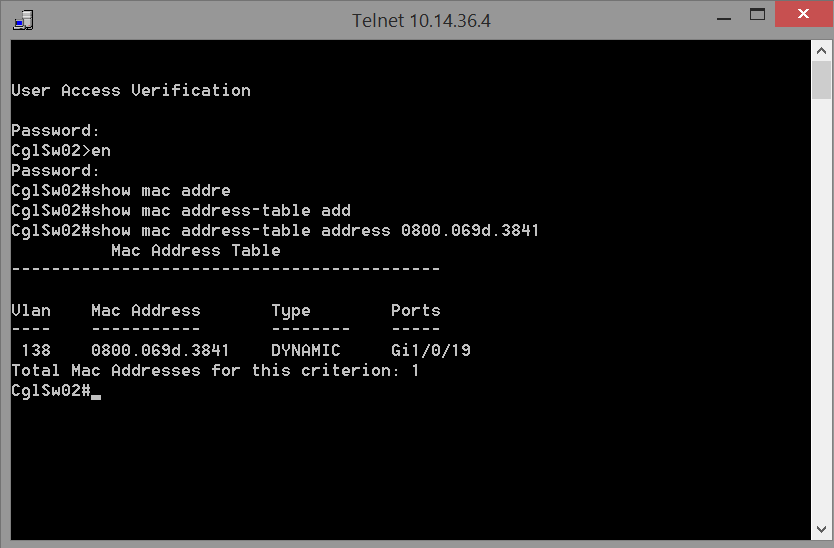
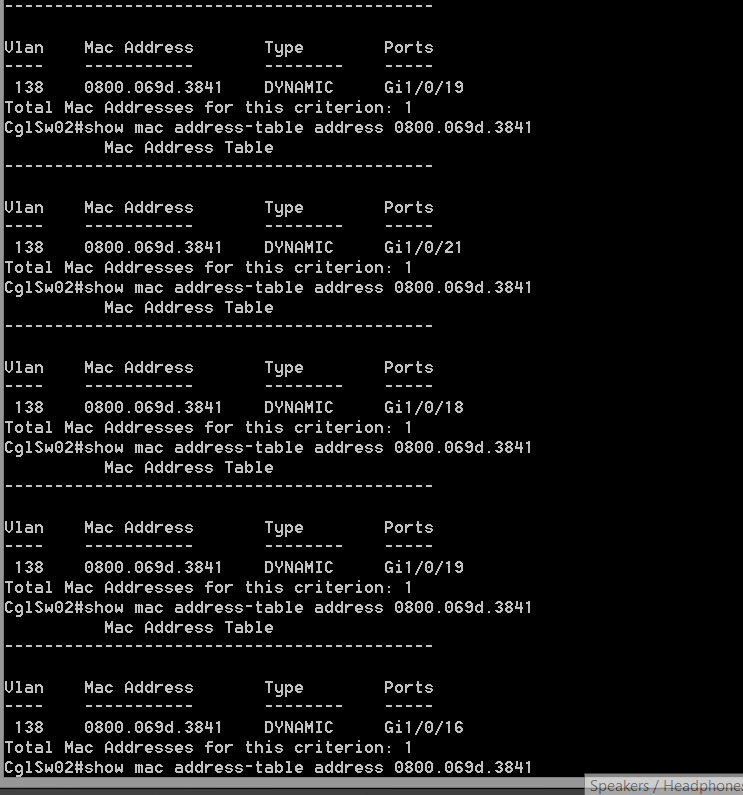
In Addition to that i see the mac 0800.069d.3841 jumping from port to port (16/17/18/19/21) see atached file.
- Mark as New
- Bookmark
- Subscribe
- Mute
- Subscribe to RSS Feed
- Permalink
- Report Inappropriate Content
04-19-2017 07:36 AM
It should not be doing that , that's a vendor issue MACs are broadcast from the NIC the switch adds it wherever it learns it so its doing what it should be in theory , you need to pass that to the vendor that the device is off and tell them its being dynamically learned in multiple ports from there devices which is causing intermittent issues , you have the proof there from your last screenshot
One thing that might quickfix is it , is make the mac static so it cant be learned dynamically through the ports , so the switch believes it belongs to 1 port only
example
mac address-table static 0000.0000.0001 vlan x interface gx/x
- Mark as New
- Bookmark
- Subscribe
- Mute
- Subscribe to RSS Feed
- Permalink
- Report Inappropriate Content
04-19-2017 07:42 AM
That could be a quickfix for this issue.
I crosschecked it and we have this kind of issue in different areas. In all other area it is also working with this kind of mac flap. Not in this amount (between 5 Ports, only 2 Ports).
I need to figure out why i have this timeouts for this devices. Even some server having this issue with the timeout.
Ithought it was the flapping but as yoou said before it is just a hint and not an error
- Mark as New
- Bookmark
- Subscribe
- Mute
- Subscribe to RSS Feed
- Permalink
- Report Inappropriate Content
04-19-2017 07:48 AM
It can be both depending on what's happening error or just a warning , im not 100% how those devices you have in place work so I cant say that for sure its not causing your issue
Think if something is trying to communicate with that at layer 2 , that's why you may be seeing intermittence , some frames may be forwarded to port 15 while some are being forwarded to 17 depending at the time where the mac is been seen on the switch , so you got traffic being bounced around like duplicate ip addresses on network same scenario but at layer 2
I would bring the vendor in on live troubleshooting call and share your screen and show them what your seeing , this cant be new to them , usually issues like this have existed before for someone else
From a switch perspective try the static mac or rule out the software by upgrading but if your seeing the issue in other switches/areas too I wouldn't think its the switch
- Mark as New
- Bookmark
- Subscribe
- Mute
- Subscribe to RSS Feed
- Permalink
- Report Inappropriate Content
04-19-2017 07:51 AM
The Problem is that i dont know the device of that mac 0800...... i just know that this is flapping. The orignial nics, connected at our devices are located on the right port on the switch. in addition to that there's one mac flapping over all ports -.-
But i think you are right. I'll try to get the vendor 🙂
- Mark as New
- Bookmark
- Subscribe
- Mute
- Subscribe to RSS Feed
- Permalink
- Report Inappropriate Content
04-19-2017 07:53 AM
Cool if you don't mind and you get a fix please post back im very interested now on what could be causing this


- Mark as New
- Bookmark
- Subscribe
- Mute
- Subscribe to RSS Feed
- Permalink
- Report Inappropriate Content
07-06-2020 03:28 AM
Hey @Mark Malone
How can we fix it? Is this normal? I'm having same logs on my switch. They're all wifi users and I'm running STP RSTP.

Discover and save your favorite ideas. Come back to expert answers, step-by-step guides, recent topics, and more.
New here? Get started with these tips. How to use Community New member guide