- Cisco Community
- Technology and Support
- Security
- OpenDNS
- OpenDNS test failed
- Subscribe to RSS Feed
- Mark Topic as New
- Mark Topic as Read
- Float this Topic for Current User
- Bookmark
- Subscribe
- Mute
- Printer Friendly Page
OpenDNS test failed

- Mark as New
- Bookmark
- Subscribe
- Mute
- Subscribe to RSS Feed
- Permalink
- Report Inappropriate Content
11-19-2014 12:48 AM
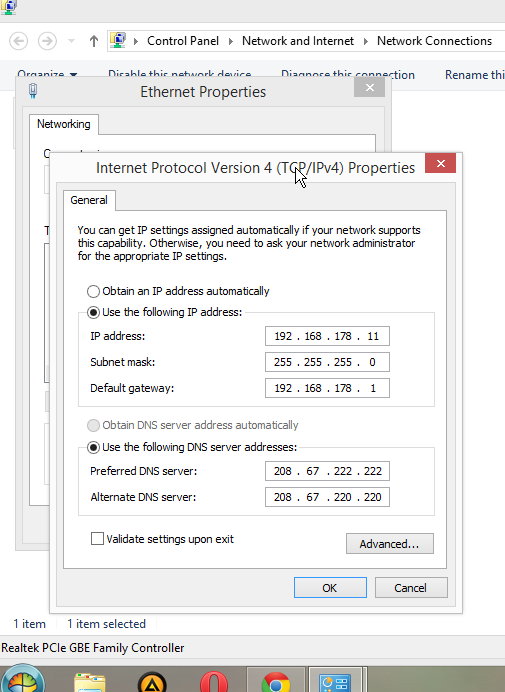
I cannot seem to setup my OpenDNS. I have a fritz-box 7360 router with a VDSL2 connection, I currently have this IP-settings:
http://i275.photobucket.com/albums/jj290/dumbl3/FORUM/2014-11-1909_41_36-_zpse768fa6b.png
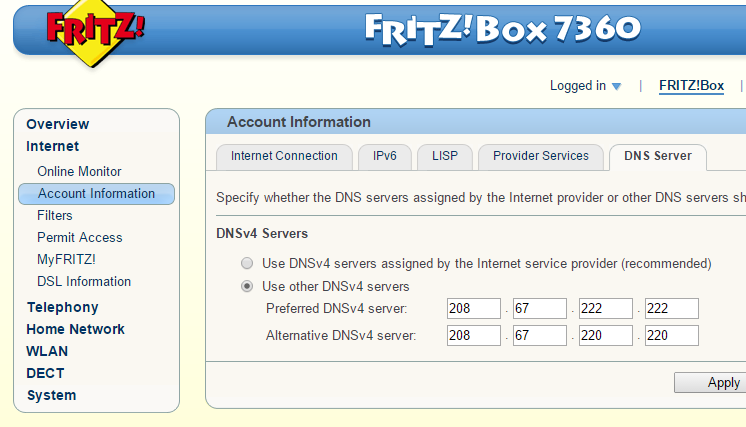
And this router settings:
http://i275.photobucket.com/albums/jj290/dumbl3/FORUM/2014-11-1909_43_50-FRITZBox_zps16cc2d9b.png
And when I do the test on opendns, it says: "Oops. You're not using OpenDNS yet. "
I cleared my browser & dns cache. I rebooted my pc and router. I disabled my firewall. But still get: Oops... What am I doing wrong here?
- Labels:
-
Other OpenDNS

- Mark as New
- Bookmark
- Subscribe
- Mute
- Subscribe to RSS Feed
- Permalink
- Report Inappropriate Content
11-19-2014 03:29 AM
Photobucket.com is blocked for me. You had to attach the screen shots here directly ("Attach file").
Not sure what you are doing wrong, but your ISP may redirect your DNS lookups to their own DNS service. Check it out:
nslookup -type=txt which.opendns.com. 208.67.220.220
- Mark as New
- Bookmark
- Subscribe
- Mute
- Subscribe to RSS Feed
- Permalink
- Report Inappropriate Content
11-19-2014 03:45 AM
Microsoft Windows [Version 6.3.9600]
(c) 2013 Microsoft Corporation. All rights reserved.
C:\Windows\System32>nslookup -type=txt which.opendns.com. 208.67.220.220
Server: resolver2.opendns.com
Address: 208.67.220.220
Non-authoritative answer:
which.opendns.com text =
"5.ams"
C:\Windows\System32>
2014-11-1909_41_36-_zpse768fa6b.png
2014-11-1909_43_50-FRITZBox_zps16cc2d9b.png
- Mark as New
- Bookmark
- Subscribe
- Mute
- Subscribe to RSS Feed
- Permalink
- Report Inappropriate Content
11-19-2014 08:05 AM
Everything looks fine. Can you copy & paste the complete plain text output of the following diagnostic commands:
nslookup -type=txt debug.opendns.com.
ipconfig /all




- Mark as New
- Bookmark
- Subscribe
- Mute
- Subscribe to RSS Feed
- Permalink
- Report Inappropriate Content
11-19-2014 08:40 AM
To test your settings, you can also run our diagnostic test tool from https://support.opendns.com/entries/21841580 and provide the link to the response here. The results would only be viewable by you and a member of the OpenDNS staff.
- Mark as New
- Bookmark
- Subscribe
- Mute
- Subscribe to RSS Feed
- Permalink
- Report Inappropriate Content
11-19-2014 09:44 AM
Based on the screenshots the DNS servers are set up properly on your router and PC, although you may want to add the DNS addresses to the DHCP settings on the router.
Have you also setup your OpenDNS account and have it associated with the public IP address you get from your ISP? Without that you'll still be using the OpenDNS servers for address resolution, but other than some very basic protections you won't be using any of the other OpenDNS features.
- Mark as New
- Bookmark
- Subscribe
- Mute
- Subscribe to RSS Feed
- Permalink
- Report Inappropriate Content
11-19-2014 10:01 AM
OK guys thanks for the info. I just run test again and now it does work, maybe it just needed some time or something..
I dont know how to add DNS to the DHCP settings. This is all I can find of DHCP settings in my router (see attachement).
I actually used 192.168.178.11 for my local IP so it falls outside the range of DHCP, (I had to open some ports for some apps..) Can you tell me where I can add this DNS to DCHP settings?
2014-11-19 18_58_36-FRITZ!Box - Opera.png

- Mark as New
- Bookmark
- Subscribe
- Mute
- Subscribe to RSS Feed
- Permalink
- Report Inappropriate Content
11-19-2014 10:44 AM
Many routers and firewalls I'm familiar with let you assign DNS server addresses for the router itself, and for DHCP as well. There are reasons why you might want to set them differently, but that's outside the scope of this discussion.
I'm not familiar with that particular firmware so it's possible that the DNS server settings you showed us earlier apply to both things. My best advice would be to check everywhere in the firmware and see what is being done. From a computer that is getting it's IP address via DHCP you can also do an ipconfig/all to fine out what DNS addresses it has been assigned.
- Mark as New
- Bookmark
- Subscribe
- Mute
- Subscribe to RSS Feed
- Permalink
- Report Inappropriate Content
11-19-2014 12:58 PM
"I dont know how to add DNS to the DHCP settings... Can you tell me where I can add this DNS to DCHP settings?"
You cannot and you don't need to, because you have double configuration of OpenDNS anyway already, on the router (WAN side) and (unnecessarily) on the computer. You better configured your router's address (192.168.178.1) as the only DNS server address on your computer.
- Mark as New
- Bookmark
- Subscribe
- Mute
- Subscribe to RSS Feed
- Permalink
- Report Inappropriate Content
01-17-2015 06:00 AM
Hello,
I have a similar issue, the opendns test fail (https://www.opendns.com/welcome/) and the internetbadguys also. I configured the opendns servers on my fritzbox 7360 but somehow this is not working. I also tried to use dns-o-matic without success. Please find below the diagnostic results:
https://diagnostic.opendns.com/d/5746920853078016
Thanks a lot in advance for your support!
- Mark as New
- Bookmark
- Subscribe
- Mute
- Subscribe to RSS Feed
- Permalink
- Report Inappropriate Content
01-17-2015 06:46 AM
No, we don't find them. These diagnostics can be seen only by OpenDNS staff and by you. Therefore I hope you also opened a related support ticket.
If not, still do so. And if you want help from us other users, post the complete plain text output of the following commands here:
nslookup -type=txt which.opendns.com. 208.67.220.220
nslookup -type=txt debug.opendns.com.
ipconfig /all
"the opendns test fail (https://www.opendns.com/welcome/)"
The test page is at http://welcome.opendns.com/
"I also tried to use dns-o-matic without success."
Sure, this is unrelated to using OpenDNS, but only relevant for IP address information updates. You will use this in conjunction with the DDNS update client of your router to keep your IP address information updated with OpenDNS - but not needed before you actually use OpenDNS.
- Mark as New
- Bookmark
- Subscribe
- Mute
- Subscribe to RSS Feed
- Permalink
- Report Inappropriate Content
01-17-2015 09:13 AM
Thanks for your reply.
Here are the MacOS output:
Results for: /usr/sbin/traceroute -I -w 2 208.67.222.222
stdout:
 1  fritz.box (192.168.178.1)  0.427 ms  0.306 ms  0.286 ms
 2  lsn5.routing.wtnet.de (84.46.113.182)  3.102 ms  2.988 ms  2.998 ms
 3  lns5.routing.wtnet.de (84.46.113.181)  3.829 ms
    bert.routing.wtnet.de (84.46.115.187)  7.044 ms  13.246 ms
 4  graf-zahl.routing.wtnet.de (84.46.112.62)  3.923 ms  5.918 ms  4.859 ms
 5  te1-4.cr1.ham1.de.ipv4.kaiaglobal.com (193.34.48.89)  3.925 ms  4.570 ms  4.092 ms
 6  ae0-120.cr1.fra1.de.ipv4.kaiaglobal.com (193.34.48.54)  16.159 ms  16.594 ms  15.743 ms
 7  ae0-1071.cr1.pra1.cz.ipv4.kaiaglobal.com (195.13.60.86)  22.900 ms  23.234 ms  25.511 ms
 8  te2-2-1061.cr1.war1.pl.ipv4.kaiaglobal.com (195.13.60.106)  34.044 ms  33.879 ms  33.782 ms
 9  opendns.plix.pl (195.182.219.66)  32.001 ms  32.150 ms  31.953 ms
10  resolver1.opendns.com (208.67.222.222)  32.035 ms  31.932 ms  31.989 ms

stderr:
traceroute to 208.67.222.222 (208.67.222.222), 64 hops max, 72 byte packets
Results for: /usr/sbin/traceroute -I -w 2 208.67.220.220
stdout:
 1  fritz.box (192.168.178.1)  0.517 ms  0.255 ms  0.231 ms
 2  lsn5.routing.wtnet.de (84.46.113.182)  2.857 ms  2.980 ms  3.169 ms
 3  lns5.routing.wtnet.de (84.46.113.181)  3.544 ms
    bert.routing.wtnet.de (84.46.115.187)  6.753 ms  13.103 ms
 4  graf-zahl.routing.wtnet.de (84.46.112.62)  3.926 ms  5.417 ms  4.360 ms
 5  te1-4.cr1.ham1.de.ipv4.kaiaglobal.com (193.34.48.89)  4.832 ms  4.054 ms  4.565 ms
 6  ae0-120.cr1.fra1.de.ipv4.kaiaglobal.com (193.34.48.54)  16.307 ms  16.590 ms  15.737 ms
 7  po2.cr1.war1.pl.ipv4.kaiaglobal.com (195.13.60.102)  31.418 ms  31.288 ms  31.675 ms
 8  opendns.plix.pl (195.182.219.66)  29.809 ms  29.504 ms  29.592 ms
 9  resolver2.opendns.com (208.67.220.220)  29.895 ms  29.730 ms  29.649 ms

stderr:
traceroute to 208.67.220.220 (208.67.220.220), 64 hops max, 72 byte packets
Results for: /usr/bin/dig @208.67.222.222 +time=10 debug.opendns.com txt
stdout:

; <<>> DiG 9.8.3-P1 <<>> @208.67.222.222 +time=10 debug.opendns.com txt
; (1 server found)
;; global options: +cmd
;; Got answer:
;; ->>HEADER<<- opcode: QUERY, status: NOERROR, id: 14200
;; flags: qr rd ra; QUERY: 1, ANSWER: 5, AUTHORITY: 0, ADDITIONAL: 0

;; QUESTION SECTION:
;debug.opendns.com.		IN	TXT

;; ANSWER SECTION:
debug.opendns.com.	0	IN	TXT	"server 1.wrw"
debug.opendns.com.	0	IN	TXT	"flags 20 0 2F4 4000800000000000000"
debug.opendns.com.	0	IN	TXT	"originid 0"
debug.opendns.com.	0	IN	TXT	"actype 0"
debug.opendns.com.	0	IN	TXT	"source 84.46.108.116:20563"

;; Query time: 101 msec
;; SERVER: 208.67.222.222#53(208.67.222.222)
;; WHEN: Sat Jan 17 18:02:20 2015
Results for: /usr/bin/dig @208.67.222.222 -p 443 +time=10 debug.opendns.com txt
stdout:

; <<>> DiG 9.8.3-P1 <<>> @208.67.222.222 -p 443 +time=10 debug.opendns.com txt
; (1 server found)
;; global options: +cmd
;; Got answer:
;; ->>HEADER<<- opcode: QUERY, status: NOERROR, id: 21874
;; flags: qr rd ra; QUERY: 1, ANSWER: 5, AUTHORITY: 0, ADDITIONAL: 0

;; QUESTION SECTION:
;debug.opendns.com.		IN	TXT

;; ANSWER SECTION:
debug.opendns.com.	0	IN	TXT	"server 3.wrw"
debug.opendns.com.	0	IN	TXT	"flags 20 0 2F4 4000800000000000000"
debug.opendns.com.	0	IN	TXT	"originid 0"
debug.opendns.com.	0	IN	TXT	"actype 0"
debug.opendns.com.	0	IN	TXT	"source 84.46.108.116:20552"

;; Query time: 202 msec
;; SERVER: 208.67.222.222#443(208.67.222.222)
;; WHEN: Sat Jan 17 18:02:21 2015
;; MSG SIZE  rcvd: 190
Results for: /usr/bin/dig @208.67.222.222 -p 5353 +time=10 debug.opendns.com txt
stdout:

; <<>> DiG 9.8.3-P1 <<>> @208.67.222.222 -p 5353 +time=10 debug.opendns.com txt
; (1 server found)
;; global options: +cmd
;; Got answer:
;; ->>HEADER<<- opcode: QUERY, status: NOERROR, id: 59699
;; flags: qr rd ra; QUERY: 1, ANSWER: 5, AUTHORITY: 0, ADDITIONAL: 0

;; QUESTION SECTION:
;debug.opendns.com.		IN	TXT

;; ANSWER SECTION:
debug.opendns.com.	0	IN	TXT	"server 3.wrw"
debug.opendns.com.	0	IN	TXT	"flags 20 0 2F4 4000800000000000000"
debug.opendns.com.	0	IN	TXT	"originid 0"
debug.opendns.com.	0	IN	TXT	"actype 0"
debug.opendns.com.	0	IN	TXT	"source 84.46.108.116:20486"

;; Query time: 168 msec
;; SERVER: 208.67.222.222#5353(208.67.222.222)
;; WHEN: Sat Jan 17 18:02:21 2015
;; MSG SIZE  rcvd: 190
Results for: /usr/bin/dig +time=10 debug.opendns.com txt
stdout:

; <<>> DiG 9.8.3-P1 <<>> +time=10 debug.opendns.com txt
;; global options: +cmd
;; Got answer:
;; ->>HEADER<<- opcode: QUERY, status: NXDOMAIN, id: 61723
;; flags: qr rd ra; QUERY: 1, ANSWER: 0, AUTHORITY: 1, ADDITIONAL: 0

;; QUESTION SECTION:
;debug.opendns.com.		IN	TXT

;; AUTHORITY SECTION:
opendns.com.		10800	IN	SOA	auth1.opendns.com. noc.opendns.com. 1421474810 16384 2048 1048576 2560

;; Query time: 261 msec
;; SERVER: 192.168.178.1#53(192.168.178.1)
;; WHEN: Sat Jan 17 18:02:21 2015
;; MSG SIZE  rcvd: 81
Results for: /usr/bin/nslookup -timeout=10 -class=chaos -type=txt hostname.bind. 192.33.4.12
stdout:
Server:		192.33.4.12
Address:	192.33.4.12#53

hostname.bind	text = "fra1b.c.root-servers.org"
Results for: /sbin/ping -c 5 www.opendns.com (www.opendns.com)
stdout:
PING www.opendns.com (67.215.92.219): 56 data bytes
64 bytes from 67.215.92.219: icmp_seq=0 ttl=55 time=152.108 ms
64 bytes from 67.215.92.219: icmp_seq=1 ttl=55 time=151.497 ms
64 bytes from 67.215.92.219: icmp_seq=2 ttl=55 time=151.596 ms
64 bytes from 67.215.92.219: icmp_seq=3 ttl=55 time=151.564 ms
64 bytes from 67.215.92.219: icmp_seq=4 ttl=55 time=151.549 ms

--- www.opendns.com ping statistics ---
5 packets transmitted, 5 packets received, 0.0% packet loss
round-trip min/avg/max/stddev = 151.497/151.663/152.108/0.225 ms
Results for: /sbin/ping -c 5 rtr1.pao.opendns.com (palo alto router)
stdout:
PING rtr1.pao.opendns.com (208.67.219.1): 56 data bytes
64 bytes from 208.67.219.1: icmp_seq=0 ttl=58 time=152.244 ms
64 bytes from 208.67.219.1: icmp_seq=1 ttl=58 time=154.421 ms
64 bytes from 208.67.219.1: icmp_seq=2 ttl=58 time=151.942 ms
64 bytes from 208.67.219.1: icmp_seq=3 ttl=58 time=187.433 ms
64 bytes from 208.67.219.1: icmp_seq=4 ttl=58 time=151.463 ms

--- rtr1.pao.opendns.com ping statistics ---
5 packets transmitted, 5 packets received, 0.0% packet loss
round-trip min/avg/max/stddev = 151.463/159.501/187.433/14.003 ms
- Mark as New
- Bookmark
- Subscribe
- Mute
- Subscribe to RSS Feed
- Permalink
- Report Inappropriate Content
01-17-2015 09:17 AM
and the network config:
Results for: /sbin/ifconfig -a
stdout:
lo0: flags=8049<UP,LOOPBACK,RUNNING,MULTICAST> mtu 16384
	options=3<RXCSUM,TXCSUM>
	inet6 ::1 prefixlen 128
	inet 127.0.0.1 netmask 0xff000000
	inet6 fe80::1%lo0 prefixlen 64 scopeid 0x1
	nd6 options=1<PERFORMNUD>
gif0: flags=8010<POINTOPOINT,MULTICAST> mtu 1280
stf0: flags=0<> mtu 1280
en0: flags=8863<UP,BROADCAST,SMART,RUNNING,SIMPLEX,MULTICAST> mtu 1500
	options=10b<RXCSUM,TXCSUM,VLAN_HWTAGGING,AV>
	ether a8:20:66:21:5c:6c
	inet 192.168.178.20 netmask 0xffffff00 broadcast 192.168.178.255
	media: autoselect (1000baseT <full-duplex,flow-control>)
	status: active
en1: flags=8823<UP,BROADCAST,SMART,SIMPLEX,MULTICAST> mtu 1500
	ether 8c:2d:aa:3f:a9:c5
	media: autoselect (<unknown type>)
	status: inactive
en2: flags=8963<UP,BROADCAST,SMART,RUNNING,PROMISC,SIMPLEX,MULTICAST> mtu 1500
	options=60<TSO4,TSO6>
	ether 32:00:16:ee:a3:a0
	media: autoselect <full-duplex>
	status: inactive
en3: flags=8963<UP,BROADCAST,SMART,RUNNING,PROMISC,SIMPLEX,MULTICAST> mtu 1500
	options=60<TSO4,TSO6>
	ether 32:00:16:ee:a3:a1
	media: autoselect <full-duplex>
	status: inactive
p2p0: flags=8802<BROADCAST,SIMPLEX,MULTICAST> mtu 2304
	ether 0e:2d:aa:3f:a9:c5
	media: autoselect
	status: inactive
awdl0: flags=8803<UP,BROADCAST,SIMPLEX,MULTICAST> mtu 1452
	ether 26:cb:17:1f:c6:07
	nd6 options=1<PERFORMNUD>
	media: autoselect
	status: inactive
bridge0: flags=8863<UP,BROADCAST,SMART,RUNNING,SIMPLEX,MULTICAST> mtu 1500
	options=63<RXCSUM,TXCSUM,TSO4,TSO6>
	ether aa:20:66:12:a9:00
	Configuration:
		id 0:0:0:0:0:0 priority 0 hellotime 0 fwddelay 0
		maxage 0 holdcnt 0 proto stp maxaddr 100 timeout 1200
		root id 0:0:0:0:0:0 priority 0 ifcost 0 port 0
		ipfilter disabled flags 0x2
	member: en2 flags=3<LEARNING,DISCOVER>
	        ifmaxaddr 0 port 6 priority 0 path cost 0
	member: en3 flags=3<LEARNING,DISCOVER>
	        ifmaxaddr 0 port 7 priority 0 path cost 0
	nd6 options=1<PERFORMNUD>
	media: <unknown type>
	status: inactive
My LAN connection is en0.
- Mark as New
- Bookmark
- Subscribe
- Mute
- Subscribe to RSS Feed
- Permalink
- Report Inappropriate Content
01-17-2015 12:21 PM
Allright after some investigation it seems the DNS entered on the fritzbox are ignored. When launching a test via "http://entropy.dns-oarc.net/test/", here are the results:
- 84.46.101.54 (dns-cache-4.wtnet.de) appears to have GREAT source port randomness and GREAT transaction ID randomness.
- 84.46.101.52 (dns-cache-2.wtnet.de) appears to have GREAT source port randomness and GREAT transaction ID randomness.
- 84.46.101.53 (dns-cache-3.wtnet.de) appears to have GREAT source port randomness and GREAT transaction ID randomness.
When I change the DNS setting directly on my machine then I have those results:
- 208.69.35.17 (m7.ams.opendns.com) appears to have GREAT source port randomness and GREAT transaction ID randomness.
- 208.69.35.21 (m11.ams.opendns.com) appears to have GREAT source port randomness and GREAT transaction ID randomness.
- 208.69.35.11 (m1.ams.opendns.com) appears to have GREAT source port randomness and GREAT transaction ID randomness.
So how can I ensure the DNS settings on the FritzBox 7360 are really effective?
- Mark as New
- Bookmark
- Subscribe
- Mute
- Subscribe to RSS Feed
- Permalink
- Report Inappropriate Content
01-17-2015 07:38 PM
This is an issue with that device supporting any DNS settings you choose, not an OpenDNS issue. Aside from exploring every setting to see if you missed something the only thing I can recommend is to make sure that you have the latest software running on there. It's likely that you will need to contact FritzBox support or a user forum for FritzBox just like this one.

Discover and save your favorite ideas. Come back to expert answers, step-by-step guides, recent topics, and more.
New here? Get started with these tips. How to use Community New member guide