- Cisco Community
- Technology and Support
- Security
- VPN
- VPN withOUT split-tunnel
- Subscribe to RSS Feed
- Mark Topic as New
- Mark Topic as Read
- Float this Topic for Current User
- Bookmark
- Subscribe
- Mute
- Printer Friendly Page

- Mark as New
- Bookmark
- Subscribe
- Mute
- Subscribe to RSS Feed
- Permalink
- Report Inappropriate Content
07-14-2014 02:12 AM
Hello everyone
I have setup a VPN connection, which I can connect to. For all connecting clients I'd like to give them an IP (from a subnet perhaps) and let them use this IP for everything they do.
So this: 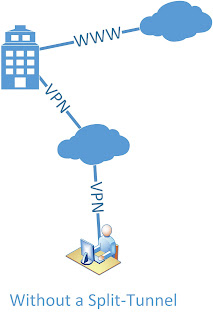
and not the current: 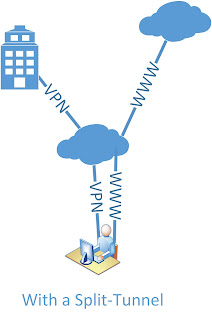
My inside is 192.168.1.0
My IP pool for VPN is 192.168.30.5-200
My server (DNS, files, website) is 192.168.1.222
Here's my setup. I marked what I thought could have something to do with it:
ASA Version 9.2(1)
!
hostname ciscoasa
enable password 8Ry2YjIyt7RRXU24 encrypted
xlate per-session deny tcp any4 any4
xlate per-session deny tcp any4 any6
xlate per-session deny tcp any6 any4
xlate per-session deny tcp any6 any6
xlate per-session deny udp any4 any4 eq domain
xlate per-session deny udp any4 any6 eq domain
xlate per-session deny udp any6 any4 eq domain
xlate per-session deny udp any6 any6 eq domain
passwd 2KFQnbNIdI.2KYOU encrypted
names
ip local pool IP-Pool 192.168.30.5-192.168.30.200 mask 255.255.255.0
!
interface Ethernet0/0
switchport access vlan 2
!
interface Ethernet0/1
!
interface Ethernet0/2
!
interface Ethernet0/3
!
interface Ethernet0/4
!
interface Ethernet0/5
!
interface Ethernet0/6
!
interface Ethernet0/7
!
interface Vlan1
nameif inside
security-level 100
ip address 192.168.1.253 255.255.255.0
!
interface Vlan2
nameif outside
security-level 0
ip address dhcp setroute
!
boot system disk0:/asa921-k8.bin
ftp mode passive
same-security-traffic permit intra-interface
object network obj_any
subnet 0.0.0.0 0.0.0.0
object network Server-25
host 192.168.1.222
description The test server
object network Server-80
host 192.168.1.222
description The test server
object network Server-443
host 192.168.1.222
description The test server
object network Server-2525
host 192.168.1.222
description The test server
object network Server-993
host 192.168.1.222
description The test server
object network Server-6001
host 192.168.1.222
description The test server
object network Server-6002
host 192.168.1.222
description The test server
object network Server-6003
host 192.168.1.222
description The test server
object network Server-6004
host 192.168.1.222
description The test server
object network VPN-HOSTS
subnet 192.168.30.0 255.255.255.0
object network inside-net
host 192.168.1.0
object network VPN-Server
host 192.168.1.222
access-list outside_access_in extended permit tcp any object Server-25 eq smtp
access-list outside_access_in extended permit tcp any object Server-2525 eq 2525
access-list outside_access_in extended permit tcp any object Server-80 eq www
access-list outside_access_in extended permit tcp any object Server-443 eq https
access-list outside_access_in extended permit tcp any object Server-993 eq 993
access-list outside_access_in extended permit tcp any object Server-6001 eq 6001
access-list outside_access_in extended permit tcp any object Server-6002 eq 6002
access-list outside_access_in extended permit tcp any object Server-6003 eq 6003
access-list outside_access_in extended permit tcp any object Server-6004 eq 6004
access-list outside_access_in extended permit ip 192.168.1.0 255.255.255.0 192.168.30.0 255.255.255.0
access-list Split-Tunnel-ACL standard permit 192.168.30.0 255.255.255.0
no pager
logging enable
logging asdm informational
mtu inside 1500
mtu outside 1500
icmp unreachable rate-limit 1 burst-size 1
asdm image disk0:/asdm-721.bin
no asdm history enable
arp timeout 14400
no arp permit-nonconnected
nat (inside,outside) source static inside-net inside-net destination static VPN-HOSTS VPN-HOSTS
nat (inside,outside) source static VPN-Server VPN-Server destination static VPN-HOSTS VPN-HOSTS
!
object network obj_any
nat (inside,outside) dynamic interface
object network Server-25
nat (inside,outside) static interface service tcp smtp smtp
object network Server-80
nat (inside,outside) static interface service tcp www www
object network Server-443
nat (inside,outside) static interface service tcp https https
object network Server-2525
nat (inside,outside) static interface service tcp 2525 2525
object network Server-993
nat (inside,outside) static interface service tcp 993 993
object network Server-6001
nat (inside,outside) static interface service tcp 6001 6001
object network Server-6002
nat (inside,outside) static interface service tcp 6002 6002
object network Server-6003
nat (inside,outside) static interface service tcp 6003 6003
object network Server-6004
nat (inside,outside) static interface service tcp 6004 6004
access-group outside_access_in in interface outside
timeout xlate 3:00:00
timeout pat-xlate 0:00:30
timeout conn 1:00:00 half-closed 0:10:00 udp 0:02:00 icmp 0:00:02
timeout sunrpc 0:10:00 h323 0:05:00 h225 1:00:00 mgcp 0:05:00 mgcp-pat 0:05:00
timeout sip 0:30:00 sip_media 0:02:00 sip-invite 0:03:00 sip-disconnect 0:02:00
timeout sip-provisional-media 0:02:00 uauth 0:05:00 absolute
timeout tcp-proxy-reassembly 0:01:00
timeout floating-conn 0:00:00
dynamic-access-policy-record DfltAccessPolicy
aaa-server HSS-auth-server protocol radius
authorize-only
aaa-server HSS-auth-server (inside) host 192.168.1.222
timeout 5
key *****
user-identity default-domain LOCAL
http server enable
http 192.168.1.0 255.255.255.0 inside
no snmp-server location
no snmp-server contact
crypto ipsec ikev1 transform-set ESP-AES-256-MD5 esp-aes-256 esp-md5-hmac
crypto ipsec ikev1 transform-set ESP-DES-SHA esp-des esp-sha-hmac
crypto ipsec ikev1 transform-set ESP-3DES-SHA esp-3des esp-sha-hmac
crypto ipsec ikev1 transform-set ESP-DES-MD5 esp-des esp-md5-hmac
crypto ipsec ikev1 transform-set ESP-AES-192-MD5 esp-aes-192 esp-md5-hmac
crypto ipsec ikev1 transform-set ESP-3DES-MD5 esp-3des esp-md5-hmac
crypto ipsec ikev1 transform-set ESP-AES-256-SHA esp-aes-256 esp-sha-hmac
crypto ipsec ikev1 transform-set ESP-AES-128-SHA esp-aes esp-sha-hmac
crypto ipsec ikev1 transform-set ESP-AES-192-SHA esp-aes-192 esp-sha-hmac
crypto ipsec ikev1 transform-set ESP-AES-128-MD5 esp-aes esp-md5-hmac
crypto ipsec security-association pmtu-aging infinite
crypto dynamic-map SYSTEM_DEFAULT_CRYPTO_MAP 65535 set ikev1 transform-set ESP-AES-128-SHA ESP-AES-128-MD5 ESP-AES-192-SHA ESP-AES-192-MD5 ESP-AES-256-SHA ESP-AES-256-MD5 ESP-3DES-SHA ESP-3DES-MD5 ESP-DES-SHA ESP-DES-MD5
crypto map outside_map 65535 ipsec-isakmp dynamic SYSTEM_DEFAULT_CRYPTO_MAP
crypto map outside_map interface outside
crypto ca trustpool policy
crypto isakmp nat-traversal 30
crypto ikev1 enable outside
crypto ikev1 policy 10
authentication crack
encryption aes-256
hash sha
group 2
lifetime 86400
crypto ikev1 policy 20
authentication rsa-sig
encryption aes-256
hash sha
group 2
lifetime 86400
crypto ikev1 policy 30
authentication pre-share
encryption aes-256
hash sha
group 2
lifetime 86400
crypto ikev1 policy 40
authentication crack
encryption aes-192
hash sha
group 2
lifetime 86400
crypto ikev1 policy 50
authentication rsa-sig
encryption aes-192
hash sha
group 2
lifetime 86400
crypto ikev1 policy 60
authentication pre-share
encryption aes-192
hash sha
group 2
lifetime 86400
crypto ikev1 policy 70
authentication crack
encryption aes
hash sha
group 2
lifetime 86400
crypto ikev1 policy 80
authentication rsa-sig
encryption aes
hash sha
group 2
lifetime 86400
crypto ikev1 policy 90
authentication pre-share
encryption aes
hash sha
group 2
lifetime 86400
crypto ikev1 policy 100
authentication crack
encryption 3des
hash sha
group 2
lifetime 86400
crypto ikev1 policy 110
authentication rsa-sig
encryption 3des
hash sha
group 2
lifetime 86400
crypto ikev1 policy 120
authentication pre-share
encryption 3des
hash sha
group 2
lifetime 86400
crypto ikev1 policy 130
authentication crack
encryption des
hash sha
group 2
lifetime 86400
crypto ikev1 policy 140
authentication rsa-sig
encryption des
hash sha
group 2
lifetime 86400
crypto ikev1 policy 150
authentication pre-share
encryption des
hash sha
group 2
lifetime 86400
telnet timeout 5
ssh stricthostkeycheck
ssh timeout 5
ssh key-exchange group dh-group1-sha1
console timeout 0
dhcp-client client-id interface outside
dhcpd auto_config outside
!
threat-detection basic-threat
threat-detection statistics access-list
no threat-detection statistics tcp-intercept
group-policy HSSvpn internal
group-policy HSSvpn attributes
wins-server value 192.168.1.222
dns-server value 192.168.1.222
vpn-tunnel-protocol ikev1
split-tunnel-policy tunnelall
split-tunnel-network-list value Split-Tunnel-ACL
default-domain value hss.dk
split-tunnel-all-dns enable
tunnel-group HSSvpn type remote-access
tunnel-group HSSvpn general-attributes
address-pool IP-Pool
authentication-server-group HSS-auth-server
default-group-policy HSSvpn
password-management
tunnel-group HSSvpn ipsec-attributes
ikev1 pre-shared-key *****
tunnel-group HSSvpn ppp-attributes
no authentication chap
no authentication ms-chap-v1
authentication ms-chap-v2
!
class-map inspection_default
match default-inspection-traffic
!
!
policy-map type inspect dns preset_dns_map
parameters
message-length maximum client auto
message-length maximum 512
policy-map global_policy
class inspection_default
inspect dns preset_dns_map
inspect ftp
inspect h323 h225
inspect h323 ras
inspect rsh
inspect rtsp
inspect esmtp
inspect sqlnet
inspect skinny
inspect sunrpc
inspect xdmcp
inspect sip
inspect netbios
inspect tftp
inspect ip-options
!
service-policy global_policy global
prompt hostname context
no call-home reporting anonymous
Cryptochecksum:c85ff8bf61669bef56b4dad704a4930a
: end
Solved! Go to Solution.
- Labels:
-
VPN
Accepted Solutions


- Mark as New
- Bookmark
- Subscribe
- Mute
- Subscribe to RSS Feed
- Permalink
- Report Inappropriate Content
07-14-2014 02:49 AM
Hi,
To change Split Tunnel VPN to Full Tunnel VPN you dont really have to do much in your setup.
Seems you have already changed the "tunnelspecified" to "tunnelall" in the "group-policy" configurations. You could remove the configuration though that defines the Split Tunnel ACL
group-policy HSSvpn attributes
no split-tunnel-network-list value Split-Tunnel-ACL
Seems you are using an internal AAA server to handle the authentication rather than doing it on the ASA. I guess if you want to allocate a specific IP address for a VPN User/username then it has to be done on the server side?
If you had the "username" configurations on the ASA you could configure under its setting which IP address the "username" gets when he/she logs in with the VPN Client.
Also naturally as you start to use Full Tunnel and all traffic from the VPN Client starts to get tunneled to the ASA you will need a NAT for the VPN Client users Internet traffic. You can configure that NAT like this for example:
object network VPN-POOL
subnet 192.168.30.0 255.255.255.0
nat (outside,outside) after-auto source dynamic VPN-POOL interface
Notice that this is a Manual NAT / Twice NAT and the actual "nat" statement IS NOT inserted under the "object" but the "object" is rather created so it can be used in the "nat" command. I see that your other Dynamic PAT configurations are configured with Auto NAT / Network Object NAT. You can do this like that also if you want. I personally do it like this.
But as I said before it seems you have already set the VPN to be Full Tunnel. Is it not perhaps acting like that? While logged in with the VPN you should be able to check Secured Routes (or something like that) section to see if it says "0.0.0.0" if so then it should be tunneling all traffic.
Hope this helps 🙂
- Jouni
- Mark as New
- Bookmark
- Subscribe
- Mute
- Subscribe to RSS Feed
- Permalink
- Report Inappropriate Content
07-14-2014 02:49 AM
Hi,
To change Split Tunnel VPN to Full Tunnel VPN you dont really have to do much in your setup.
Seems you have already changed the "tunnelspecified" to "tunnelall" in the "group-policy" configurations. You could remove the configuration though that defines the Split Tunnel ACL
group-policy HSSvpn attributes
no split-tunnel-network-list value Split-Tunnel-ACL
Seems you are using an internal AAA server to handle the authentication rather than doing it on the ASA. I guess if you want to allocate a specific IP address for a VPN User/username then it has to be done on the server side?
If you had the "username" configurations on the ASA you could configure under its setting which IP address the "username" gets when he/she logs in with the VPN Client.
Also naturally as you start to use Full Tunnel and all traffic from the VPN Client starts to get tunneled to the ASA you will need a NAT for the VPN Client users Internet traffic. You can configure that NAT like this for example:
object network VPN-POOL
subnet 192.168.30.0 255.255.255.0
nat (outside,outside) after-auto source dynamic VPN-POOL interface
Notice that this is a Manual NAT / Twice NAT and the actual "nat" statement IS NOT inserted under the "object" but the "object" is rather created so it can be used in the "nat" command. I see that your other Dynamic PAT configurations are configured with Auto NAT / Network Object NAT. You can do this like that also if you want. I personally do it like this.
But as I said before it seems you have already set the VPN to be Full Tunnel. Is it not perhaps acting like that? While logged in with the VPN you should be able to check Secured Routes (or something like that) section to see if it says "0.0.0.0" if so then it should be tunneling all traffic.
Hope this helps 🙂
- Jouni
- Mark as New
- Bookmark
- Subscribe
- Mute
- Subscribe to RSS Feed
- Permalink
- Report Inappropriate Content
07-14-2014 03:32 AM
My good sir - you are spot on!
Thanks a lot 😄

Discover and save your favorite ideas. Come back to expert answers, step-by-step guides, recent topics, and more.
New here? Get started with these tips. How to use Community New member guide