- Cisco Community
- Technology and Support
- Security
- Network Security
- ASA upgrade failure
- Subscribe to RSS Feed
- Mark Topic as New
- Mark Topic as Read
- Float this Topic for Current User
- Bookmark
- Subscribe
- Mute
- Printer Friendly Page
ASA upgrade failure


- Mark as New
- Bookmark
- Subscribe
- Mute
- Subscribe to RSS Feed
- Permalink
- Report Inappropriate Content
01-25-2018 03:30 PM - edited 02-21-2020 07:12 AM
Hello team,
plz your support
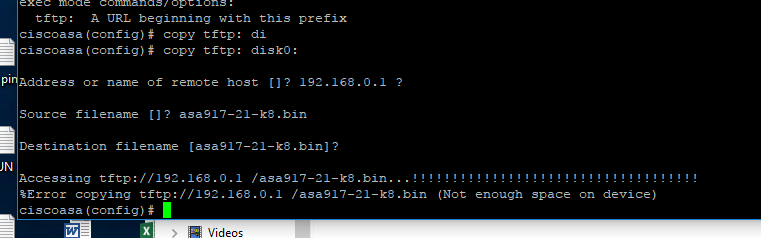
about the below ... the asa without any firmware now .. how can I solve this and the memory i think its filled.
- Labels:
-
Other Network Security Topics



- Mark as New
- Bookmark
- Subscribe
- Mute
- Subscribe to RSS Feed
- Permalink
- Report Inappropriate Content
01-25-2018 03:57 PM
Delete old files off the flash you don't need (such as the old firmware).
dir flash:
delete flash:xxx
- Mark as New
- Bookmark
- Subscribe
- Mute
- Subscribe to RSS Feed
- Permalink
- Report Inappropriate Content
01-25-2018 04:00 PM
- Mark as New
- Bookmark
- Subscribe
- Mute
- Subscribe to RSS Feed
- Permalink
- Report Inappropriate Content
01-25-2018 04:02 PM
Find other files you can delete. Perhaps old anyconnect packages, etc.




- Mark as New
- Bookmark
- Subscribe
- Mute
- Subscribe to RSS Feed
- Permalink
- Report Inappropriate Content
01-26-2018 12:26 AM
Is that the legacy 5505? With the default flash, there is only space for one firmware, asdm and two anyconnect images. If that's the case you have to delete one of the actual used files and then load the new one. You can also delete the running image and load a new one. But you should make sure that no one cuts the power while upgrading ...
If you found this post helpful, please give it Kudos. If my answer solves your problem, please click Accept as Solution so others can benefit from it.
- Mark as New
- Bookmark
- Subscribe
- Mute
- Subscribe to RSS Feed
- Permalink
- Report Inappropriate Content
01-26-2018 02:37 AM
i entered to rommon and makes may pc as tftp and working with the asa fine . but when i make copy tftp disk ... the ERROR message shown that there is no space .
you can see this


Discover and save your favorite ideas. Come back to expert answers, step-by-step guides, recent topics, and more.
New here? Get started with these tips. How to use Community New member guide
