- Cisco Community
- Technology and Support
- Networking
- Switching
- C9300 install package files don't match the current IOS version
- Subscribe to RSS Feed
- Mark Topic as New
- Mark Topic as Read
- Float this Topic for Current User
- Bookmark
- Subscribe
- Mute
- Printer Friendly Page
C9300 install package files don't match the current IOS version


- Mark as New
- Bookmark
- Subscribe
- Mute
- Subscribe to RSS Feed
- Permalink
- Report Inappropriate Content
07-07-2025 07:04 PM
Hi there,
I'm working to change the boot method from BUNDLE to INSTALL, and before doing that, I'm checking more packages.conf file to ensure the packages are the same version as the running IOS in the switch. However, it's not.
[ Switch 1 ] Active Package(s) Information:
State (St): I - Inactive, U - Activated & Uncommitted,
C - Activated & Committed, D - Deactivated & Uncommitted
--------------------------------------------------------------------------------
Type St Filename/Version
--------------------------------------------------------------------------------
IMG C 17.06.04.0.4912
--------------------------------------------------------------------------------
Auto abort timer: inactive
--------------------------------------------------------------------------------
The command below is showing the packages are referring to the past IOS 17.03.05 instead of 17.06.04.
more packages.conf | i rp
# example: mount rp 0 0 rp_base /auto/some/nfs/path/abs_soft/rp_base.ppc
# example: iso rp 0 0 rp_base rp_base.ppc.bin
# purposes, in deployment the files will always be managed
boot rp 0 0 rp_boot cat9k-rpboot.17.03.05.SPA.pkg
iso rp 0 0 rp_base cat9k-rpbase.17.03.05.SPA.pkg
iso rp 0 0 rp_daemons cat9k-rpbase.17.03.05.SPA.pkg
iso rp 0 0 rp_iosd cat9k-rpbase.17.03.05.SPA.pkg
iso rp 0 0 rp_security cat9k-rpbase.17.03.05.SPA.pkg
iso rp 0 0 rp_wlc cat9k-wlc.17.03.05.SPA.pkg
iso rp 0 0 rp_webui cat9k-webui.17.03.05.SPA.pkg
iso rp 0 0 srdriver cat9k-srdriver.17.03.05.SPA.pkg
iso rp 0 0 guestshell cat9k-guestshell.17.03.05.SPA.pkg
boot rp 1 0 rp_boot cat9k-rpboot.17.03.05.SPA.pkg
iso rp 1 0 rp_base cat9k-rpbase.17.03.05.SPA.pkg
iso rp 1 0 rp_daemons cat9k-rpbase.17.03.05.SPA.pkg
iso rp 1 0 rp_iosd cat9k-rpbase.17.03.05.SPA.pkg
iso rp 1 0 rp_security cat9k-rpbase.17.03.05.SPA.pkg
iso rp 1 0 rp_wlc cat9k-wlc.17.03.05.SPA.pkg
iso rp 1 0 rp_webui cat9k-webui.17.03.05.SPA.pkg
iso rp 1 0 srdriver cat9k-srdriver.17.03.05.SPA.pkg
iso rp 1 0 guestshell cat9k-guestshell.17.03.05.SPA.pkg
What do you think the best approach in this case is? Trying to reinstall the 17.06.04 ?
- Labels:
-
Catalyst 9000
-
LAN Switching
- Mark as New
- Bookmark
- Subscribe
- Mute
- Subscribe to RSS Feed
- Permalink
- Report Inappropriate Content
07-07-2025 08:51 PM
Are you trying to do this with no downtime?
If you don't mind the switch doing a reload, then it's easy to go from Bundle to Install (I have a thread in a similar vein to this https://community.cisco.com/t5/cisco-catalyst-center/will-cc-upgrade-a-switch-in-bundle-mode-to-install-mode/m-p/5147106#M9798)
From my memory, the packages.conf file is updated/created during the 'install add file xxxx' part of the process.
I am not sure how you would go about getting it into install mode without a reboot to be honest, but it's easy if you don't mind a reboot:
no boot system
boot system flash:packages.conf
no boot manual
end
wr
install add file flash:cat9k_lite_iosxe.17.12.03.SPA.bin activate commit
(adjust filename to suit)


- Mark as New
- Bookmark
- Subscribe
- Mute
- Subscribe to RSS Feed
- Permalink
- Report Inappropriate Content
07-07-2025 10:18 PM
This is a known bug (Bug ID is "private") and, depending on what command was used to extract the packages off the BIN file, the error message will appear at the conclusion of the extraction (see below).
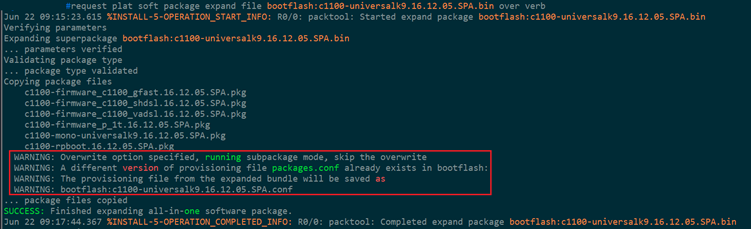
Please post the complete output to the command "dir".
Alternatively, please read Cisco 3850: IOS-XE/Firmware Upgrade.

Discover and save your favorite ideas. Come back to expert answers, step-by-step guides, recent topics, and more.
New here? Get started with these tips. How to use Community New member guide