- Cisco Community
- Technology and Support
- Networking
- Cisco Catalyst Center
- No results in DNA WSA Sensor based test
- Subscribe to RSS Feed
- Mark Topic as New
- Mark Topic as Read
- Float this Topic for Current User
- Bookmark
- Subscribe
- Mute
- Printer Friendly Page


- Mark as New
- Bookmark
- Subscribe
- Mute
- Subscribe to RSS Feed
- Permalink
- Report Inappropriate Content
01-17-2020 03:40 AM - edited 01-17-2020 03:42 AM
Hello
We are deploying DNA Wirelesss Assurance with 1800s sensors.
Sensors has been provisioned in DNA-C.
And simpe Test Suite has been scheduled.
But there is no results.
==========================================================
In sensor CLI:
AP70F3.5A7A.0198#show dot11 sensor stats
## Network Assurance Sensor Statistics ##
WSA Status: Enabled
NA Connectivity: Connected
NA Connectivity I/F: Wired  http
NA Server URL: https://10.64.128.127
Auth Type: EAP
HTTP Proxy IP: PROXY_IP
Backhaul SSID: CiscoSensorProvisioning
Id-token:
Port: PORT
Total Test Cases Run: 0
Successful Test Cases: 0
Failed Test Cases: 0
Network Assurance 5G Radio Statistics
--------------------------
Host Rx K Bytes: 0
Host Tx K Bytes: 0
Unicasts Rx: 0
Unicasts Tx: 0
Broadcasts Rx: 0
Broadcasts Tx: 0
Beacons Rx: 0
Beacons Tx: 0
Multicasts Rx: 0
Multicasts Tx: 0
CRC errors: 0

Network Assurance 2G Radio Statistics
--------------------------
Host Rx K Bytes: 0
Host Tx K Bytes: 0
Unicasts Rx: 0
Unicasts Tx: 0
Broadcasts Rx: 0
Broadcasts Tx: 0
Beacons Rx: 0
Beacons Tx: 0
Multicasts Rx: 0
Multicasts Tx: 0
CRC errors: 0

AP70F3.5A7A.0198#
AP70F3.5A7A.0198#show dot11 sensor test config
Test Config Received Time: 2020-01-17 10:47:30.604699
{
    advancedConfig: {
        rssiThreshold: -75
    }
    testConfig:
        {
            targetAPs:
            testSuiteName: test-1
            name: Onboarding
            bands: BOTH
            scheduleInDays: 0
            connection: WIRELESS
            frequency: {
                value: 30
                unit: MINUTES
            }
            ssids:
                {
                    username: null
                    validTo: 0
                    layer3webAuthsecurity: null
                    numAps: 0
                    id: 0
                    authTypeRcvd: null
                    authType: WPA2_PSK
                    ssid: retail-service
                    authProtocol: null
                    eapMethod: null
                    certxferprotocol: HTTP
                    qosPolicy: null
                    layer3webAuthpassword: ****
                    psk: ****
                    layer3webAuthuserName: null
                    bands: BOTH
                    layer3webAuthEmailAddress: null
                    certfilename: null
                    profileName: retail-service
                    password: ****
                    certstatus: ACTIVE
                    wlc: 10.64.0.116
                    certpassphrase: null
                    numSensors: 0
                    status: ENABLED
                    certdownloadurl: null
                    wlanId: 0
                    validFrom: 0
                }

            startTime: 1579257944554
            repeatCountOnFailure: 2
            numberOfApsToTest: 3
            wlans:
                retail-service

            testSuiteDetails: {
                BUILDING: Global/\u041c\u043e\u0441\u043a\u043e\u0432\u0441\u043a\u0438\u0439/6266
                AREAID: 32328f6c-3c7a-409a-8e74-6f6130743b8c
                TESTSUITENAME: test-1
                FLOOR: Global/\u041c\u043e\u0441\u043a\u043e\u0432\u0441\u043a\u0438\u0439/6266/1
                AREA: Global/\u041c\u043e\u0441\u043a\u043e\u0432\u0441\u043a\u0438\u0439
                FLOORID: ba56b83d-a535-4d33-bcc4-2cc45b04851f
                TESTSUITEID: 5e219058a61fa7002016a29f
                BUILDINGID: 307a9eff-c1c4-4074-b9bc-fc7db74c3ddf
            }
            config:
                {}

            type: DEDICATED
            testSuiteId: 5e219058a61fa7002016a29f:!_ba56b83d-a535-4d33-bcc4-2cc45b04851f:!_Global/\u041c\u043e\u0441\u043a\u043e\u0432\u0441\u043a\u0438\u0439/6266/1:!_307a9eff-c1c4-4074-b9bc-fc7db74c3ddf:!_Global/\u041c\u043e\u0441\u043a\u043e\u0432\u0441\u043a\u0438\u0439/6266:!_32328f6c-3c7a-409a-8e74-6f6130743b8c:!_Global/\u041c\u043e\u0441\u043a\u043e\u0432\u0441\u043a\u0438\u0439:!_test-1
        }

    wlans:
        {
            username: null
            validTo: 0
            layer3webAuthsecurity: null
            numAps: 0
            id: 0
            authTypeRcvd: null
            authType: WPA2_PSK
            ssid: retail-service
            authProtocol: null
            eapMethod: null
            certxferprotocol: HTTP
            qosPolicy: null
            layer3webAuthpassword: ****
            psk: ****
            layer3webAuthuserName: null
            bands: BOTH
            layer3webAuthEmailAddress: null
            certfilename: null
            profileName: retail-service
            password: ****
            certstatus: ACTIVE
            wlc: 10.64.0.116
            certpassphrase: null
            numSensors: 0
            status: ENABLED
            certdownloadurl: null
            wlanId: 0
            validFrom: 0
        }

}
AP70F3.5A7A.0198#show dot11 sensor test results
AP70F3.5A7A.0198#
NTP has been configured via CLI
AP70F3.5A7A.0198#show ntp
NTP server       Stratum  Version  Last Received    Delay     Offset    Jitter
time.moscow.spo  2        4        1827sec ago      0.000ms   0.000ms   0.000ms
As you see test suite is configured on sensor but there is no result
Please help to troubleshoot this issue?
Thanks.
Solved! Go to Solution.
- Labels:
-
Cisco DNA Assurance
Accepted Solutions

- Mark as New
- Bookmark
- Subscribe
- Mute
- Subscribe to RSS Feed
- Permalink
- Report Inappropriate Content
01-20-2020 06:45 AM
You are running old sensor code which isn't recommended since DNAC version 1.2.10. Please attempt to upgrade at least 8.8.263.0:
-- https://software.cisco.com/download/home/286318948/type/286288051/release/8.8.263.0
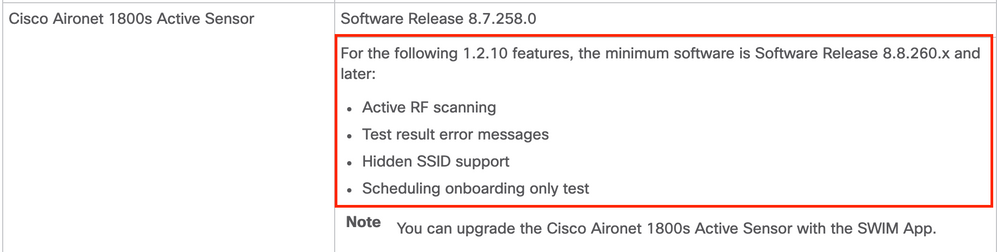
Since your 1800s sensor has already been claimed and in your DNA center inventory, you can use SWIM to upgrade the software on the sensor from the DNA center GUI.
- Mark as New
- Bookmark
- Subscribe
- Mute
- Subscribe to RSS Feed
- Permalink
- Report Inappropriate Content
01-17-2020 07:34 AM
What DNAC version do you have deployed?
What version is the 1800s running?
- Mark as New
- Bookmark
- Subscribe
- Mute
- Subscribe to RSS Feed
- Permalink
- Report Inappropriate Content
01-19-2020 08:54 PM
Hello
1800s Running Image : 8.8.259.0
DNAC maglev, version 1.3.0.3938
sensor-assurance Assurance - Sensor 1.4.0.484
- Mark as New
- Bookmark
- Subscribe
- Mute
- Subscribe to RSS Feed
- Permalink
- Report Inappropriate Content
01-19-2020 11:07 PM - edited 01-19-2020 11:13 PM
As i see test suits does not run on to the sensors
- Mark as New
- Bookmark
- Subscribe
- Mute
- Subscribe to RSS Feed
- Permalink
- Report Inappropriate Content
01-20-2020 06:45 AM
You are running old sensor code which isn't recommended since DNAC version 1.2.10. Please attempt to upgrade at least 8.8.263.0:
-- https://software.cisco.com/download/home/286318948/type/286288051/release/8.8.263.0
Since your 1800s sensor has already been claimed and in your DNA center inventory, you can use SWIM to upgrade the software on the sensor from the DNA center GUI.

Discover and save your favorite ideas. Come back to expert answers, step-by-step guides, recent topics, and more.
New here? Get started with these tips. How to use Community New member guide