- Cisco Community
- Technology and Support
- Collaboration
- Collaboration Applications
- Re: WebEx Productivity Tools Script Error
- Subscribe to RSS Feed
- Mark Topic as New
- Mark Topic as Read
- Float this Topic for Current User
- Bookmark
- Subscribe
- Mute
- Printer Friendly Page
WebEx Productivity Tools Script Error


- Mark as New
- Bookmark
- Subscribe
- Mute
- Subscribe to RSS Feed
- Permalink
- Report Inappropriate Content
06-12-2018 12:43 PM - edited 03-17-2019 07:35 PM
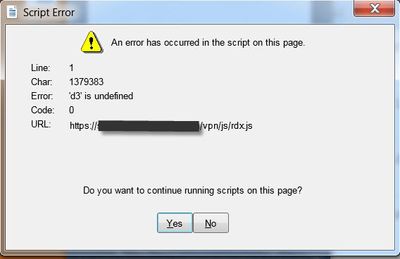
when launch the WebEx Productivity Tools to sign in, I am getting some script errors and if I click Yes on these script errors and eventually I get a blank window.
we have configured a virtual NetScaler as the SAML IDP for SSO. it works with no problem when login through a web browser (IE). However, when use PTools, I am getting those script errors. has anyone here experienced a similar problem before?

- Labels:
-
Other Collaboration Applications
- Mark as New
- Bookmark
- Subscribe
- Mute
- Subscribe to RSS Feed
- Permalink
- Report Inappropriate Content
12-14-2020 12:12 AM
So how do i fix this.?
- Mark as New
- Bookmark
- Subscribe
- Mute
- Subscribe to RSS Feed
- Permalink
- Report Inappropriate Content
03-23-2021 01:44 AM
So weird that there hasnt been any response at this thread.
- Mark as New
- Bookmark
- Subscribe
- Mute
- Subscribe to RSS Feed
- Permalink
- Report Inappropriate Content
03-23-2021 01:46 AM
I got this same issue with Cisco Webex Meetings
- Mark as New
- Bookmark
- Subscribe
- Mute
- Subscribe to RSS Feed
- Permalink
- Report Inappropriate Content
05-27-2021 10:32 AM
Found the answer here:
https://help.webex.com/en-us/nal834m/Known-Issues-with-Webex-for-BroadWorks
Windows Client - Script Error Appears During Login when Do Not Save Encrypted Files to Disk' is Enabled
A script error appears if you run the Webex app on Windows and the Do Not Save Encrypted Files to Disk advanced security setting is enabled in Internet Explorer. This error occurs if the following conditions are true:
- Webex app is running on Windows (standalone version)
- User attempts to log in as a BroadWorks-authorized user
- In Internet Explorer, the Do Not Save Encrypted Files to Disk advanced security setting is enabled
Workaound
Disable the Do Not Save Encrypted Files to Disk setting in Internet Explorer:
- In Internet Explorer, click the Tools icon and select Internet Options.
- Click the Advanced tab.
- Under Security, uncheck the Do Not Save Encrypted Files to Disk check box and click OK

Discover and save your favorite ideas. Come back to expert answers, step-by-step guides, recent topics, and more.
New here? Get started with these tips. How to use Community New member guide