- Cisco Community
- Technology and Support
- Networking
- Switching
- Cisco 3560G Duplex Issue?
- Subscribe to RSS Feed
- Mark Topic as New
- Mark Topic as Read
- Float this Topic for Current User
- Bookmark
- Subscribe
- Mute
- Printer Friendly Page
Cisco 3560G Duplex Issue?


- Mark as New
- Bookmark
- Subscribe
- Mute
- Subscribe to RSS Feed
- Permalink
- Report Inappropriate Content
01-05-2017 09:56 AM - edited 03-08-2019 08:48 AM
Hi Everyone,
I have Cisco 3560G 48 port (non-PoE) switch, IP routing enabled (as it is being used as a core routing switch), with 3 Avaya ERS 5520 switches as user switches. All servers are connected to the 3560G.
Problem is, the performance is abysmal. I'm getting, maybe 300Mbit/s one direction, and anywhere from 50-200Mbit/s the other. All ports are at full duplex, no collisions, no input errors, no CRC errors, etc. and all ports (except for trunk ports), are configured with "spanning-tree portfast" only. The trunks are set to "switchport trunk encapsulation dot1q, switchport mode trunk, and spanning-tree portfast trunk" (probably will remove the " spanning-tree portfast trunk" line soon). No problems under "sh spanning-tree vlan 1", It's a simple configuration.
Any suggestions on what to check/change? I was thinking about swapping the switch out with another one but thought I would ask first.
Thanks!
- Labels:
-
Other Switching

- Mark as New
- Bookmark
- Subscribe
- Mute
- Subscribe to RSS Feed
- Permalink
- Report Inappropriate Content
01-05-2017 10:15 AM
Are your ports hard configured for speed/duplex, or auto?
The 48gig port 3560 (and 3750) do have backplane and PPS rates that cannot support all ports running at gig, concurrently. However, you really need to load it up to exceed what it can support.
The 3560 (and 3750) often drop packets, especially if QoS is globally enabled (is it?) with its default settings. You didn't note whether you have any egress drops. (I recall [?] not all IOS versions reflect egress queue drops on the interface drop counter, but the ASIC and/or QoS stats, I recall [?], do. I.e. if interfaces don't show egress drops, you might want to check the hardware drop counters too.)
The 3650 (and 3750) performance can tank if you exceed TCAM limits. You can check TCAM usage stats, you can also insure you're using the optimal SDM template for your needs. (What's your CPU usage history like?)
Besides your 3560, what stats do your Avaya switches show? What are their host ports speed (i.e. gig or FE)? Is the 300 Mbps limited between gig (host) ports on the 3650, or does this include the Avaya switches?
- Mark as New
- Bookmark
- Subscribe
- Mute
- Subscribe to RSS Feed
- Permalink
- Report Inappropriate Content
01-05-2017 10:56 AM
Thanks for the response.
Everything is set to auto. We have 17 devices connected, 13 showing 1G/Full and 4 at 100/Full.
QoS has not been enabled. A couple of the ports have 40 and 68 Total Output Drops consecutively, while one trunk port as 260 and another trunk has 168. A couple of the ports have 1 late collision and most have 1 interface reset.
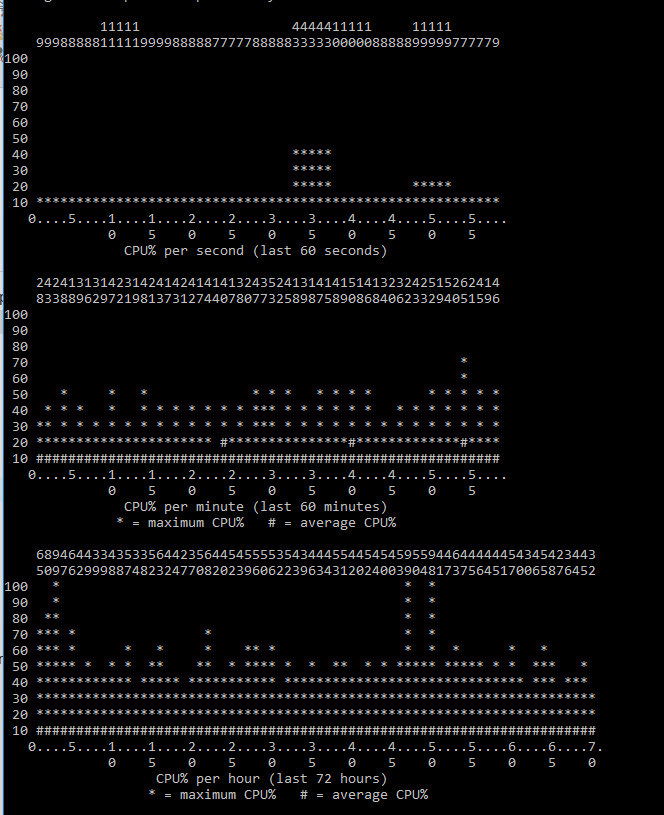
CPU usage is below 1%. It's not a heavily utilized network, and so it has a simple configuration. Majority is just set to it's default configuration. Running 12.4(55)SE10. Switch isn't heavily utilized so I don't think it has exceeded any limits.
All Avaya switches show 1G/Full. Speed issue only seems to occur on the Cisco. Users computers on the Avaya switches can communicate with each other without issue.
*I have added the switch configuration file and the interface info to this message.*
- Mark as New
- Bookmark
- Subscribe
- Mute
- Subscribe to RSS Feed
- Permalink
- Report Inappropriate Content
01-05-2017 10:27 PM
Hi,
What are these 4 Full/100 devices? any reason they are set to 100Mbps?
The drops you've mentioned above, is it increasing, or same?
Can you post the output for :
sh platform port-asic stats drop
sh platform tcam utilization
Also, are you using TCP based test from iPerf ? and what about the ping latency between host A & B ?
If you are using tcp based test from iPerf, can you also run a UDP based test between A & B & see if you are getting high "jitter" rate.
Thanks,
- Mark as New
- Bookmark
- Subscribe
- Mute
- Subscribe to RSS Feed
- Permalink
- Report Inappropriate Content
01-06-2017 06:42 AM
Ok I've added the text files of the output for the sh commands.
I've also included the output of the TCP and UDP iperf, both directions. The network isn't being heavily utilized. If you want any specific window sizes or bandwidth settings, please let me know.
Thanks!


- Mark as New
- Bookmark
- Subscribe
- Mute
- Subscribe to RSS Feed
- Permalink
- Report Inappropriate Content
01-05-2017 11:27 AM
Hello
You could also check if this core switch is running as the STP root? As I dont see any setting to determine this, Can you check to make sure this switch is indeed the stp root for the domain?
Otherwise if it isn't then you would get a performance hit if a substandard switch is currently ruuning as the root .
sh spanning-tree root vlan x root detail
sh spanning-tree summary
sh spanning-tree interface x/x
you can set this core switch to be the root by
spanning-tree vlan x priority 0 ( in values of 4096) <--This is more deterministic then the macro version primary /secondary root commands
res
Paul
Please rate and mark as an accepted solution if you have found any of the information provided useful.
This then could assist others on these forums to find a valuable answer and broadens the community’s global network.
Kind Regards
Paul
- Mark as New
- Bookmark
- Subscribe
- Mute
- Subscribe to RSS Feed
- Permalink
- Report Inappropriate Content
01-05-2017 12:22 PM
Hi Paul. Thanks for your reply.
I thought it was yesterday but running the commands you specified showed it wasn't.
Before:
VLAN0001
Root ID Priority 32768
Address 0014.c72d.ec01 <-- Avaya Switch
Cost 4
Port 46 (GigabitEthernet0/46)
Hello Time 2 sec Max Age 20 sec Forward Delay 15 sec
After:
VLAN0001
Root ID Priority 1
Address 0019.aa59.b300 <-- Cisco Core
This bridge is the root
Hello Time 2 sec Max Age 20 sec Forward Delay 15 sec
I did run the spanning-tree command to specify the Cisco as the root but that hasn't seemed to make a performance difference.
- Mark as New
- Bookmark
- Subscribe
- Mute
- Subscribe to RSS Feed
- Permalink
- Report Inappropriate Content
01-05-2017 12:32 PM
Hello
Have you checked the memory and cpu utilisation?
sh process cpu sorted
sh process cpu history
sh memory processor stat
res
paul
Please rate and mark as an accepted solution if you have found any of the information provided useful.
This then could assist others on these forums to find a valuable answer and broadens the community’s global network.
Kind Regards
Paul
- Mark as New
- Bookmark
- Subscribe
- Mute
- Subscribe to RSS Feed
- Permalink
- Report Inappropriate Content
01-05-2017 12:52 PM


- Mark as New
- Bookmark
- Subscribe
- Mute
- Subscribe to RSS Feed
- Permalink
- Report Inappropriate Content
01-09-2017 03:49 AM
What IOS version are you running?
- Mark as New
- Bookmark
- Subscribe
- Mute
- Subscribe to RSS Feed
- Permalink
- Report Inappropriate Content
01-12-2017 08:03 AM
Currently running the latest available. 12.2(44)SE5
- Mark as New
- Bookmark
- Subscribe
- Mute
- Subscribe to RSS Feed
- Permalink
- Report Inappropriate Content
01-05-2017 01:01 PM
On the subject of STP, Cisco uses, by default, PVSTP, and often other vendors don't inter-operate with it. (Also, when using STP, rapid is a much better choice, although again, Cisco has rapid-PVSTP, and other vendors might have an issue with that too. Sometime to inter-operate you need to use MST.) Also, on trunks, Cisco switches don't, by default tag VLAN1, or the assigned native VLAN, if different from VLAN 1, and that can also cause vendor inter-operation problems.
As you only appear to be using one VLAN, VLAN 1, you should be able to change your trunk ports to access ports (on both Cisco and the Avaya switches) or, on the Cisco, define a new dummy VLAN, and make it the native VLAN for the trunk ports. (How Cisco and Avaya deal with 802.1Q, might be the cause of your performance issue.)
BTW, you can make port-fast a default (which cuts down the length of the config file), and when using it, you often pair it with BPDUGuard (which can also be made a default).
There also might be some benefit to defining your access ports as access ports.
Some suggested commands:
spanning-tree mode rapid-pvst
spanning-tree portfast default
spanning-tree portfast bpduguard default
spanning-tree vlan 1-1004 priority 8192
interface range g0/1 - 45
no spanning-tree portfast
switchport mode access
Oh, and as the 3560 (and 3750) has 2 MB of RAM per 24 copper ports, and for the uplink ports, you might consider moving on of your Avaya links to 1..24 and/or move one, or another, to one of the uplink ports (use a copper SFP).
Also note, if you do change your Avaya ports to access ports, BPDUGuard will likely take the ports down. You can configure those ports to override the above BPDUGuard default (spanning-tree bpduguard disable).
- Mark as New
- Bookmark
- Subscribe
- Mute
- Subscribe to RSS Feed
- Permalink
- Report Inappropriate Content
01-05-2017 09:01 PM
Thanks for the commands. I have implemented a few of them, and will do the rest this weekend. I did the siwtchport mode access, portfast default and no spanning-tree portfast right now.
It have noticed something strange where if I run bandwidth testing software, like iperf, from a machine A, the test from machine A to B is good. If I go to B and run the test from B to A, it's good. if I go on machine A and do a test from B to A, the performance is horrible. And if I'm on B, and do a transfer from A to B, it's horrible. From A to B, it is Gbit. From B to A, it ranges from 50Mbit/s speeds to 300Mbit/s transfer speeds. It' fluctuates really bad. I've seen this on Cisco switches that don't negotiate duplex properly with Cisco routers (when we were setting up MPLS with our provider), but everything seems ok. I have forced some devices to speed 1000 but it doesn't make a difference either.
- Mark as New
- Bookmark
- Subscribe
- Mute
- Subscribe to RSS Feed
- Permalink
- Report Inappropriate Content
01-06-2017 08:10 AM
Yup, if you have a duplex mismatch, performance will be horrible (although not sure if the effect is only unidirectional), but if you ports are auto/auto and they are running full duplex, that should indicate both sides are auto and agreed on full duplex.
When you note testing between hosts A and B, this on just the Cisco, between the Cisco and an Avaya or just on the Avaya?
- Mark as New
- Bookmark
- Subscribe
- Mute
- Subscribe to RSS Feed
- Permalink
- Report Inappropriate Content
01-06-2017 02:01 PM
It only occurs on the Cisco switch. All devices I am testing with are on the Cisco 3560G. Even disconnecting other devices off of the switch doesn't seem to make a difference. All devices and the switch report as 1Gb/Full (or 100Mb/Full).

Discover and save your favorite ideas. Come back to expert answers, step-by-step guides, recent topics, and more.
New here? Get started with these tips. How to use Community New member guide