- Cisco Community
- Technology and Support
- Networking
- Switching
- Renumbering 2960x stack Members
- Subscribe to RSS Feed
- Mark Topic as New
- Mark Topic as Read
- Float this Topic for Current User
- Bookmark
- Subscribe
- Mute
- Printer Friendly Page


- Mark as New
- Bookmark
- Subscribe
- Mute
- Subscribe to RSS Feed
- Permalink
- Report Inappropriate Content
12-13-2017 12:19 PM - edited 03-08-2019 01:06 PM
hello, is there a way to re-number the switch stack members without having to reconfigure the ports after the reload. I tried with the command switch [current number]renumber [desired number] but that switched the ports config with it.
Thanks
Solved! Go to Solution.
- Labels:
-
Other Switching
Accepted Solutions
- Mark as New
- Bookmark
- Subscribe
- Mute
- Subscribe to RSS Feed
- Permalink
- Report Inappropriate Content
12-13-2017 12:55 PM
Thanks. We're starting this at 4:30 ET. I'll let you know. How do you read this output?
Stack Port Status Neighbors
Switch# Port 1 Port 2 Port 1 Port 2
--------------------------------------------------------
1 Ok Down 2 None
2 Ok Down 1 None



- Mark as New
- Bookmark
- Subscribe
- Mute
- Subscribe to RSS Feed
- Permalink
- Report Inappropriate Content
12-13-2017 12:28 PM
Hi
There is no way to force the change without a reload.
>> Marcar como útil o contestado, si la respuesta resolvió la duda, esto ayuda a futuras consultas de otros miembros de la comunidad. <<
- Mark as New
- Bookmark
- Subscribe
- Mute
- Subscribe to RSS Feed
- Permalink
- Report Inappropriate Content
12-13-2017 12:34 PM
The reload is fine actually but the config is not shifting according to the renumbering. For example
Gi1/0/1 is supposed to be Gi2/0/1 but when we re-number and reload the config of Gi1/0/1 is taking the config of Gi2/0/1 instead keeping its config.
- Mark as New
- Bookmark
- Subscribe
- Mute
- Subscribe to RSS Feed
- Permalink
- Report Inappropriate Content
12-13-2017 12:36 PM
Hi
Have you verified if a switch is displayed as provisioned?
Show switch
>> Marcar como útil o contestado, si la respuesta resolvió la duda, esto ayuda a futuras consultas de otros miembros de la comunidad. <<
- Mark as New
- Bookmark
- Subscribe
- Mute
- Subscribe to RSS Feed
- Permalink
- Report Inappropriate Content
12-13-2017 12:40 PM
Here's the show switch. I will be also changing the switches priority tonight.
WSCC2960X-Admin-1#show switch detail
Switch/Stack Mac Address : b07d.47b5.9b00
H/W Current
Switch# Role Mac Address Priority Version State
----------------------------------------------------------
1 Member f078.16d4.2c80 1 4 Ready
*2 Master b07d.47b5.9b00 1 4 Ready
Stack Port Status Neighbors
Switch# Port 1 Port 2 Port 1 Port 2
--------------------------------------------------------
1 Ok Down 2 None
2 Ok Down 1 None
WSCC2960X-Admin-1#
- Mark as New
- Bookmark
- Subscribe
- Mute
- Subscribe to RSS Feed
- Permalink
- Report Inappropriate Content
12-13-2017 12:42 PM
Hi
Stack Port Status Neighbors
Switch# Port 1 Port 2 Port 1 Port 2
--------------------------------------------------------
1 Ok Down 2 None
2 Ok Down 1 None
Have you verified if the stack cabling are connected correctly?
>> Marcar como útil o contestado, si la respuesta resolvió la duda, esto ayuda a futuras consultas de otros miembros de la comunidad. <<
- Mark as New
- Bookmark
- Subscribe
- Mute
- Subscribe to RSS Feed
- Permalink
- Report Inappropriate Content
12-13-2017 12:49 PM
I will have to check with the client. They should be criss crossed right? 1--2 and 2--1
- Mark as New
- Bookmark
- Subscribe
- Mute
- Subscribe to RSS Feed
- Permalink
- Report Inappropriate Content
12-13-2017 12:51 PM
That is correct
>> Marcar como útil o contestado, si la respuesta resolvió la duda, esto ayuda a futuras consultas de otros miembros de la comunidad. <<
- Mark as New
- Bookmark
- Subscribe
- Mute
- Subscribe to RSS Feed
- Permalink
- Report Inappropriate Content
12-13-2017 12:55 PM
Thanks. We're starting this at 4:30 ET. I'll let you know. How do you read this output?
Stack Port Status Neighbors
Switch# Port 1 Port 2 Port 1 Port 2
--------------------------------------------------------
1 Ok Down 2 None
2 Ok Down 1 None
- Mark as New
- Bookmark
- Subscribe
- Mute
- Subscribe to RSS Feed
- Permalink
- Report Inappropriate Content
12-13-2017 01:03 PM
Hi
It looks like the stack port 1 on both switches are directly connected and nothing connected to stack port 2.
>> Marcar como útil o contestado, si la respuesta resolvió la duda, esto ayuda a futuras consultas de otros miembros de la comunidad. <<
- Mark as New
- Bookmark
- Subscribe
- Mute
- Subscribe to RSS Feed
- Permalink
- Report Inappropriate Content
12-13-2017 02:01 PM
Ok we're on now so port 2 is not connected at all. how do you recommend doing this? Should I power off the switch connect the stacking cables the right way and then power back on? We also wanted to add a new switch to the stack
- Mark as New
- Bookmark
- Subscribe
- Mute
- Subscribe to RSS Feed
- Permalink
- Report Inappropriate Content
12-13-2017 02:06 PM
Hi
The physical connection should be:
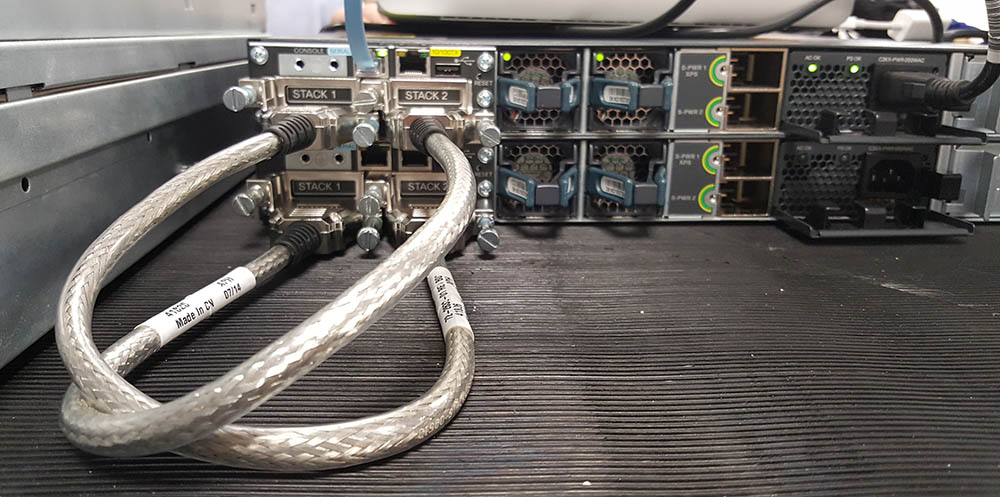
Now you can connect the cable with the devices turned on, in my case I prefer connect them turned off.
Hope it is useful
:-)
>> Marcar como útil o contestado, si la respuesta resolvió la duda, esto ayuda a futuras consultas de otros miembros de la comunidad. <<
- Mark as New
- Bookmark
- Subscribe
- Mute
- Subscribe to RSS Feed
- Permalink
- Report Inappropriate Content
12-13-2017 02:13 PM
Ok powering off and recabling. Can I re-number them next, reload and then add the 3rd switch?
- Mark as New
- Bookmark
- Subscribe
- Mute
- Subscribe to RSS Feed
- Permalink
- Report Inappropriate Content
12-13-2017 02:18 PM
- Mark as New
- Bookmark
- Subscribe
- Mute
- Subscribe to RSS Feed
- Permalink
- Report Inappropriate Content
12-13-2017 02:23 PM - edited 12-13-2017 02:24 PM
Yes, that will work. Always get a backup of the configuration.
>> Marcar como útil o contestado, si la respuesta resolvió la duda, esto ayuda a futuras consultas de otros miembros de la comunidad. <<

Discover and save your favorite ideas. Come back to expert answers, step-by-step guides, recent topics, and more.
New here? Get started with these tips. How to use Community New member guide