- Cisco Community
- Technology and Support
- Collaboration
- Unified Communications Infrastructure
- cucm10.5 upgrade to cucm 14
- Subscribe to RSS Feed
- Mark Topic as New
- Mark Topic as Read
- Float this Topic for Current User
- Bookmark
- Subscribe
- Mute
- Printer Friendly Page
cucm10.5 upgrade to cucm 14


- Mark as New
- Bookmark
- Subscribe
- Mute
- Subscribe to RSS Feed
- Permalink
- Report Inappropriate Content
02-17-2023 02:21 AM
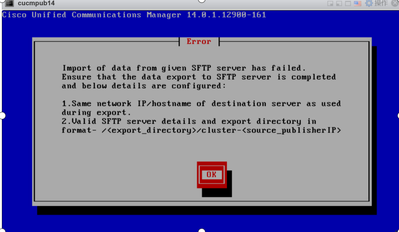
When I upgrade CUCM which version is 10.5.2 to CUCM 14 by Fresh Install with Data Import, it get an error.
I have checked the destination server IP and the SFTP directory and it's correct. How should I troubleshoot ?
- Labels:
-
Unified Communications



- Mark as New
- Bookmark
- Subscribe
- Mute
- Subscribe to RSS Feed
- Permalink
- Report Inappropriate Content
02-17-2023 02:26 AM - edited 02-17-2023 02:27 AM
Can you share the screenshot or the path you mention on cucm installation and
the path on SFTP
I believe it’s just matter of SFTP path. There is specific requirement
and if you can share the folder screenshot it will be helpful

- Mark as New
- Bookmark
- Subscribe
- Mute
- Subscribe to RSS Feed
- Permalink
- Report Inappropriate Content
02-17-2023 04:24 AM
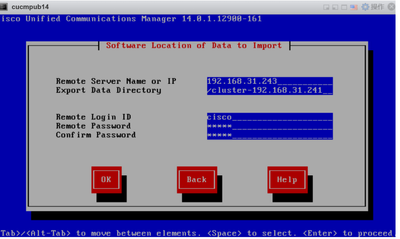
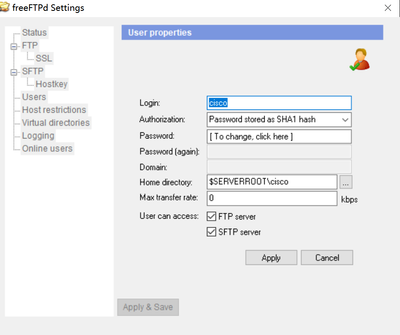
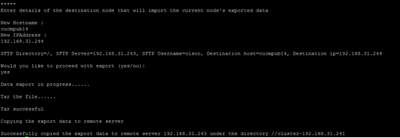
I installed the freeFTP as the sftp server on windows 10. The home directory of the user is cisco. I exported the cucm 10 data to the sftp server and it created an folder named cluster-192.168.31.241 automaticlly under the home directory.

- Mark as New
- Bookmark
- Subscribe
- Mute
- Subscribe to RSS Feed
- Permalink
- Report Inappropriate Content
03-16-2024 07:19 PM
We recently ran into this same error; were you able to find a solution/workaround? TIA
- Mark as New
- Bookmark
- Subscribe
- Mute
- Subscribe to RSS Feed
- Permalink
- Report Inappropriate Content
03-17-2024 08:03 PM
Just move the sftp server to linux .



- Mark as New
- Bookmark
- Subscribe
- Mute
- Subscribe to RSS Feed
- Permalink
- Report Inappropriate Content
03-17-2024 03:13 PM
It is probably an issue with the ciphers or key exchange algorithms. I use the OpenSSH server on FreeBSD and Linux, and this works for me.
in sshd_config:

KexAlgorithms +diffie-hellman-group1-sha1
KexAlgorithms +diffie-hellman-group-exchange-sha1

Ciphers +aes128-cbc
# 3DES isn't supported on newer version of DRS or in
# newer versions of OpenSSH
Ciphers +3des-cbc

Newer Ubuntu needs this:
PubkeyAcceptedAlgorithms +ssh-rsa
HostkeyAlgorithms +ssh-rsa- Mark as New
- Bookmark
- Subscribe
- Mute
- Subscribe to RSS Feed
- Permalink
- Report Inappropriate Content
03-17-2024 08:02 PM
Yes,When I changed the sftp server from window to linunx and it worked.
- Mark as New
- Bookmark
- Subscribe
- Mute
- Subscribe to RSS Feed
- Permalink
- Report Inappropriate Content
06-03-2024 01:41 PM
@gushuhua could you please tell which Linux server you use and sftp
- Mark as New
- Bookmark
- Subscribe
- Mute
- Subscribe to RSS Feed
- Permalink
- Report Inappropriate Content
06-09-2025 12:48 PM
Good day all,
The fix for this issue / error is very simple.
#1 check to make sure the IP /address is 100 % correct.
#2 The SFTP path is root + cluster-your ip add address. eg below
/cluster_10.10.1.10 that is it.
#3 if you get that error after these steps. do the following.
#1 disable NIC card from new VM
#2 power on OLD VM with old ip address
#3 ping from your SFTP TFTP or STP to cucm VM. make sure the solorwinds FTP is working and can talk to CUCM.
#4. on your MGMT VM or database or storage ... delete old cluster-IP.address
#5 start the export from OLD CUCM VM again, and WAIT just wait it can take up to 1 hr or more depending what size CUCM you have
#6 once you get a full complete, then you can shut down old VM start new VM with new NIC ip address, or old address does not matter.
#7 and import with /cluster-10.10.1.10
that will solve this error.
not sure how the tor file get corrupted, but it happens..
Things to look out for. DO NOT OPEN cluster-10.10.1.10 FILE BEFORE ITS DONE.
make sure the file size once done is not small ... aka 40m with 10 phones mine was 1.4 GB
GL all

Discover and save your favorite ideas. Come back to expert answers, step-by-step guides, recent topics, and more.
New here? Get started with these tips. How to use Community New member guide