- Cisco Community
- Technology and Support
- Data Center and Cloud
- Unified Computing System (UCS)
- Unified Computing System Discussions
- Getting error while installing cisco intersight virtual appliance
- Subscribe to RSS Feed
- Mark Topic as New
- Mark Topic as Read
- Float this Topic for Current User
- Bookmark
- Subscribe
- Mute
- Printer Friendly Page
Getting error while installing cisco intersight virtual appliance

- Mark as New
- Bookmark
- Subscribe
- Mute
- Subscribe to RSS Feed
- Permalink
- Report Inappropriate Content
04-07-2024 08:29 AM
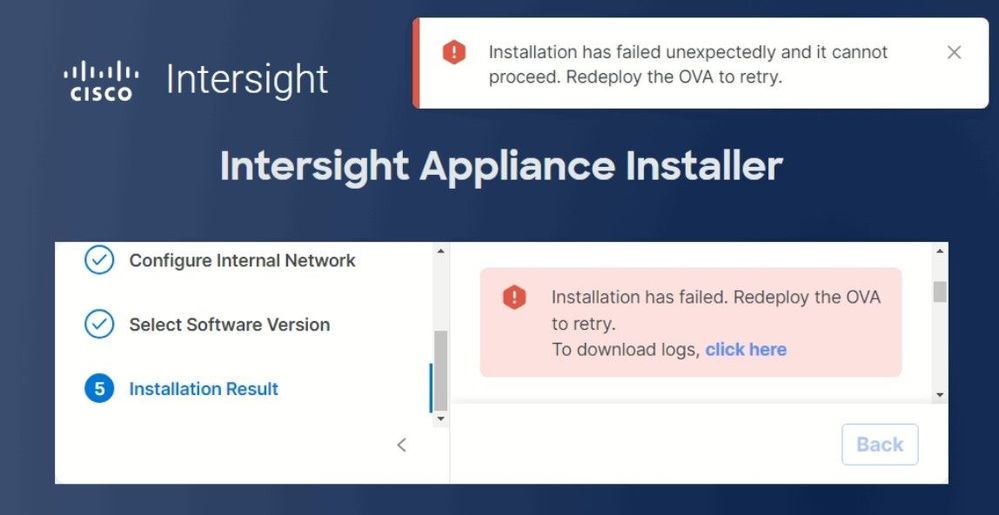
I am installing cisco virtual connected appliance using vcenter client hosted on esxi host. I followed the installation steps from cisco (https://www.cisco.com/c/en/us/td/docs/unified_computing/Intersight/b_Cisco_Intersight_Appliance_Getting_Started_Guide/m_installation.html). VM is created and configured network configs including DNS etc. Ping test also succeeds. Claiming device id also succeeds and installation process starts via download latest package. After taking hours for downloading 518 installation packages and installation, installation fails and gives error to redeploy the virtual appliance ova. Upon troubleshooting i found system services check was failed as well. Appreciate support on this issue.
- Labels:
-
Other Unified Computing System


- Mark as New
- Bookmark
- Subscribe
- Mute
- Subscribe to RSS Feed
- Permalink
- Report Inappropriate Content
04-07-2024 09:55 AM - edited 04-07-2024 09:56 AM
Make sure you are not picking 'tiny' deploy size. Needs to be 'small' or larger.
Kirk...
- Mark as New
- Bookmark
- Subscribe
- Mute
- Subscribe to RSS Feed
- Permalink
- Report Inappropriate Content
04-14-2024 10:07 PM
Dear @Kirk J
Thank you for your response. I have chosen 'small' size deployment. The error snapshots i am attaching for your review as well.

- Mark as New
- Bookmark
- Subscribe
- Mute
- Subscribe to RSS Feed
- Permalink
- Report Inappropriate Content
04-14-2024 10:09 PM
Dear @Kirk J
I tried to deploy multiple times, restarting the appliance before deployment, restarting the network configs and system services as well before deployment but still same error.
Thank you.
- Mark as New
- Bookmark
- Subscribe
- Mute
- Subscribe to RSS Feed
- Permalink
- Report Inappropriate Content
05-21-2024 11:40 AM - edited 05-21-2024 11:40 AM
We are running into similar error for a PVA appliance but at the "Setting up database service" step. any update on this is greatly appreciated
- Mark as New
- Bookmark
- Subscribe
- Mute
- Subscribe to RSS Feed
- Permalink
- Report Inappropriate Content
05-30-2024 01:37 PM
Any resolution on the db service error at setup? I'm having this exact issue. TAC is at a loss- mostly just checking and rechecking DNS, disk requirements and https access, which all check out.
- Mark as New
- Bookmark
- Subscribe
- Mute
- Subscribe to RSS Feed
- Permalink
- Report Inappropriate Content
05-31-2024 06:46 AM
Hi, we did get this resolved. It turns out that if you have EVC mode enabled on your cluster, then intersight VM deployment requires AVX to be enabled through EVC on vSphere.
- Mark as New
- Bookmark
- Subscribe
- Mute
- Subscribe to RSS Feed
- Permalink
- Report Inappropriate Content
06-03-2024 07:38 AM
keyurdharamshi - Amazing! Can't thank you enough. I've been wrestling with this for over a month and TAC seemingly has no knowledge or documentation of it. I'm up and running now; much appreciated!



- Mark as New
- Bookmark
- Subscribe
- Mute
- Subscribe to RSS Feed
- Permalink
- Report Inappropriate Content
06-03-2024 08:01 AM
-
It is mandatory to have a CPU that supports the AVX feature. If you have the Enhanced vMotion Compatibility (EVC) level configured for your VMware vSphere cluster, ensure that the EVC level is set to a CPU family that supports the AVX feature.
- Mark as New
- Bookmark
- Subscribe
- Mute
- Subscribe to RSS Feed
- Permalink
- Report Inappropriate Content
06-03-2024 08:04 AM
Thanks! At least I'm not the only one whose eyes glazed over that portion. Reading is hard...
- Mark as New
- Bookmark
- Subscribe
- Mute
- Subscribe to RSS Feed
- Permalink
- Report Inappropriate Content
08-11-2026 09:05 AM
Hi,

I encountered an error while setting up Cisco Intersight. Based on your experience, please help me resolve this issue. Thank you very much. Focus failed setting up security service

Discover and save your favorite ideas. Come back to expert answers, step-by-step guides, recent topics, and more.
New here? Get started with these tips. How to use Community New member guide

