- Cisco Community
- Technology and Support
- Small Business Support Community
- Wireless - Small Business
- Re: How to access ssh on Cisco Business CBW150AX ?
- Subscribe to RSS Feed
- Mark Topic as New
- Mark Topic as Read
- Float this Topic for Current User
- Bookmark
- Subscribe
- Mute
- Printer Friendly Page


- Mark as New
- Bookmark
- Subscribe
- Mute
- Subscribe to RSS Feed
- Permalink
- Report Inappropriate Content
04-26-2024 12:43 AM
Dear all
I have a new cbw150ax-s unk access point.
I have set a captive portal and test AAA authen with external radius.
All work fine but there is no accounting send to my radius server.
So I need to access ssh to use terminal and enable radius accounting.
I enable SSHv2 on then I ssh to AP ip address.
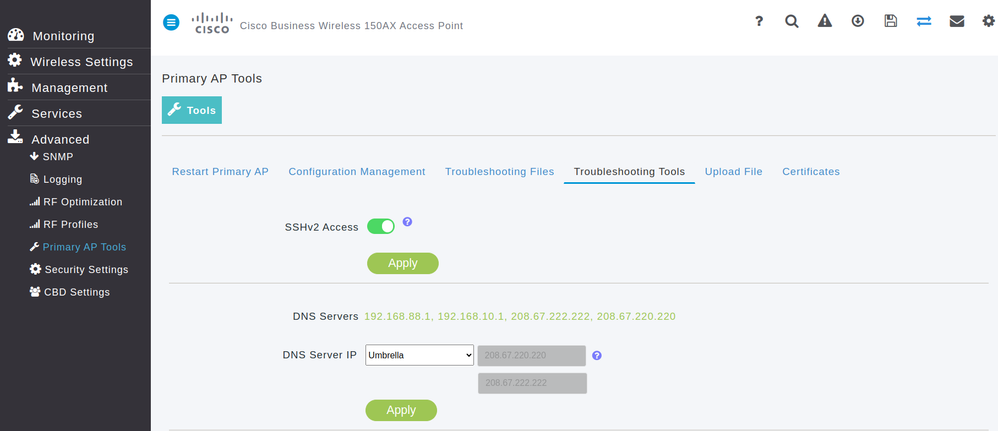
I got error :
easyzone@easyzone-IdeaPad-5-15ITL05:~$ ssh 192.168.88.251 -l ssh
ssh@192.168.88.251: Permission denied (publickey,keyboard-interactive).
It seems cbw150ax needs a publickey instead of use normal username and password.
But there is no option in web management to generate a ssh public key.
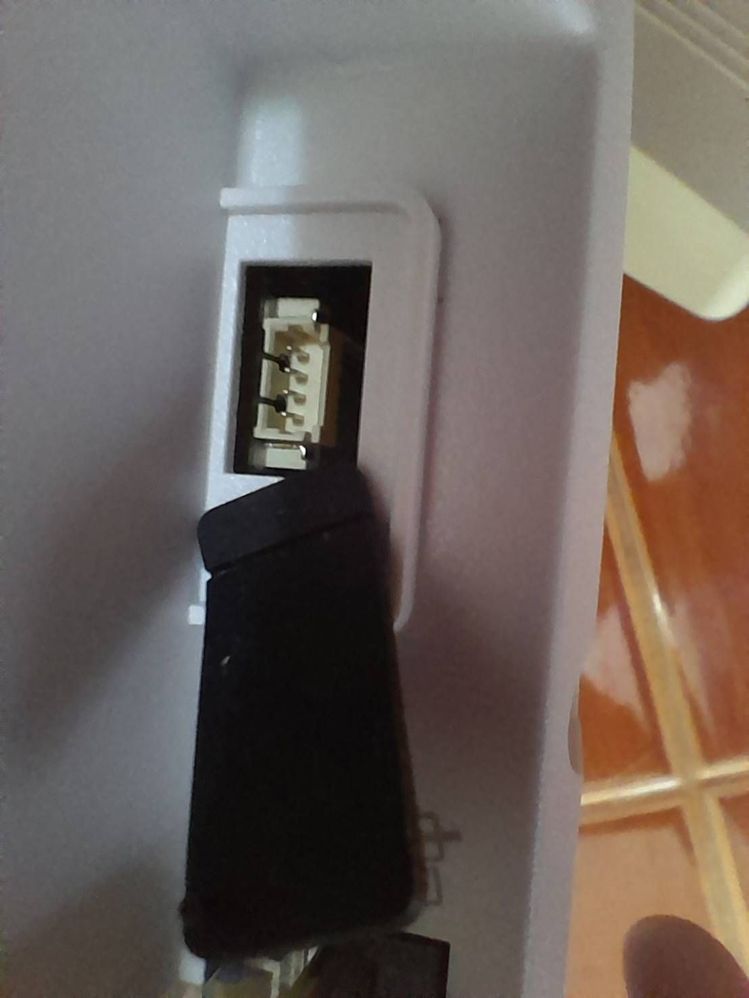
I saw a serial port
But which cable I can connect to this port.
Please advice me.
Thank you in advance
Chuan chudabut
https://www.cloud-hotspot.com
Solved! Go to Solution.
Accepted Solutions


- Mark as New
- Bookmark
- Subscribe
- Mute
- Subscribe to RSS Feed
- Permalink
- Report Inappropriate Content
04-29-2024 11:08 PM
- No , it's just means that SSH on the device is not available for customer use ,
M.
-- Let everything happen to you
Beauty and terror
Just keep going
No feeling is final
Reiner Maria Rilke (1899)
- Mark as New
- Bookmark
- Subscribe
- Mute
- Subscribe to RSS Feed
- Permalink
- Report Inappropriate Content
07-15-2024 11:14 PM - edited 07-15-2024 11:18 PM
I have found how to enable radius accounting for captive portal without access ssh.
Method is below
1. Go to Advanced > Primary AP Tools > Configuration Management
2. Download config.txt from this menu
3. edit config.txt (before edit the file you need to set a captive portal and test AAA authen with external radius first).
Find lines
config wlan radius_server acct interim-update disable 3600
config wlan radius_server acct disable 5
change them to
config wlan radius_server acct interim-update enable 3600
config wlan radius_server acct enable 5
4. save and upload config.txt to ap with the same menu.
5. wait for ap reboot them check it.
- Mark as New
- Bookmark
- Subscribe
- Mute
- Subscribe to RSS Feed
- Permalink
- Report Inappropriate Content
04-26-2024 02:04 AM
- Could you hoover or press on the little blue question mark mark near sshv2 access ; you may get more info's as to how setup SSH ,
M.
-- Let everything happen to you
Beauty and terror
Just keep going
No feeling is final
Reiner Maria Rilke (1899)
- Mark as New
- Bookmark
- Subscribe
- Mute
- Subscribe to RSS Feed
- Permalink
- Report Inappropriate Content
04-29-2024 06:58 PM
Thank you so much for your reply and I sorry for my late reply.
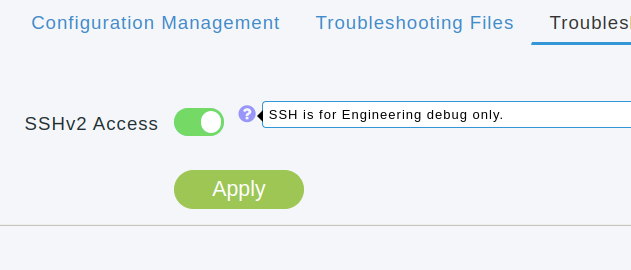
The picture below is message info on little blue question mark.
It is a message. It provides nothing about how to setup.
Please advice me ....
- Mark as New
- Bookmark
- Subscribe
- Mute
- Subscribe to RSS Feed
- Permalink
- Report Inappropriate Content
04-29-2024 10:06 PM
>...It provides nothing about how to setup.
It does : SSH is for Engineering debug only ,
M.
-- Let everything happen to you
Beauty and terror
Just keep going
No feeling is final
Reiner Maria Rilke (1899)
- Mark as New
- Bookmark
- Subscribe
- Mute
- Subscribe to RSS Feed
- Permalink
- Report Inappropriate Content
04-29-2024 11:00 PM
This message means normal user can not access on ssh because we don't have a public key and there is no option to create a public key for ssh.
Is it right?
- Mark as New
- Bookmark
- Subscribe
- Mute
- Subscribe to RSS Feed
- Permalink
- Report Inappropriate Content
04-29-2024 11:08 PM
- No , it's just means that SSH on the device is not available for customer use ,
M.
-- Let everything happen to you
Beauty and terror
Just keep going
No feeling is final
Reiner Maria Rilke (1899)
- Mark as New
- Bookmark
- Subscribe
- Mute
- Subscribe to RSS Feed
- Permalink
- Report Inappropriate Content
04-30-2024 03:55 AM
Thank you so much.
So I need to looking for a console serial connection port.
- Mark as New
- Bookmark
- Subscribe
- Mute
- Subscribe to RSS Feed
- Permalink
- Report Inappropriate Content
04-30-2024 05:25 AM
- Ref : https://www.cisco.com/c/en/us/support/docs/smb/wireless/CBW-AX/kmgmt3378-get-to-know-150ax-151axm.html
>.. Console Port (For Tech Support Only)
Seems like a dead lock...
M.
-- Let everything happen to you
Beauty and terror
Just keep going
No feeling is final
Reiner Maria Rilke (1899)
- Mark as New
- Bookmark
- Subscribe
- Mute
- Subscribe to RSS Feed
- Permalink
- Report Inappropriate Content
04-30-2024 06:38 PM
My goal is to enable radius accouting for captive portal.
I wonder why EAP 802.1x authentication with external radius. a radius accouting function is enable by default.
But captive portal with external radius, a radius accouting function is not enable by default.
I try to enable it.
Do I need to submit on CBW feature request?
- Mark as New
- Bookmark
- Subscribe
- Mute
- Subscribe to RSS Feed
- Permalink
- Report Inappropriate Content
04-30-2024 11:31 PM
- Note sure if it can be done with captive portal , check this document :
https://www.cisco.com/c/en/us/td/docs/wireless/access_point/csbap/CBW_WiFi_6/Admin_Guide/b_cisco_business_wifi_6_admin_guide/m_4_wireless_settings.html
Look for Radius Accounting with Find in the browser ,
M,
-- Let everything happen to you
Beauty and terror
Just keep going
No feeling is final
Reiner Maria Rilke (1899)
- Mark as New
- Bookmark
- Subscribe
- Mute
- Subscribe to RSS Feed
- Permalink
- Report Inappropriate Content
05-01-2024 01:49 AM
Thank you.
But there is no radius accounting from captive portal sends to my radius server.
- Mark as New
- Bookmark
- Subscribe
- Mute
- Subscribe to RSS Feed
- Permalink
- Report Inappropriate Content
05-01-2024 02:10 AM
- To me it looks more that you will have to use higher end models and or APs out of the Small Business oriented market(s) ;
you may also ask Cisco through https://www.cisco.com/c/en/us/support/web/tsd-cisco-small-business-support-center-contacts.html
M.
-- Let everything happen to you
Beauty and terror
Just keep going
No feeling is final
Reiner Maria Rilke (1899)
- Mark as New
- Bookmark
- Subscribe
- Mute
- Subscribe to RSS Feed
- Permalink
- Report Inappropriate Content
07-15-2024 11:14 PM - edited 07-15-2024 11:18 PM
I have found how to enable radius accounting for captive portal without access ssh.
Method is below
1. Go to Advanced > Primary AP Tools > Configuration Management
2. Download config.txt from this menu
3. edit config.txt (before edit the file you need to set a captive portal and test AAA authen with external radius first).
Find lines
config wlan radius_server acct interim-update disable 3600
config wlan radius_server acct disable 5
change them to
config wlan radius_server acct interim-update enable 3600
config wlan radius_server acct enable 5
4. save and upload config.txt to ap with the same menu.
5. wait for ap reboot them check it.

Discover and save your favorite ideas. Come back to expert answers, step-by-step guides, recent topics, and more.
New here? Get started with these tips. How to use Community New member guide