- Cisco Community
- Technology and Support
- Networking
- Wireless
- Re: Authentication passed but no session?
- Subscribe to RSS Feed
- Mark Topic as New
- Mark Topic as Read
- Float this Topic for Current User
- Bookmark
- Subscribe
- Mute
- Printer Friendly Page
Authentication passed but no session?


- Mark as New
- Bookmark
- Subscribe
- Mute
- Subscribe to RSS Feed
- Permalink
- Report Inappropriate Content
01-21-2021 12:44 AM - edited 07-05-2021 01:02 PM
Hi, can anyone suggest the possible reasons why Cisco ISE would authenticate an end user device with "5200 Authentication succeeded" but there is no active session? I've seen this several times for some users who are having trouble connecting. Am a noob so even obvious suggestions welcome! Many thanks
- Labels:
-
ISE


- Mark as New
- Bookmark
- Subscribe
- Mute
- Subscribe to RSS Feed
- Permalink
- Report Inappropriate Content
01-21-2021 02:40 AM
- What's your ISE version and include same info's for the current wireless platform(s) being used , also provide controller-model (e.g.)
M.
-- Let everything happen to you
Beauty and terror
Just keep going
No feeling is final
Reiner Maria Rilke (1899)
- Mark as New
- Bookmark
- Subscribe
- Mute
- Subscribe to RSS Feed
- Permalink
- Report Inappropriate Content
01-21-2021 05:28 AM
Hi, sorry thought it would be a generic issue/question so didn't include.
ISE v2.4
Cisco WLC 5520 8.3.133.0
Cisco network from end to end including AP's
Many thanks
- Mark as New
- Bookmark
- Subscribe
- Mute
- Subscribe to RSS Feed
- Permalink
- Report Inappropriate Content
01-21-2021 07:49 AM
Ref : https://www.cisco.com/c/en/us/td/docs/security/ise/2-4/compatibility/b_ise_sdt_24.html
Looking at Table 4. , all ISE features are supported from 8.5x. , in 8.3x Guest Originating URL is not supported , don't know if that is related. You may try an 8.5.x release and compare.
M.
-- Let everything happen to you
Beauty and terror
Just keep going
No feeling is final
Reiner Maria Rilke (1899)
- Mark as New
- Bookmark
- Subscribe
- Mute
- Subscribe to RSS Feed
- Permalink
- Report Inappropriate Content
01-21-2021 08:23 AM
Many thanks for your reply. That's an interesting point but would a session not be initiated on ISE even though the user's browser didn't go to the previous web page?
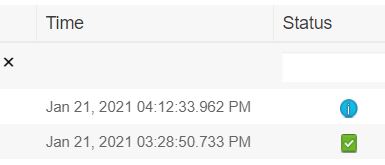
The other thing is I am also getting these issues with our internal non Guest SSID users. Attached is an example of a user that has just authenticated and a session icon is showing under "Live Logs" but no session shows under "Live sessions"? I don't get it.
Thanks.



- Mark as New
- Bookmark
- Subscribe
- Mute
- Subscribe to RSS Feed
- Permalink
- Report Inappropriate Content
01-21-2021 09:00 AM
Just want to better understand the issue. Is it with guest or like employees using 802.1x? I only really focus on the live logs and not live session. Live logs to me, show me the information I need. Also when you have issues, putting in as much detail as possible helps. Generic questions will not get folks to chime in. One thing you should mention, is "what the issue is" and "are you able to replicate it or not". Things like, is the client in the run state on the controller, is your design using local mode of flexconnect, is the issue with certain devices or types of devices or maybe with just a single ssid. All this helps folks think and provide a response or maybe even ask more questions.
*** Please rate helpful posts ***
- Mark as New
- Bookmark
- Subscribe
- Mute
- Subscribe to RSS Feed
- Permalink
- Report Inappropriate Content
01-22-2021 12:30 AM
Hi, appreciate your reply. This is happening for both Guest and employees using 802.1x. I realise I should have more info here but I'm so new to this I don't even know the answers to each of the questions you suggested.
I just thought that there maybe a couple of generic suggestions as to why a client who says they can't establish a Wi-Fi connection still gets both an "authentication success" and a "Session" in Live logs but not in Live sessions. Maybe being a bit naive.
Thanks


- Mark as New
- Bookmark
- Subscribe
- Mute
- Subscribe to RSS Feed
- Permalink
- Report Inappropriate Content
01-22-2021 03:24 AM
You probably need to start with a debug of a client experiencing the problem on the WLC to see precise detail of what's happening when it goes wrong.
https://cway.cisco.com/wireless-debug-analyzer/ can help with understanding the debugs but sometimes the reason should be obvious once you look at the debugs - sometimes can be as simple as you forgot to enable fast SSID change https://www.cisco.com/c/en/us/td/docs/wireless/controller/8-3/config-guide/b_cg83/b_cg83_chapter_0100001.html and therefore client gets deleted after switching SSID.
Also 8.3 AireOS is end of life and 8.3.133.0 release is not the latest - see https://www.cisco.com/c/en/us/support/docs/wireless/wireless-lan-controller-software/200046-tac-recommended-aireos.html#anc10 so you might be hitting a known bug which was fixed in a later release.
Seriously consider moving to 8.5 or later AireOS if your APs are supported - see https://www.cisco.com/c/en/us/td/docs/wireless/compatibility/matrix/compatibility-matrix.html#pgfId-590411
Please click Helpful if this post helped you and Accept as Solution (drop down menu at top right of this reply) if this answered your query.
------------------------------
TAC recommended codes for AireOS WLC's and TAC recommended codes for 9800 WLC's
Best Practices for AireOS WLC's, Best Practices for 9800 WLC's and Cisco Wireless compatibility matrix
Check your 9800 WLC config with Wireless Config Analyzer using "show tech wireless" output or "config paging disable" then "show run-config" output on AireOS and use Wireless Debug Analyzer to analyze your WLC client debugs
Field Notice: FN63942 APs and WLCs Fail to Create CAPWAP Connections Due to Certificate Expiration
Field Notice: FN72424 Later Versions of WiFi 6 APs Fail to Join WLC - Software Upgrade Required
Field Notice: FN72524 IOS APs stuck in downloading state after 4 Dec 2022 due to Certificate Expired
- Fixed in 8.10.196.0, latest 9800 releases, 8.5.182.12 (8.5.182.13 for 3504) and 8.5.182.109 (IRCM, 8.5.182.111 for 3504)
Field Notice: FN70479 AP Fails to Join or Joins with 1 Radio due to Country Mismatch, RMA needed
Field Notice: FN74383 APs Running 17.12.4/5/6/6a May Run Out of Flash Space Preventing Upgrades
How to avoid boot loop due to corrupted image on Wave 2 and Catalyst 11ax Access Points (CSCvx32806)
Field Notice: FN74035 - Wave2 APs DFS May Not Detect Radar After Channel Availability Check Time
Leo's list of bugs affecting 2800/3800/4800/1560 APs
Default AP console baud rate from 17.12.x is 115200 - introduced by CSCwe88390
- Mark as New
- Bookmark
- Subscribe
- Mute
- Subscribe to RSS Feed
- Permalink
- Report Inappropriate Content
01-22-2021 04:04 AM
Many thanks for this and to everyone. I am going to look in to upgrading and then re-visit the issue as I could be chasing my tail. Makes sense even if we didn't have these questions.
Thanks again and if I find anything useful, will post here.

Discover and save your favorite ideas. Come back to expert answers, step-by-step guides, recent topics, and more.
New here? Get started with these tips. How to use Community New member guide
