- Cisco Community
- Technology and Support
- Networking
- Wireless
- Re: Central dhcp at flexconnect
- Subscribe to RSS Feed
- Mark Topic as New
- Mark Topic as Read
- Float this Topic for Current User
- Bookmark
- Subscribe
- Mute
- Printer Friendly Page
Central dhcp at flexconnect


- Mark as New
- Bookmark
- Subscribe
- Mute
- Subscribe to RSS Feed
- Permalink
- Report Inappropriate Content
10-22-2021 06:57 PM - edited 10-23-2021 09:11 AM
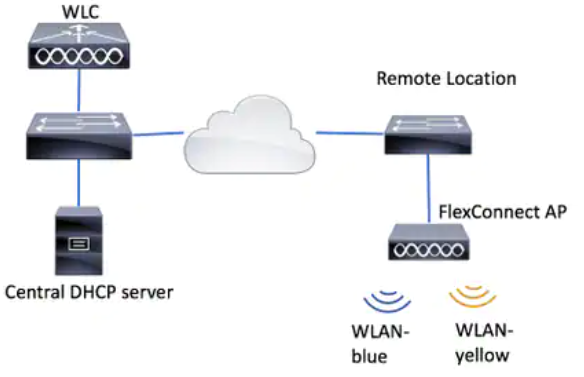
Hi Please see the below diagram with central dhcp server. Not sure how to define the "central". When we create dynamic interface at wlc, we need to enter dhcp server ip address. Can we say this dhcp server is central dhcp server? otherwise is local dhcp server? Thank you
- Labels:
-
Wireless LAN Controller



- Mark as New
- Bookmark
- Subscribe
- Mute
- Subscribe to RSS Feed
- Permalink
- Report Inappropriate Content
10-22-2021 08:25 PM
Just define your ip helpers on the subnets just as if they were wired.
*** Please rate helpful posts ***


- Mark as New
- Bookmark
- Subscribe
- Mute
- Subscribe to RSS Feed
- Permalink
- Report Inappropriate Content
10-23-2021 12:08 AM
Ok, in your case for flex AP's the most viable option would be to have the VLAN configured at the remote branch and IP helper configured directly under the Layer 3 SVI (this could be in your core switch, firewall, router at remote location).
In case of using central dhcp for flex connect (warning; you are going to over complicate your deployment and also expose your infrastructure to some bugs). For this you need to have a working dynamic interface in the WLC and the DHCP server IP configured under that interface. If you are using central dhcp in your remote branch, it is must to have NAT/PAT enabled on that ssid.
The traffic flow will be like below.
1. Client connects to ssid and receives an IP from the same range as the dynamic interface in WLC. DHCP packets are sent over the capwap tunnel to the WLC. WLC forwards it to the DHCP server configured under it's interface.
2. Client sends traffic to AP
3. AP will NAT traffic from this IP's in to it's Management IP. (AP management IP)
4. Traffic is routed over the local network and any clients behind the AP will be seen coming from AP management. So you need to have proper upstream routing and firewall rules to allow desired connectivity.
You must use this option only when you don't have any control over the switching/routing at remote location or dedicated VLAN not available for SSID mapping at remote location.
TAC recommended codes for AireOS WLC's
Best Practices for AireOS WLC's
TAC recommended codes for 9800 WLC's
Best Practices for 9800 WLC's
Cisco Wireless compatibility matrix
___________________________________________
Arshad Safrulla
- Mark as New
- Bookmark
- Subscribe
- Mute
- Subscribe to RSS Feed
- Permalink
- Report Inappropriate Content
10-23-2021 06:54 AM - edited 10-23-2021 06:54 AM
sorry my question is not clear. What I want to know is why we say that "Central DHCP server" in that diagram is central dhcp server instead of local dhcp server? Its because the dhcp server is close to WLC? or it is on the other side of WAN? I do not think that is reason. Maybe it is due to some configuration.
- Mark as New
- Bookmark
- Subscribe
- Mute
- Subscribe to RSS Feed
- Permalink
- Report Inappropriate Content
10-23-2021 07:34 AM
Central DHCP means that you have dhcp server(s) in a location that serves multiple sites. Central can mean that you have services in multiple DC's as an example that provides dhcp for a single site to hundreds of sites.
*** Please rate helpful posts ***
- Mark as New
- Bookmark
- Subscribe
- Mute
- Subscribe to RSS Feed
- Permalink
- Report Inappropriate Content
10-23-2021 07:53 AM - edited 10-23-2021 09:22 AM
Thank you Scott. What you said is what function the central dhcp server has. what i want to know is what is difference of defining/configuring between central dhcp server and local dhcp server. In another word, why we call this dhcp server as central dhcp server instead of local dhcp server? I think its because configuration difference of two kind of dhcp server. What is the difference?
- Mark as New
- Bookmark
- Subscribe
- Mute
- Subscribe to RSS Feed
- Permalink
- Report Inappropriate Content
10-23-2021 11:08 AM
That is a logical definition. If you have one site and all your resources are there, then you can say it's local or centralized. Think about your other resources you provide your users... is your mail local or centralized? File share local or centralized?
A typical design would be that you don't have dhcp servers in every location. If you have hundred or thousands of site, would you want local or centralized dhcp? Look at it that way... it really doesn't matter from a controller point of view, because you would be using ip helper address in majority of deployments.
*** Please rate helpful posts ***


- Mark as New
- Bookmark
- Subscribe
- Mute
- Subscribe to RSS Feed
- Permalink
- Report Inappropriate Content
10-25-2021 04:28 AM
I think in this context central DHCP means for a WLAN which is centrally switched so DHCP server is defined on the WLC interface, whereas local DHCP server (flex local switching) is not necessarily defined at all because it will be on the local router or switch on the local vlan (wireless traffic is simply bridged to the local vlan).
Put another way - the WLC must proxy (AireOS) or relay (IOS-XE) the DHCP to a central server.
Please click Helpful if this post helped you and Accept as Solution (drop down menu at top right of this reply) if this answered your query.
------------------------------
TAC recommended codes for AireOS WLC's and TAC recommended codes for 9800 WLC's
Best Practices for AireOS WLC's, Best Practices for 9800 WLC's and Cisco Wireless compatibility matrix
Check your 9800 WLC config with Wireless Config Analyzer using "show tech wireless" output or "config paging disable" then "show run-config" output on AireOS and use Wireless Debug Analyzer to analyze your WLC client debugs
Field Notice: FN63942 APs and WLCs Fail to Create CAPWAP Connections Due to Certificate Expiration
Field Notice: FN72424 Later Versions of WiFi 6 APs Fail to Join WLC - Software Upgrade Required
Field Notice: FN72524 IOS APs stuck in downloading state after 4 Dec 2022 due to Certificate Expired
- Fixed in 8.10.196.0, latest 9800 releases, 8.5.182.12 (8.5.182.13 for 3504) and 8.5.182.109 (IRCM, 8.5.182.111 for 3504)
Field Notice: FN70479 AP Fails to Join or Joins with 1 Radio due to Country Mismatch, RMA needed
Field Notice: FN74383 APs Running 17.12.4/5/6/6a May Run Out of Flash Space Preventing Upgrades
How to avoid boot loop due to corrupted image on Wave 2 and Catalyst 11ax Access Points (CSCvx32806)
Field Notice: FN74035 - Wave2 APs DFS May Not Detect Radar After Channel Availability Check Time
Leo's list of bugs affecting 2800/3800/4800/1560 APs
Default AP console baud rate from 17.12.x is 115200 - introduced by CSCwe88390

Discover and save your favorite ideas. Come back to expert answers, step-by-step guides, recent topics, and more.
New here? Get started with these tips. How to use Community New member guide
