- Cisco Community
- Technology and Support
- Networking
- Wireless
- Firmware Network Issue MR30.5
- Subscribe to RSS Feed
- Mark Topic as New
- Mark Topic as Read
- Float this Topic for Current User
- Bookmark
- Subscribe
- Mute
- Printer Friendly Page

- Mark as New
- Bookmark
- Subscribe
- Mute
- Subscribe to RSS Feed
- Permalink
- Report Inappropriate Content
01-09-2024 12:34 AM
Hi together,
we have a bad condition with MR 29.6.1 → MR 30.5 on AP MR36 ....
Let's try to describe:
We have 100 AP's, MR33, 36, 55 ...
In some classrooms we didn't have enough RJ-45 plug near the beamer/projector, so we had used network Splitter. (1)
This had works well with Firmware up to 29.6.1. After Upgrade to Firmware MR 30.5 all MR36 no longer has network connection to the MS Switches, if they are connected through a Network Splitter. They still are powered with PoE and could mesh, but they no longer accept the LAN Cable. On the Meraki Networkswitch the Accesspoint Port ist showen as only PoE, but not LAN connected
MR33 don't have this issue with MR 30.5
MR36 don't have this issue without splitter, or with the Firmware MR 29.6.x (or MR 28.x)
If i replace a "failed MR36" with a MR33, it work on the same cable with the Firmware 30.5.
I downgrade for now the firmware back to 29.6.1 and it's all "fine" - but we would like to use the a newer Firmware MR 30.x if the "bug" is fixed.
... Yes, RJ-45 Splitters aren't the greatest way to use a single Cat6e Port as two Cat 5e Ports.
Sadly we can't use a tiny network switch as we had two completly different VLAN Settings on this Cat5e Ports.
1) 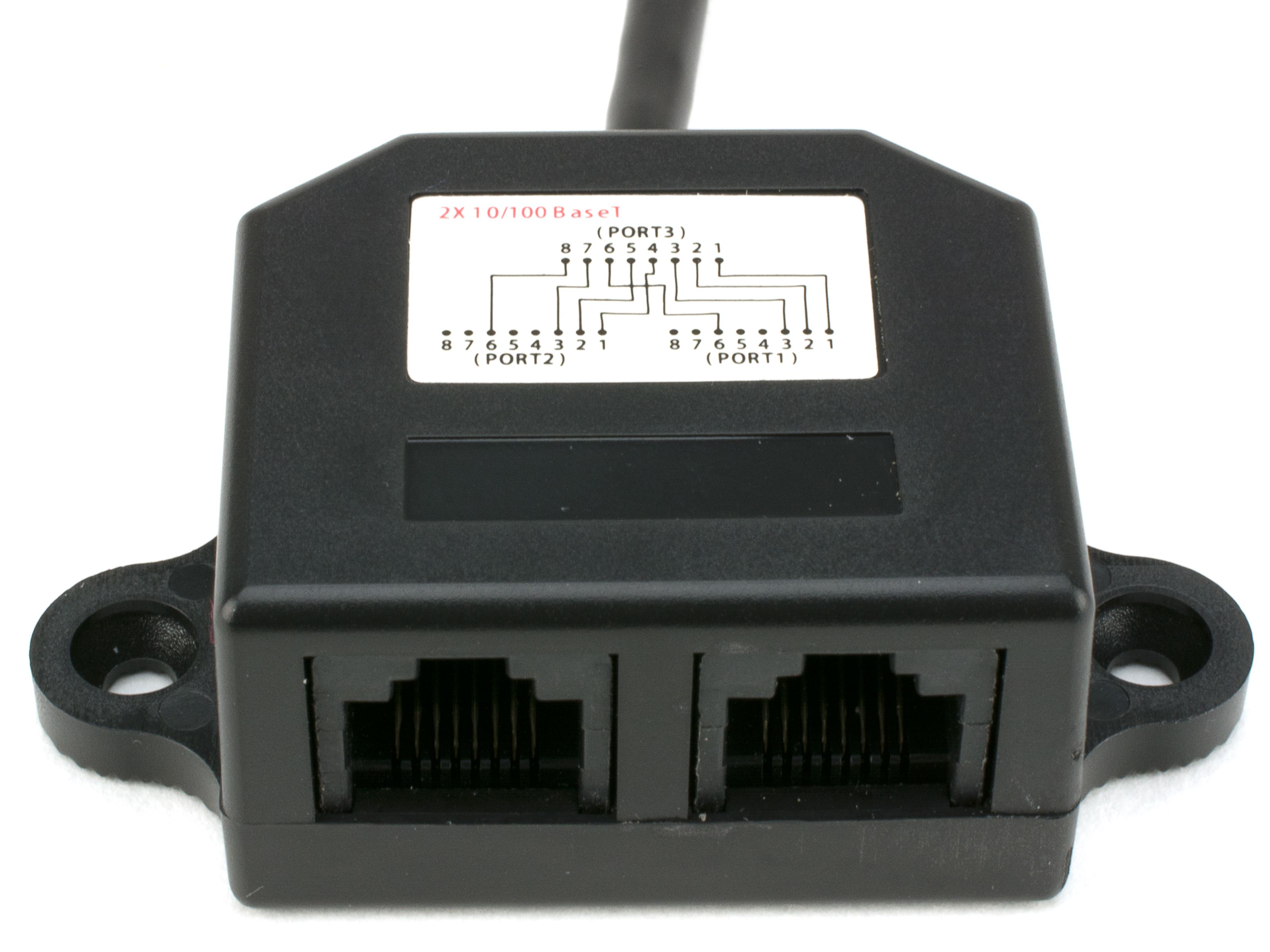 PS: probely i'll have to open a bug report
Solved! Go to Solution.
- Labels:
-
Meraki
Accepted Solutions


- Mark as New
- Bookmark
- Subscribe
- Mute
- Subscribe to RSS Feed
- Permalink
- Report Inappropriate Content
01-09-2024 08:50 AM
While support works through this issue the workaround that I have found that works is to set the switchport to 100Mbps Full duplex or to only allow speed negotiation on the switch port to 10Mpbs and 100Mbps removing 1000Mbps from the negotiation option (this last option is available in some vendor switches).
The issue described only happens when the switchport is 1000Mbps capable but the cable between the MR36/46/56 and the switch has only two pairs. The obvious answer is to use a four pair cable but in the case of the need for splitters or the cable can not be replace then the workaround should work.


- Mark as New
- Bookmark
- Subscribe
- Mute
- Subscribe to RSS Feed
- Permalink
- Report Inappropriate Content
01-09-2024 02:41 AM
- You may file a bug report , what exactly makes it not work with a network splitter in this version, is not known for me but for sure I would consider it being an unsupported network terminator especially for an AP. Usually it then comes down to the reverse : some kind of fix makes the AP behave correctly on the/every network...
M.
-- Let everything happen to you
Beauty and terror
Just keep going
No feeling is final
Reiner Maria Rilke (1899)
- Mark as New
- Bookmark
- Subscribe
- Mute
- Subscribe to RSS Feed
- Permalink
- Report Inappropriate Content
01-09-2024 02:47 AM
For me the "funny" Part was that only the newer MR36er AP has this issue, the MR33 can handle it.
As a normal Cat Cable has 8 "pin", the Splitter devide it in 2x 4 Pin. So two device has a "4 pin" cable. And it looks that the MR36 with fresher firmware no longer accept a 4 pin connection.
So i'll open a bug case and hope this condition could be fixed 🙂
- Mark as New
- Bookmark
- Subscribe
- Mute
- Subscribe to RSS Feed
- Permalink
- Report Inappropriate Content
01-09-2024 03:35 AM
>....So i'll open a bug case and hope this condition could be fixed
- You could do it , but I have doubts that the claim will be accepted : in theory network performance could get obstructed and or have a negative impact on connected client(s) network performance. Let's say : it's safe to go for a standard network connection for AP(s)
M.
-- Let everything happen to you
Beauty and terror
Just keep going
No feeling is final
Reiner Maria Rilke (1899)
- Mark as New
- Bookmark
- Subscribe
- Mute
- Subscribe to RSS Feed
- Permalink
- Report Inappropriate Content
01-09-2024 04:04 AM
@Mark Elsen it's fully clear, it has impact 😄 -- we installed the splitters about 18 month ago and the Accesspoints connect since then only "100 Mbit full-duplex" and no longer Gigabit.
As the issue is only on MR36, i thought it could have to do with the mGB Connector on MR36.
- Mark as New
- Bookmark
- Subscribe
- Mute
- Subscribe to RSS Feed
- Permalink
- Report Inappropriate Content
01-09-2024 04:31 AM
Ok, let us know what they have to say about it!
M.
-- Let everything happen to you
Beauty and terror
Just keep going
No feeling is final
Reiner Maria Rilke (1899)
- Mark as New
- Bookmark
- Subscribe
- Mute
- Subscribe to RSS Feed
- Permalink
- Report Inappropriate Content
01-09-2024 06:15 AM
@Mark Elsen first response -
Please confirm the make and model of the referenced "network splitter" in use?
https://www.delock.de/produkt/65177/merkmale.html
Better than they won't give a try 🙂

- Mark as New
- Bookmark
- Subscribe
- Mute
- Subscribe to RSS Feed
- Permalink
- Report Inappropriate Content
01-09-2024 05:48 AM
i have the same on my access point when i wall back on old firmware everything is working but the port is at 100mega. and when a make the update the access point stay down, i think they stay on the old firmware. and due to cable issue i think they can't get the new update of 30.5.
I will troubleshoot the issue. My switchs are PoE
- Mark as New
- Bookmark
- Subscribe
- Mute
- Subscribe to RSS Feed
- Permalink
- Report Inappropriate Content
01-09-2024 06:06 AM
@Nightstick - in my case the accesspoint got PoE power and than search very log for a mesh neighbors. After it establish a connection over mesh it "works", but without use of LAN Cabeling.
It looks to help first manualy force the switch networkport to "half duplex 100" so AP can start with LAN, but i got high portion of CRC 😞


- Mark as New
- Bookmark
- Subscribe
- Mute
- Subscribe to RSS Feed
- Permalink
- Report Inappropriate Content
01-09-2024 08:50 AM
While support works through this issue the workaround that I have found that works is to set the switchport to 100Mbps Full duplex or to only allow speed negotiation on the switch port to 10Mpbs and 100Mbps removing 1000Mbps from the negotiation option (this last option is available in some vendor switches).
The issue described only happens when the switchport is 1000Mbps capable but the cable between the MR36/46/56 and the switch has only two pairs. The obvious answer is to use a four pair cable but in the case of the need for splitters or the cable can not be replace then the workaround should work.
- Mark as New
- Bookmark
- Subscribe
- Mute
- Subscribe to RSS Feed
- Permalink
- Report Inappropriate Content
01-09-2024 09:35 AM


On my Test-Accesspoint 👍😊 - worked fine.

- Mark as New
- Bookmark
- Subscribe
- Mute
- Subscribe to RSS Feed
- Permalink
- Report Inappropriate Content
01-09-2024 09:20 AM
Thank you for the tips, it works for me

Discover and save your favorite ideas. Come back to expert answers, step-by-step guides, recent topics, and more.
New here? Get started with these tips. How to use Community New member guide
