- Cisco Community
- Technology and Support
- Networking
- Switching
- StackWise-Virtual MGMT port mac flap
- Subscribe to RSS Feed
- Mark Topic as New
- Mark Topic as Read
- Float this Topic for Current User
- Bookmark
- Subscribe
- Mute
- Printer Friendly Page
StackWise-Virtual MGMT port mac flap


- Mark as New
- Bookmark
- Subscribe
- Mute
- Subscribe to RSS Feed
- Permalink
- Report Inappropriate Content
04-15-2024 06:06 PM
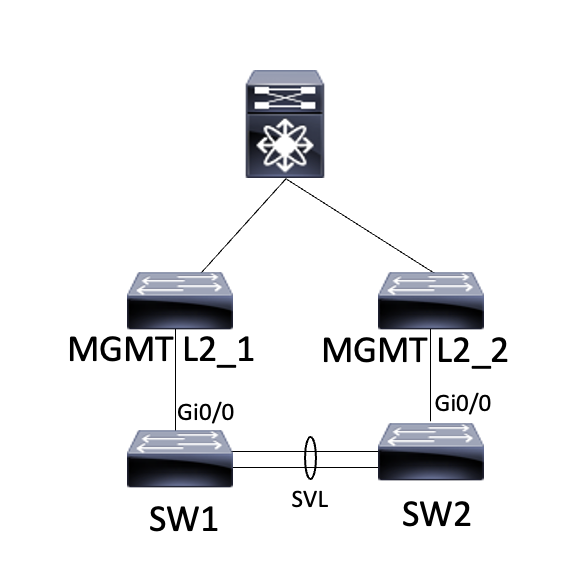
Configure StackWise-Virtual to configure the Mgmt port as shown in the picture.
However, sometimes I couldn't communicate with the Mgmt IP, so I monitored it.
Normally, the MAC comes from MGMT L2_1, but when communication is not possible, the MAC comes from MGMT_L2_2, and when communication is possible, the MAC comes from MGMT L2_1. MGMT port mac flap occurs, what should I do? Is it a bug?
- Labels:
-
Catalyst 9000
-
LAN Switching

- Mark as New
- Bookmark
- Subscribe
- Mute
- Subscribe to RSS Feed
- Permalink
- Report Inappropriate Content
03-11-2026 10:47 AM
The IP-Adress is only active on the "active" Switch in StackWise Virtual as in "master" of the Stack. So if you reload SW1, the IP-Adress will bei active on SW2 and you have to refresh the ARP Table.


- Mark as New
- Bookmark
- Subscribe
- Mute
- Subscribe to RSS Feed
- Permalink
- Report Inappropriate Content
03-13-2026 11:46 PM - edited 03-13-2026 11:46 PM
Hello
The svl is seen a single logical switch - but you are plumbing in two mgt ports from both physical switches of that svl and the upstream sws are seeing the same mac on different ports
Note - the primary sw is the one that should be the acitve port
Also if these ports are being used for DAD then this is the possible root cause of those mac flaps- suggest relocate your DAD connections onto a dedicated physical port other than mgt port
Please rate and mark as an accepted solution if you have found any of the information provided useful.
This then could assist others on these forums to find a valuable answer and broadens the community’s global network.
Kind Regards
Paul


- Mark as New
- Bookmark
- Subscribe
- Mute
- Subscribe to RSS Feed
- Permalink
- Report Inappropriate Content
03-14-2026 01:27 AM
The MGMT port is a Layer 3 out-of-band connection. In SVL, only 1 MGMT Port action is available in the active role.
Layer 2 domains are different across switches, so could you make sure you have the correct root port for STP?
Also, could you check the SVL switch for any switch-over activity in the log to confirm stability?
Some of the information is not clear. What is the role of the switches and the top switch in the diagram? From where do you try to reach these MGMT IPs?
=====️ Preenayamo Vasudevam ️=====
***** Rate All Helpful Responses *****
- Mark as New
- Bookmark
- Subscribe
- Mute
- Subscribe to RSS Feed
- Permalink
- Report Inappropriate Content
06-04-2026 10:17 AM
Based on the behavior described, this does not necessarily appear to be a software bug. In a StackWise Virtual deployment, the management IP is active only on the current active switch, so MAC address changes can occur during role transitions or failover events. Additionally, if both management ports are connected upstream, the network may detect the same MAC address on different interfaces, resulting in MAC flap notifications.
It would be worth verifying whether the management ports are also being used for Dual-Active Detection (DAD) and checking the upstream switch MAC address tables and ARP entries. Using a dedicated DAD link and ensuring the management connection is aligned with Cisco's StackWise Virtual design recommendations may help eliminate the issue.

Discover and save your favorite ideas. Come back to expert answers, step-by-step guides, recent topics, and more.
New here? Get started with these tips. How to use Community New member guide