- Cisco Community
- Technology and Support
- Collaboration
- TelePresence and Video Infrastructure
- Thanks Acevirgil. I already
- Subscribe to RSS Feed
- Mark Topic as New
- Mark Topic as Read
- Float this Topic for Current User
- Bookmark
- Subscribe
- Mute
- Printer Friendly Page


- Mark as New
- Bookmark
- Subscribe
- Mute
- Subscribe to RSS Feed
- Permalink
- Report Inappropriate Content
03-05-2016 09:57 PM - edited 03-18-2019 05:39 AM
Hi,
We have TC endpoints running TC7.3.2. We don't have NTP and already set to OFF. We want to adjust the time manually using the buit-in clock on codec. How can we adjust the time manually. On the web interface, I cannot see on the time settings to adjust the correct timing of hour/minutes. Is there a command on the API to to do this?
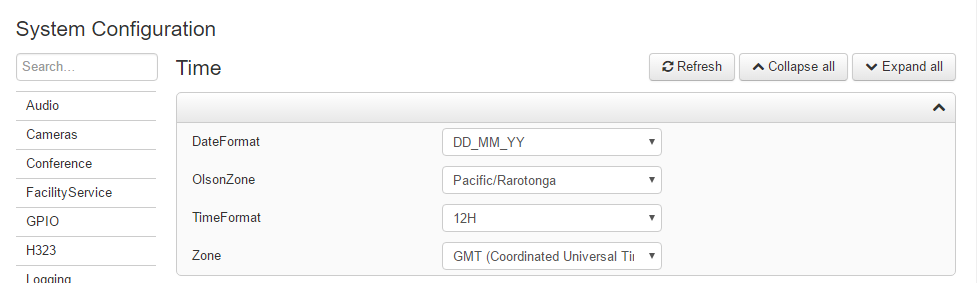
Appreciate for your help.
Thank you in advance.
Solved! Go to Solution.
- Labels:
-
Room Endpoints
Accepted Solutions



- Mark as New
- Bookmark
- Subscribe
- Mute
- Subscribe to RSS Feed
- Permalink
- Report Inappropriate Content
03-06-2016 05:05 AM
If these are endpoints using the Touch device, you should be able to adjust the time settings on the touch panel. Make sure the UserPreferences is set to On for this setting to be available on the Touch device and to access the setting.
On the web interface go to Configuration > System Configuration > UserInterface > UserPreferences : On
On the touch panel, navigate on Settings > Administrator > Admin settings > Date, Time & Location
From here you should be able to set the correct clock timing manually.
regards,
Acevirgil

- Mark as New
- Bookmark
- Subscribe
- Mute
- Subscribe to RSS Feed
- Permalink
- Report Inappropriate Content
03-05-2016 10:55 PM
Hi,
try to look for the commands xconfiguration time ?
xConfiguration Time DateFormat:
xConfiguration Time OlsonZone:
xConfiguration Time TimeFormat:
xConfiguration Time Zone:
regds,
aman
- Mark as New
- Bookmark
- Subscribe
- Mute
- Subscribe to RSS Feed
- Permalink
- Report Inappropriate Content
03-06-2016 12:21 AM
Thanks Aman for your response. Looks like the commands are pre-configured time setting formats. I'm looking for the setting where I can adjust the clock manually in terms of exact hour and minutes. Before on old TC endpoints, there is a setting to adjust the time manually if there is no NTP.
The endpoints are in Saudi Arabia and if i will set the OlsonZone to Asia/Riyadh and Zone to GMT+3:00 (Kuwait, Riyadh), i'm getting wrong time settings. Note that NTP is disabled on the endpoints since we don't use NTP server.
- Mark as New
- Bookmark
- Subscribe
- Mute
- Subscribe to RSS Feed
- Permalink
- Report Inappropriate Content
03-06-2016 01:42 AM
What is the exact version of Codec on which you are able to set Manual time and device [C20/Sx20]?
regds,
aman
- Mark as New
- Bookmark
- Subscribe
- Mute
- Subscribe to RSS Feed
- Permalink
- Report Inappropriate Content
03-06-2016 05:05 AM
If these are endpoints using the Touch device, you should be able to adjust the time settings on the touch panel. Make sure the UserPreferences is set to On for this setting to be available on the Touch device and to access the setting.
On the web interface go to Configuration > System Configuration > UserInterface > UserPreferences : On
On the touch panel, navigate on Settings > Administrator > Admin settings > Date, Time & Location
From here you should be able to set the correct clock timing manually.
regards,
Acevirgil
- Mark as New
- Bookmark
- Subscribe
- Mute
- Subscribe to RSS Feed
- Permalink
- Report Inappropriate Content
03-07-2016 05:13 AM
Thanks Acevirgil. I already managed to changed the time as per the procedure you provided.
On the TC7.3.2 version web interface, the setting I'm looking is not available not like on the old versions. TC6.x.x
- Mark as New
- Bookmark
- Subscribe
- Mute
- Subscribe to RSS Feed
- Permalink
- Report Inappropriate Content
03-07-2016 05:45 AM
Hi,
which setting you are referring to via Web interface which was available in TC 6?
can u share?
regds,
aman
- Mark as New
- Bookmark
- Subscribe
- Mute
- Subscribe to RSS Feed
- Permalink
- Report Inappropriate Content
03-11-2016 06:34 AM
You're welcome.
I don't think manual adjustment of time settings are available on the TC endpoints' web interface even on old versions. Or are you referring to the old OSD of TC endpoints using TRC 5? Menus for time settings on OSD are available when using TRC 5.
regards,
Acevirgil

Discover and save your favorite ideas. Come back to expert answers, step-by-step guides, recent topics, and more.
New here? Get started with these tips. How to use Community New member guide