- Cisco Community
- Technology and Support
- Networking
- Wireless
- Capwap problem on C9115AXI-E
- Subscribe to RSS Feed
- Mark Topic as New
- Mark Topic as Read
- Float this Topic for Current User
- Bookmark
- Subscribe
- Mute
- Printer Friendly Page

- Mark as New
- Bookmark
- Subscribe
- Mute
- Subscribe to RSS Feed
- Permalink
- Report Inappropriate Content
10-18-2021 06:55 AM
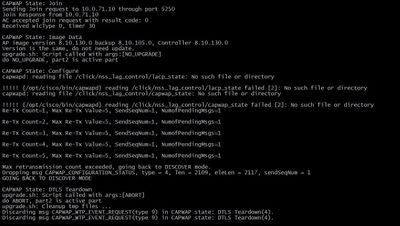
Help me understand what is the problem with configuring the point and Cisco Wireless Controlller .
Solved! Go to Solution.
- Labels:
-
Aironet Access Points
Accepted Solutions


- Mark as New
- Bookmark
- Subscribe
- Mute
- Subscribe to RSS Feed
- Permalink
- Report Inappropriate Content
10-20-2021 12:34 AM - edited 10-20-2021 12:35 AM
@AlexandrM wrote:
*spamApTask7: Oct 18 02:48:27.088: %LWAPP-3-RD_ERR4: capwap_ac_sm.c:3506 The system detects an invalid regulatory domain 802.11bg:-A 802.11a:-AB for AP 5c:e1:76:d2:94:e0
*spamApTask7: Oct 18 02:48:27.088: %LOG-3-Q_IND: spam_lrad.c:12558 Country code (GB) not configured for AP 5c:e1:76:d2:94:e0[...It occurred 2 times.!]
Uhhhh ... The answer to the problem.


- Mark as New
- Bookmark
- Subscribe
- Mute
- Subscribe to RSS Feed
- Permalink
- Report Inappropriate Content
10-18-2021 07:03 AM
Make sure that the WLC is successfully syncing to a NTP server. More on troubleshooting AP join issues on AireOS can be found on the below link.
TAC recommended codes for AireOS WLC's
Best Practices for AireOS WLC's
TAC recommended codes for 9800 WLC's
Best Practices for 9800 WLC's
Cisco Wireless compatibility matrix
___________________________________________
Arshad Safrulla



- Mark as New
- Bookmark
- Subscribe
- Mute
- Subscribe to RSS Feed
- Permalink
- Report Inappropriate Content
10-18-2021 07:31 AM
Can you provide some additional information? It helps to also understand if there are other access points that are joined and working, that are the same or maybe different models. This helps with isolation the issue to maybe a single ap, issues with all the aps of the same model or maybe a new install in which something was missed if no other aps are joined.
Arshadsaf provided a good guide to troubleshoot, but you also need to take time to search the forum on specific errors you see in the logs that might help you determine what is wrong. Typically a whole log from when an ap boots up is provided and reviewed. The easiest way to determine if you have a configuration or design issue is to place the ap on the same subnet as the controller and see if it joins or not. If not, then steps must of been missed during the install.... this is if its a brand new install and no ap's have joined.
*** Please rate helpful posts ***
- Mark as New
- Bookmark
- Subscribe
- Mute
- Subscribe to RSS Feed
- Permalink
- Report Inappropriate Content
10-18-2021 07:49 AM
I have only one cisco access point, I am worried that the log says: "no such file directory".
From the log it is clear that the AP sees the controller, connects to it and after that does not find 2 files, gives an error and disconnects
- Mark as New
- Bookmark
- Subscribe
- Mute
- Subscribe to RSS Feed
- Permalink
- Report Inappropriate Content
10-18-2021 08:03 AM
Well... you will see some errors and some are no big deal. Have you tried to search that error? Since this is a new install, have you followed the instructions and looked at the guide that was linked? There are things that need to be correct or else the ap's will never join. Also, the output you have is not enough information.
- Read the troubleshooting guide
- Tell us what controller are you using and how many
- Post the full output when the ap is booted up
- Make sure the ap is on the same subnet as the controller
- Make sure that the country code is defined on the controller that matches the ap
- Provide a description of how everything is connected
*** Please rate helpful posts ***
- Mark as New
- Bookmark
- Subscribe
- Mute
- Subscribe to RSS Feed
- Permalink
- Report Inappropriate Content
10-18-2021 03:11 PM
With such tiny screenshot, there is really nothing wrong with that output.
Console into the AP and reboot. Post the entire boot-up process.
NOTE: DO NOT POST screenshot(s).


- Mark as New
- Bookmark
- Subscribe
- Mute
- Subscribe to RSS Feed
- Permalink
- Report Inappropriate Content
10-19-2021 10:03 AM
+ logs from WLC
+ join stats from WLC:
show ap join stats summary all
show ap join stats detailed <Cisco AP Mac>
Please click Helpful if this post helped you and Accept as Solution if this answered your query.
------------------------------
TAC recommended codes for AireOS WLC's and TAC recommended codes for 9800 WLC's
Best Practices for AireOS WLC's, Best Practices for 9800 WLC's and Cisco Wireless compatibility matrix
Check your 9800 WLC config with Wireless Config Analyzer using "show tech wireless" output or "config paging disable" then "show run-config" output on AireOS and use Wireless Debug Analyzer to analyze your WLC client debugs
Field Notice: FN63942 APs and WLCs Fail to Create CAPWAP Connections Due to Certificate Expiration
Field Notice: FN72424 Later Versions of WiFi 6 APs Fail to Join WLC - Software Upgrade Required
Field Notice: FN72524 IOS APs stuck in downloading state after 4 Dec 2022 due to Certificate Expired
- Fixed in 8.10.196.0, latest 9800 releases, 8.5.182.12 (8.5.182.13 for 3504) and 8.5.182.109 (IRCM, 8.5.182.111 for 3504)
Field Notice: FN70479 AP Fails to Join or Joins with 1 Radio due to Country Mismatch, RMA needed
Field Notice: FN74383 APs Running 17.12.4/5/6/6a May Run Out of Flash Space Preventing Upgrades
How to avoid boot loop due to corrupted image on Wave 2 and Catalyst 11ax Access Points (CSCvx32806)
Field Notice: FN74035 - Wave2 APs DFS May Not Detect Radar After Channel Availability Check Time
Leo's list of bugs affecting 2800/3800/4800/1560 APs
Default AP console baud rate from 17.12.x is 115200 - introduced by CSCwe88390
AP supported channel lookup: https://apchannels.cisco.com/
- Mark as New
- Bookmark
- Subscribe
- Mute
- Subscribe to RSS Feed
- Permalink
- Report Inappropriate Content
10-20-2021 12:06 AM
Console AP log (txt file)
Log from Wireless controller:
) not configured for AP 5c:e1:76:d2:94:e0
*spamApTask7: Oct 18 02:48:27.088: %LWAPP-3-AP_DEL: spam_lrad.c:6088 5c:e1:76:d2:94:e0: Entry deleted for AP: 10.0.71.4 (5250) reason : Regulatory Domain Mismatch.
*spamApTask7: Oct 18 02:48:27.088: %CAPWAP-3-POST_DECODE_ERR: capwap_ac_sm.c:6914 Post decode processing failed for Config status from AP 5c:e1:76:d2:94:e0
*spamApTask7: Oct 18 02:48:27.088: %CAPWAP-3-DTLS_CLOSED_ERR: capwap_ac_sm.c:7516 5c:e1:76:d2:94:e0: DTLS connection closed forAP 10:0:71:4 (5250), Controller: 10:0:71:10 (5246) Regulatory Domain Mismatch
*spamApTask7: Oct 18 02:48:27.088: %LWAPP-3-RD_ERR4: capwap_ac_sm.c:3506 The system detects an invalid regulatory domain 802.11bg:-A 802.11a:-AB for AP 5c:e1:76:d2:94:e0
*spamApTask7: Oct 18 02:48:27.088: %LOG-3-Q_IND: spam_lrad.c:12558 Country code (GB) not configured for AP 5c:e1:76:d2:94:e0[...It occurred 2 times.!]
- Mark as New
- Bookmark
- Subscribe
- Mute
- Subscribe to RSS Feed
- Permalink
- Report Inappropriate Content
10-20-2021 12:34 AM - edited 10-20-2021 12:35 AM
@AlexandrM wrote:
*spamApTask7: Oct 18 02:48:27.088: %LWAPP-3-RD_ERR4: capwap_ac_sm.c:3506 The system detects an invalid regulatory domain 802.11bg:-A 802.11a:-AB for AP 5c:e1:76:d2:94:e0
*spamApTask7: Oct 18 02:48:27.088: %LOG-3-Q_IND: spam_lrad.c:12558 Country code (GB) not configured for AP 5c:e1:76:d2:94:e0[...It occurred 2 times.!]
Uhhhh ... The answer to the problem.
- Mark as New
- Bookmark
- Subscribe
- Mute
- Subscribe to RSS Feed
- Permalink
- Report Inappropriate Content
10-20-2021 02:24 AM
Yep, thx all, i just share my mistake

Discover and save your favorite ideas. Come back to expert answers, step-by-step guides, recent topics, and more.
New here? Get started with these tips. How to use Community New member guide
