- Cisco Community
- Technology and Support
- Networking
- Wireless
- Re: Client get IP but no network
- Subscribe to RSS Feed
- Mark Topic as New
- Mark Topic as Read
- Float this Topic for Current User
- Bookmark
- Subscribe
- Mute
- Printer Friendly Page
Client get IP but no network


- Mark as New
- Bookmark
- Subscribe
- Mute
- Subscribe to RSS Feed
- Permalink
- Report Inappropriate Content
08-06-2019 04:09 AM - edited 07-05-2021 10:48 AM
Hi,
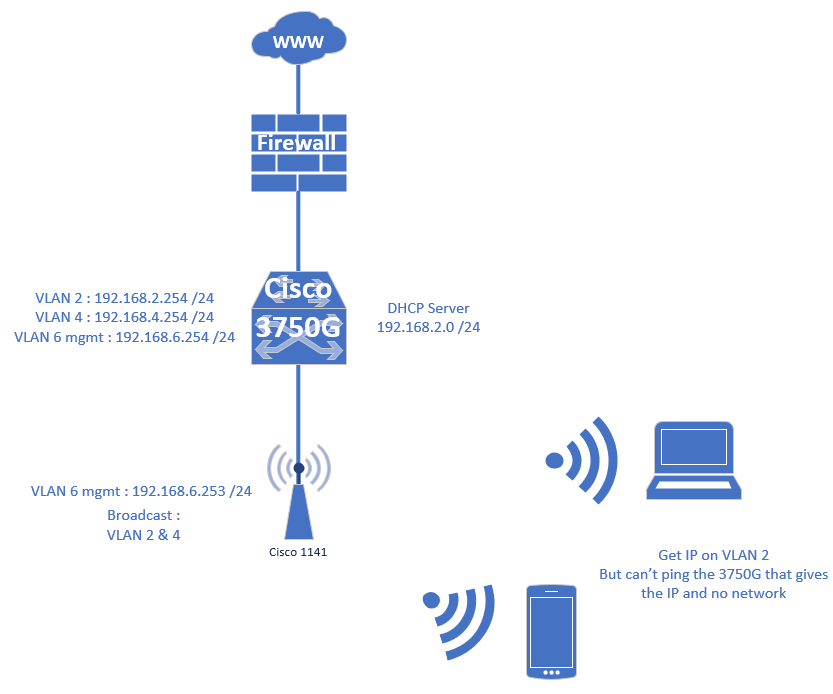
I have a wifi access point (Cisco 1141) that broadcast 2 VLANs (2 & 4). On the VLAN 4 no problem. On the VLAN 2 when a device try to connect to the access point an IP his delivered by the DHCP server but the client can't access to network. It can be on the same network or by the gateway, nothing answer to ping or other network access. Even the DHCP server that delivered IP address can't be reachable.
The AP is in standalone mode.
Nobody edit the configuration of the switch or AP. Everything works fine until this problem.
This is the network plan :
Have you got some ideas about this issue.
Thanks
- Labels:
-
Aironet Access Points

- Mark as New
- Bookmark
- Subscribe
- Mute
- Subscribe to RSS Feed
- Permalink
- Report Inappropriate Content
08-06-2019 07:27 AM
- "show version" from the AP
- Your AP config (show run) with any sensitive info removed
- The switch configuration (show run) with any sensitive info removed
- A screenshot (or simply confirmation) of your DHCP Server config for that VLAN
Can you also check the client is being given a /24 subnet with the right gateway from the server?
Finally, you said it was working previously... so absolutely nothing has changed since when it was working and now it is broken? Not even an AP restart/DHCP change?
Cheers,
Ric
Please rate helpful / correct posts
- Mark as New
- Bookmark
- Subscribe
- Mute
- Subscribe to RSS Feed
- Permalink
- Report Inappropriate Content
08-06-2019 08:28 AM


- Mark as New
- Bookmark
- Subscribe
- Mute
- Subscribe to RSS Feed
- Permalink
- Report Inappropriate Content
08-07-2019 07:52 AM - edited 08-07-2019 07:54 AM
Your AP has DEFINITELY been restarted - it has crashed - possibly multiple times - we only see the last time:
System returned to ROM by watchdog timer expired
System restarted at 12:38:15 +0200 Tue Aug 6 2019 <<<<<<<<<<< that's yesterday
Last reset from watchdog timer expired
That being the case - the most likely thing is that the config was not saved before it was restarted and after it crashed some of the config was lost. If you have config backups you need to look back at your config backup from before the problem started (when exactly did the problem start?). A dir of the AP's flash might show you crashinfo or event files showing the history of crash(es) although watchdog restarts usually won't generate anything.
Watchdog crashes could also indicate a hardware problem but that is unlikely to explain the issue you have now (more likely config).
Please click Helpful if this post helped you and Accept as Solution if this answered your query.
------------------------------
TAC recommended codes for AireOS WLC's and TAC recommended codes for 9800 WLC's
Best Practices for AireOS WLC's, Best Practices for 9800 WLC's and Cisco Wireless compatibility matrix
Check your 9800 WLC config with Wireless Config Analyzer using "show tech wireless" output or "config paging disable" then "show run-config" output on AireOS and use Wireless Debug Analyzer to analyze your WLC client debugs
Field Notice: FN63942 APs and WLCs Fail to Create CAPWAP Connections Due to Certificate Expiration
Field Notice: FN72424 Later Versions of WiFi 6 APs Fail to Join WLC - Software Upgrade Required
Field Notice: FN72524 IOS APs stuck in downloading state after 4 Dec 2022 due to Certificate Expired
- Fixed in 8.10.196.0, latest 9800 releases, 8.5.182.12 (8.5.182.13 for 3504) and 8.5.182.109 (IRCM, 8.5.182.111 for 3504)
Field Notice: FN70479 AP Fails to Join or Joins with 1 Radio due to Country Mismatch, RMA needed
Field Notice: FN74383 APs Running 17.12.4/5/6/6a May Run Out of Flash Space Preventing Upgrades
How to avoid boot loop due to corrupted image on Wave 2 and Catalyst 11ax Access Points (CSCvx32806)
Field Notice: FN74035 - Wave2 APs DFS May Not Detect Radar After Channel Availability Check Time
Leo's list of bugs affecting 2800/3800/4800/1560 APs
Default AP console baud rate from 17.12.x is 115200 - introduced by CSCwe88390
- Mark as New
- Bookmark
- Subscribe
- Mute
- Subscribe to RSS Feed
- Permalink
- Report Inappropriate Content
08-07-2019 02:10 PM
I restarted the AP when I saw the problem and hope everything back but always the same problem. The configuration was saved before restart in the AP and on an external storage.

Discover and save your favorite ideas. Come back to expert answers, step-by-step guides, recent topics, and more.
New here? Get started with these tips. How to use Community New member guide
