- Cisco Community
- Technology and Support
- Networking
- Wireless
- Re: FlexConnect Local Switching - Client roaming issues.
- Subscribe to RSS Feed
- Mark Topic as New
- Mark Topic as Read
- Float this Topic for Current User
- Bookmark
- Subscribe
- Mute
- Printer Friendly Page
FlexConnect Local Switching - Client roaming issues.


- Mark as New
- Bookmark
- Subscribe
- Mute
- Subscribe to RSS Feed
- Permalink
- Report Inappropriate Content
01-06-2023 01:33 AM
I have a simple setup of WLC 2504 v8.3.150.0 + 1142 + 2702 + RVS 4000 router with no VLAN.
My requirement is to setup these two APs in FlexConnect mode. I have provided the snapshots of settings for the SSID.
I have created a separate AP group for these two APs in FlexConnect mode. My main problem is client roaming is not working. I have Win 10 Lenovo T490s laptop where I start a continuous ping to one wired machine on network. The laptop connects to 2702 and pings start. Now I move the laptop to different room closer to 1142 and 2702 completely goes away as I move to one corner of the room. The expectation is that laptop should connect to 1142 and pings should continue. I see initial request timeouts and then general failures as I lose the IP address. The only way to reconnect is to turn of the laptop wifi and then turn on again.
I did another experiment where I simply just disabled the option "FlexConnect Local Switching" and roaming works flawlessly. So maybe I am missing some setting which is causing this roaming failure.
Any help would be appreciated. Thanks.

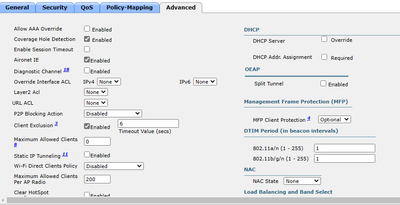
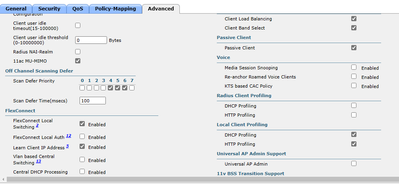
- Labels:
-
Wireless LAN Controller
- Mark as New
- Bookmark
- Subscribe
- Mute
- Subscribe to RSS Feed
- Permalink
- Report Inappropriate Content
10-16-2023 01:58 AM
Thanks for the suggestion. Unfortunately entering the command resulted in Error: WLAN <your_wlan_id> enabled. My struggle is with an older facility we have inherited running a pair of 2504 WLCs with a mixture of 1532, 1562, 2702 and 2802 access points with the outdoor access points working in a below freezing environment, in case the added detail is useful to you. I can see the host associate with the access point but I haven't yet managed to track the mechanism by which the roam failure occurs. I have taken a third party access point to site and confirmed the behaviour also occurs when roaming between vendor devices. Now I'm feeling like I am highjacking someone else's ticket!


- Mark as New
- Bookmark
- Subscribe
- Mute
- Subscribe to RSS Feed
- Permalink
- Report Inappropriate Content
10-16-2023 02:01 AM
>...Error: WLAN <your_wlan_id> enabled.
- You may want to temporarily disable the WLAN and then execute the command suggested ,
M.
-- ' Listen to the wind, it talks
Listen to the silence, it speaks
Listen to your heart, it knows
Ganado Mucho (1809 to 1893 ) Navajo Indian


- Mark as New
- Bookmark
- Subscribe
- Mute
- Subscribe to RSS Feed
- Permalink
- Report Inappropriate Content
10-16-2023 02:35 AM
You can also try disabling PMK caching on the wireless profile in Windows machine to see how it works.


- « Previous
-
- 1
- 2
- Next »
Discover and save your favorite ideas. Come back to expert answers, step-by-step guides, recent topics, and more.
New here? Get started with these tips. How to use Community New member guide
