- Cisco Community
- Technology and Support
- Networking
- Network Management
- Re: Removing Device Pack file from Prime Infrastructure
- Subscribe to RSS Feed
- Mark Topic as New
- Mark Topic as Read
- Float this Topic for Current User
- Bookmark
- Subscribe
- Mute
- Printer Friendly Page


- Mark as New
- Bookmark
- Subscribe
- Mute
- Subscribe to RSS Feed
- Permalink
- Report Inappropriate Content
04-25-2024 08:57 AM
Hello.
On the Software Update page of Prime there is one Pack which i can not install or delete because it is already included in another installation i did before. Now this pack stays on the page and i am not able to remove it.
Does anybody know where these files are stored in the CLI or how i can remove it from there?

Thanks.
Solved! Go to Solution.
- Labels:
-
Network Management
Accepted Solutions
- Mark as New
- Bookmark
- Subscribe
- Mute
- Subscribe to RSS Feed
- Permalink
- Report Inappropriate Content
04-25-2024 11:48 PM
Hello M.
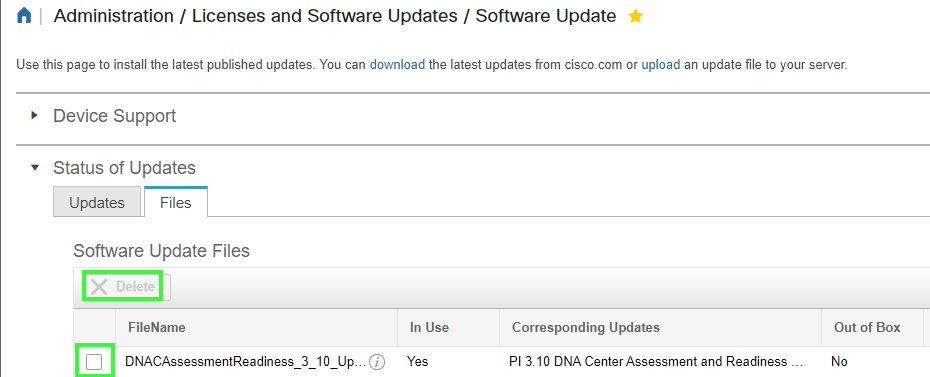
i found it by myself. If the pack is not installed, like in my case, you can delete the file here:
S.


- Mark as New
- Bookmark
- Subscribe
- Mute
- Subscribe to RSS Feed
- Permalink
- Report Inappropriate Content
04-25-2024 10:24 PM
- In essence not possible and or checkout this thread : https://community.cisco.com/t5/network-management/cisco-prime-3-1-how-to-remove-device-pack-7/td-p/3016808
M.
-- Each morning when I wake up and look into the mirror I always say ' Why am I so brilliant ? '
When the mirror will then always repond to me with ' The only thing that exceeds your brilliance is your beauty! '
- Mark as New
- Bookmark
- Subscribe
- Mute
- Subscribe to RSS Feed
- Permalink
- Report Inappropriate Content
04-25-2024 11:48 PM
Hello M.
i found it by myself. If the pack is not installed, like in my case, you can delete the file here:
S.
- Mark as New
- Bookmark
- Subscribe
- Mute
- Subscribe to RSS Feed
- Permalink
- Report Inappropriate Content
11-07-2024 08:51 AM
if the file state in Use is Yes you can´t dele the file, how change the state to No
- Mark as New
- Bookmark
- Subscribe
- Mute
- Subscribe to RSS Feed
- Permalink
- Report Inappropriate Content
11-07-2024 11:20 PM
If they are in use, you can not delete them. They are needed if in us is Yes and need to stay on the device.

Discover and save your favorite ideas. Come back to expert answers, step-by-step guides, recent topics, and more.
New here? Get started with these tips. How to use Community New member guide