- Cisco Community
- Technology and Support
- Networking
- Switching
- High Memory Utilization
- Subscribe to RSS Feed
- Mark Topic as New
- Mark Topic as Read
- Float this Topic for Current User
- Bookmark
- Subscribe
- Mute
- Printer Friendly Page
High Memory Utilization

- Mark as New
- Bookmark
- Subscribe
- Mute
- Subscribe to RSS Feed
- Permalink
- Report Inappropriate Content
12-29-2009 02:32 PM - edited 03-06-2019 09:06 AM
Hello all,
Few of our branch office switches are running with high memory utilization, we are receiving alerts on our monitoring tool for the same. Monitoring tool shows Memory 1 is running with 90% (above threshold limit) and other memory is fine. These are 3500 series switches used in branch offices.
My concern is....
Is this really a issue or a bug?
What is Memory 1 and Memory 2?
How to identify the issue, any commands other than Show process memory?
IOS (tm) C3500XL Software (C3500XL-C3H2S-M), Version 12.0(5.1)XP,
SWITCH03>sh pro mem
Total: 12415464, Used: 10696620, Free: 1718844
Please advice.
Thanks,
Karthik.
- Labels:
-
Other Switching


- Mark as New
- Bookmark
- Subscribe
- Mute
- Subscribe to RSS Feed
- Permalink
- Report Inappropriate Content
12-29-2009 03:52 PM
Hi Karthik,
Hoooooooooooooooo boy! I've never seen this IOS version before. This is probably better than the Interim Software (XU) version. Is this a 3524XL-EN, 3548XL-EN or 3508XL-EN?
High memory utilization on the 2900XL/3500XL is commonly attributed by high bandwidth utilization and/or spanning-tree loop.
May I ask if you can post your config?
- Mark as New
- Bookmark
- Subscribe
- Mute
- Subscribe to RSS Feed
- Permalink
- Report Inappropriate Content
01-01-2010 12:37 AM
Hello,
Please Help me to resolve this issue.
These are WS-C3548-XL-EN switches.
Below is the another switch details with the same model number.
==========================================================================
IOS (tm) C3500XL Software (C3500XL-C3H2S-M), Version 12.0(5.1)XP, MAINTENANCE IN
TERIM SOFTWARE
ROM: Bootstrap program is C3500XL boot loader
INB00switch1 uptime is 30 weeks, 20 hours, 37 minutes
System returned to ROM by power-on
System restarted at 07:42:59 EDT Thu Jun 4 2009
System image file is "flash:c3500XL-c3h2s-mz-120.5.1-XP.bin"
cisco WS-C3548-XL (PowerPC403) processor (revision 0x01) with 16384K/1024K bytes
of memory.
Model number: WS-C3548-XL-EN
===========================================================================
Sorry, I cant provide you the configure it against the company policy. But i can tell you what are all we have configured.
We have configured following on switches
- TACACS & AAA.
- NTP & SNMP String
- VLAN 1 (All ports are in this VLAN)
- All ports configured for duplex full/speed 100/spanning-tree portfast
- Trunk on Uplink ports (Gig 0/1 & Gig 0/2)
- Spanning tree 1 is not currently active: Disabled
Let me know if you require any other details.
Thanks
Karthik.

- Mark as New
- Bookmark
- Subscribe
- Mute
- Subscribe to RSS Feed
- Permalink
- Report Inappropriate Content
01-02-2010 05:41 AM
About the only thing you will probably be able to do with those is see if you can get ahold of the last IOS version they made for that switch and load it up. Those have been out of support for over 2 years now. a lot of switches if they have been up a long time will eventually get a low memory condition due to a slow memory leak where it does not release memory that is not being used like it should . Usually a reboot will fix this in most cases. You also have to make sure it does not have another cause like an infected machine generating a ton of traffic etc... a look thru this doc might help.
- Mark as New
- Bookmark
- Subscribe
- Mute
- Subscribe to RSS Feed
- Permalink
- Report Inappropriate Content
01-03-2010 04:47 AM
Hello,
Could you please let me know what is Memory 1 and Memory 2 on switches?
Regards,
Karthik...

- Mark as New
- Bookmark
- Subscribe
- Mute
- Subscribe to RSS Feed
- Permalink
- Report Inappropriate Content
01-02-2010 06:28 AM
Hi Karthik,
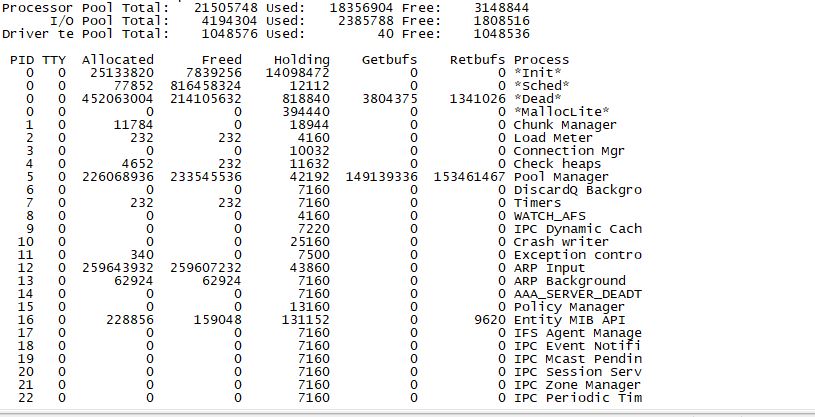
Could you please check from the (sh processes memory) output , what exactly consumes memory from the Allocated portion?
check also the CPU status? Post back the output from both.
As A side note, your configuration are simple and straight forward and shouldnt consume such memory.
HTH
Mohamed
- Mark as New
- Bookmark
- Subscribe
- Mute
- Subscribe to RSS Feed
- Permalink
- Report Inappropriate Content
01-03-2010 04:36 AM
Hi all,
Can I know more information on *Dead* Process which always has PID "0" (Zero) and Memory details for the same.
I could see the holding memory with high values, does it affect the memory utilization?
Can *Dead* process be killed and restarted without rebooting the switch?
Regards,
Karthik.

- Mark as New
- Bookmark
- Subscribe
- Mute
- Subscribe to RSS Feed
- Permalink
- Report Inappropriate Content
01-03-2010 05:10 AM
Hi Karthik
Can you post the below command output.
sh stack
show register
show region
show proc mem
show proc cpu.
Thanks

- Mark as New
- Bookmark
- Subscribe
- Mute
- Subscribe to RSS Feed
- Permalink
- Report Inappropriate Content
02-21-2018 07:36 AM
- Mark as New
- Bookmark
- Subscribe
- Mute
- Subscribe to RSS Feed
- Permalink
- Report Inappropriate Content
05-29-2020 07:07 AM
Hi, Ive run show process memory on individual switches, could anyone advise how I could get this information from over 500+ switches within DNA? I want to be able to compare results over a period of time. Thanks
- Mark as New
- Bookmark
- Subscribe
- Mute
- Subscribe to RSS Feed
- Permalink
- Report Inappropriate Content
02-27-2018 06:03 AM
Hi Karthik,
High Memory Utilization
You can check the memory by "sh proc mem" command . You can enable VTP pruning in the network so that unnecessary broadcast will not pass through the switch

Discover and save your favorite ideas. Come back to expert answers, step-by-step guides, recent topics, and more.
New here? Get started with these tips. How to use Community New member guide