- Cisco Community
- Technology and Support
- Networking
- Wireless
- Re: Certificate unknown alert
- Subscribe to RSS Feed
- Mark Topic as New
- Mark Topic as Read
- Float this Topic for Current User
- Bookmark
- Subscribe
- Mute
- Printer Friendly Page


- Mark as New
- Bookmark
- Subscribe
- Mute
- Subscribe to RSS Feed
- Permalink
- Report Inappropriate Content
03-26-2021 07:53 AM - edited 07-05-2021 01:02 PM
I have 4 AIR-CAP3502i-A-K9's that received Fatal reports from WLC 8.5.164.0. I have 7 others still associating.
*Mar 26 14:01:47.000: %CAPWAP-5-DTLSREQSEND: DTLS connection request sent peer_ip: x.x.x.x peer_port: 5246
*Mar 26 14:01:47.210: %DTLS-5-ALERT: Received FATAL : Certificate unknown alert from x.x.x.x
*Mar 26 14:01:47.210: %DTLS-5-SEND_ALERT: Send FATAL : Close notify Alert to x.x.x.x:5246
How do I regen or create a new Cert?
Solved! Go to Solution.
- Labels:
-
Aironet Access Points
Accepted Solutions



- Mark as New
- Bookmark
- Subscribe
- Mute
- Subscribe to RSS Feed
- Permalink
- Report Inappropriate Content
03-29-2021 05:52 AM
ON WLC CLI> config ap cert-expiry-ignore mic enable


- Mark as New
- Bookmark
- Subscribe
- Mute
- Subscribe to RSS Feed
- Permalink
- Report Inappropriate Content
03-26-2021 09:10 AM
- On the AP check the certificate with : AP# show crypto pki certificates
M.
-- Let everything happen to you
Beauty and terror
Just keep going
No feeling is final
Reiner Maria Rilke (1899)
- Mark as New
- Bookmark
- Subscribe
- Mute
- Subscribe to RSS Feed
- Permalink
- Report Inappropriate Content
03-26-2021 09:27 AM
unfortunately there is no Show Crypto cmd but I can view them all in show tech..
there is:
crypto pki certificate chain cisco-m2-root-cert
certificate ca 01...
crypto pki certificate chain Cisco_IOS_M2_MIC_cert
certificate ca 02...
crypto pki certificate chain airespace-old-root-cert
certificate ca 00...
crypto pki certificate chain airespace-new-root-cert
certificate ca 00..
crypto pki certificate chain airespace-device-root-cert
certificate ca 03...
crypto pki certificate chain cisco-root-cert
certificate ca 5FF87B282B54DC8D42A315B568C9ADFF..
crypto pki certificate chain Cisco_IOS_MIC_cert
certificate 15B7774C000000055EC7...
certificate ca 6A6967B3000000000003
end list..
- Mark as New
- Bookmark
- Subscribe
- Mute
- Subscribe to RSS Feed
- Permalink
- Report Inappropriate Content
03-26-2021 11:45 PM
>crypto pki certificate chain cisco-m2-root-cert
certificate ca 01...
- Check if any expiration dates are mentioned too.
M.
-- Let everything happen to you
Beauty and terror
Just keep going
No feeling is final
Reiner Maria Rilke (1899)


- Mark as New
- Bookmark
- Subscribe
- Mute
- Subscribe to RSS Feed
- Permalink
- Report Inappropriate Content
03-28-2021 02:35 AM
Have you read https://www.cisco.com/c/en/us/support/docs/field-notices/639/fn63942.html and followed the instructions carefully?
If you forgot to apply the config to allow APs or WLC (you didn't mention WLC model but they can also be affected) with expired cert then you'll have to turn off NTP, set the time back to before cert(s) expired, apply the config workaround on WLC, allow all APs to rejoin and get the update, then put NTP on again.
Please click Helpful if this post helped you and Accept as Solution (drop down menu at top right of this reply) if this answered your query.
------------------------------
TAC recommended codes for AireOS WLC's and TAC recommended codes for 9800 WLC's
Best Practices for AireOS WLC's, Best Practices for 9800 WLC's and Cisco Wireless compatibility matrix
Check your 9800 WLC config with Wireless Config Analyzer using "show tech wireless" output or "config paging disable" then "show run-config" output on AireOS and use Wireless Debug Analyzer to analyze your WLC client debugs
Field Notice: FN63942 APs and WLCs Fail to Create CAPWAP Connections Due to Certificate Expiration
Field Notice: FN72424 Later Versions of WiFi 6 APs Fail to Join WLC - Software Upgrade Required
Field Notice: FN72524 IOS APs stuck in downloading state after 4 Dec 2022 due to Certificate Expired
- Fixed in 8.10.196.0, latest 9800 releases, 8.5.182.12 (8.5.182.13 for 3504) and 8.5.182.109 (IRCM, 8.5.182.111 for 3504)
Field Notice: FN70479 AP Fails to Join or Joins with 1 Radio due to Country Mismatch, RMA needed
Field Notice: FN74383 APs Running 17.12.4/5/6/6a May Run Out of Flash Space Preventing Upgrades
How to avoid boot loop due to corrupted image on Wave 2 and Catalyst 11ax Access Points (CSCvx32806)
Field Notice: FN74035 - Wave2 APs DFS May Not Detect Radar After Channel Availability Check Time
Leo's list of bugs affecting 2800/3800/4800/1560 APs
Default AP console baud rate from 17.12.x is 115200 - introduced by CSCwe88390
- Mark as New
- Bookmark
- Subscribe
- Mute
- Subscribe to RSS Feed
- Permalink
- Report Inappropriate Content
03-29-2021 08:59 AM
I have NOW! I feel a migraine headache coming on.

- Mark as New
- Bookmark
- Subscribe
- Mute
- Subscribe to RSS Feed
- Permalink
- Report Inappropriate Content
03-26-2021 07:59 PM
Certificate expired for some ap
- Mark as New
- Bookmark
- Subscribe
- Mute
- Subscribe to RSS Feed
- Permalink
- Report Inappropriate Content
03-29-2021 05:52 AM
ON WLC CLI> config ap cert-expiry-ignore mic enable
- Mark as New
- Bookmark
- Subscribe
- Mute
- Subscribe to RSS Feed
- Permalink
- Report Inappropriate Content
03-29-2021 09:12 AM
that solved the 4 3502's attached to the 5508 on 8.5.164.0 . reporting the cert unknown.
not the 1810w reporting Discovery response from MWAR ''running version 0.0.0.0 is rejected
or the 3 1852s attached to the 5520 also reporting: Discovery response from MWAR ''running version 0.0.0.0 is rejected
I have not yet been thru all the previous replies..
thank you the 3502's comprised an entire site.. so good they are alive again.
- Mark as New
- Bookmark
- Subscribe
- Mute
- Subscribe to RSS Feed
- Permalink
- Report Inappropriate Content
03-29-2021 09:45 AM
- Mark as New
- Bookmark
- Subscribe
- Mute
- Subscribe to RSS Feed
- Permalink
- Report Inappropriate Content
03-29-2021 11:36 AM
understood. however, I have a 9800-40 sitting in the wings waiting to take command once it gets vlan interfaces to support the entire campus. I'm combining two sites into one and need more elbow room.
- Mark as New
- Bookmark
- Subscribe
- Mute
- Subscribe to RSS Feed
- Permalink
- Report Inappropriate Content
03-30-2021 04:55 AM
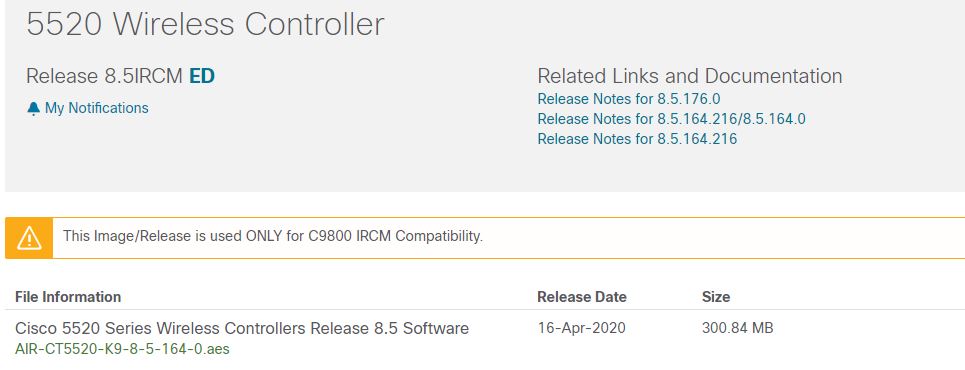
Note that there is a new IRCM release 8.5.176.0 which Cisco said on webinar last week resolves a number of bugs in 8.5.164.0 and should also have all the fixes which went into 8.5.171.0 so suggest you upgrade to that for a start:
https://software.cisco.com/download/home/286284738/type/280926587/release/8.5IRCM
https://software.cisco.com/download/home/282600534/type/280926587/release/8.5IRCM
They said the TAC recommended releases https://www.cisco.com/c/en/us/support/docs/wireless/wireless-lan-controller-software/200046-tac-recommended-aireos.html#anc9 should get updated with that info soon (not yet I see).
If you still have the problem with the other APs then try factory defaulting them (often fixes that type of problem) and if that doesn't help you'll need to get full console logs from at least one of them and ideally packet captures of the CAPWAP discovery/join at the same time.
Please click Helpful if this post helped you and Accept as Solution (drop down menu at top right of this reply) if this answered your query.
------------------------------
TAC recommended codes for AireOS WLC's and TAC recommended codes for 9800 WLC's
Best Practices for AireOS WLC's, Best Practices for 9800 WLC's and Cisco Wireless compatibility matrix
Check your 9800 WLC config with Wireless Config Analyzer using "show tech wireless" output or "config paging disable" then "show run-config" output on AireOS and use Wireless Debug Analyzer to analyze your WLC client debugs
Field Notice: FN63942 APs and WLCs Fail to Create CAPWAP Connections Due to Certificate Expiration
Field Notice: FN72424 Later Versions of WiFi 6 APs Fail to Join WLC - Software Upgrade Required
Field Notice: FN72524 IOS APs stuck in downloading state after 4 Dec 2022 due to Certificate Expired
- Fixed in 8.10.196.0, latest 9800 releases, 8.5.182.12 (8.5.182.13 for 3504) and 8.5.182.109 (IRCM, 8.5.182.111 for 3504)
Field Notice: FN70479 AP Fails to Join or Joins with 1 Radio due to Country Mismatch, RMA needed
Field Notice: FN74383 APs Running 17.12.4/5/6/6a May Run Out of Flash Space Preventing Upgrades
How to avoid boot loop due to corrupted image on Wave 2 and Catalyst 11ax Access Points (CSCvx32806)
Field Notice: FN74035 - Wave2 APs DFS May Not Detect Radar After Channel Availability Check Time
Leo's list of bugs affecting 2800/3800/4800/1560 APs
Default AP console baud rate from 17.12.x is 115200 - introduced by CSCwe88390

Discover and save your favorite ideas. Come back to expert answers, step-by-step guides, recent topics, and more.
New here? Get started with these tips. How to use Community New member guide
