- Cisco Community
- Technology and Support
- Networking
- Wireless
- Re: AP 2702
- Subscribe to RSS Feed
- Mark Topic as New
- Mark Topic as Read
- Float this Topic for Current User
- Bookmark
- Subscribe
- Mute
- Printer Friendly Page


- Mark as New
- Bookmark
- Subscribe
- Mute
- Subscribe to RSS Feed
- Permalink
- Report Inappropriate Content
03-13-2023 03:35 AM
Hi,
I got an AP 2702 with the Giga 1 interface up but protocol down.
I tried shut and no shut, and got the same.
Here is the show interface command:
GigabitEthernet1 is up, line protocol is down
  Hardware is PowerPC Ethernet, address is e865.49d2.c89d (bia e865.49d2.c89d)
  MTU 1500 bytes, BW 1000000 Kbit/sec, DLY 10 usec,
     reliability 255/255, txload 1/255, rxload 1/255
  Encapsulation ARPA, loopback not set
  Keepalive set (10 sec)
  Auto Duplex, Auto Speed, media type is T
  output flow-control is unsupported, input flow-control is unsupported
  ARP type: ARPA, ARP Timeout 04:00:00
  Last input never, output never, output hang never
  Last clearing of "show interface" counters never
  Input queue: 0/42878/0/0 (size/max/drops/flushes); Total output drops: 0
  Queueing strategy: fifo
  Output queue: 0/40 (size/max)
  5 minute input rate 0 bits/sec, 0 packets/sec
  5 minute output rate 0 bits/sec, 0 packets/sec
     0 packets input, 0 bytes, 0 no buffer
     Received 0 broadcasts (0 IP multicasts)
     0 runts, 0 giants, 0 throttles
     0 input errors, 0 CRC, 0 frame, 0 overrun, 0 ignored
     0 watchdog, 0 multicast, 0 pause input
     0 packets output, 0 bytes, 0 underruns
     0 output errors, 0 collisions, 1 interface resets
     0 unknown protocol drops
     0 babbles, 0 late collision, 0 deferred
     0 lost carrier, 0 no carrier, 0 pause output
     0 output buffer failures, 0 output buffers swapped out
Prime shows the AP like this:
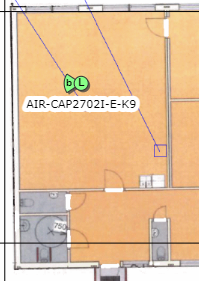
And WLC shows it like this:
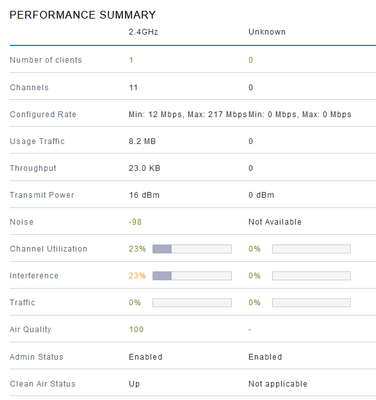
Any Ideas?!
Solved! Go to Solution.
- Labels:
-
Aironet Access Points
Accepted Solutions


- Mark as New
- Bookmark
- Subscribe
- Mute
- Subscribe to RSS Feed
- Permalink
- Report Inappropriate Content
03-14-2023 04:50 AM
Yes that confirms failed hardware on 5GHz radio.
The AP hardware is still supported. If you have it on contract - RMA as normal via TAC. If you don't have it on contract then read the warranty info I provided above - can still be RMA but just takes longer and you have to follow the warranty process. You must send in the faulty AP (after raising RMA) and then they will send the replacement within 10 days of receiving the faulty part.
Please click Helpful if this post helped you and Accept as Solution (drop down menu at top right of this reply) if this answered your query.
------------------------------
TAC recommended codes for AireOS WLC's and TAC recommended codes for 9800 WLC's
Best Practices for AireOS WLC's, Best Practices for 9800 WLC's and Cisco Wireless compatibility matrix
Check your 9800 WLC config with Wireless Config Analyzer using "show tech wireless" output or "config paging disable" then "show run-config" output on AireOS and use Wireless Debug Analyzer to analyze your WLC client debugs
Field Notice: FN63942 APs and WLCs Fail to Create CAPWAP Connections Due to Certificate Expiration
Field Notice: FN72424 Later Versions of WiFi 6 APs Fail to Join WLC - Software Upgrade Required
Field Notice: FN72524 IOS APs stuck in downloading state after 4 Dec 2022 due to Certificate Expired
- Fixed in 8.10.196.0, latest 9800 releases, 8.5.182.12 (8.5.182.13 for 3504) and 8.5.182.109 (IRCM, 8.5.182.111 for 3504)
Field Notice: FN70479 AP Fails to Join or Joins with 1 Radio due to Country Mismatch, RMA needed
Field Notice: FN74383 APs Running 17.12.4/5/6/6a May Run Out of Flash Space Preventing Upgrades
How to avoid boot loop due to corrupted image on Wave 2 and Catalyst 11ax Access Points (CSCvx32806)
Field Notice: FN74035 - Wave2 APs DFS May Not Detect Radar After Channel Availability Check Time
Leo's list of bugs affecting 2800/3800/4800/1560 APs
Default AP console baud rate from 17.12.x is 115200 - introduced by CSCwe88390

- Mark as New
- Bookmark
- Subscribe
- Mute
- Subscribe to RSS Feed
- Permalink
- Report Inappropriate Content
03-13-2023 04:02 AM
hi
how you powered the AP? poe? what is the interface status from switch side?
Good luck
KB
- Mark as New
- Bookmark
- Subscribe
- Mute
- Subscribe to RSS Feed
- Permalink
- Report Inappropriate Content
03-13-2023 05:12 AM
The AP is powered by a Power Injector (Cisco CB-PWRINJ-NA 15.4W Single-Port PoE Injector)
This is the switch interface:
FastEthernet0/23 is up, line protocol is up (connected)
  Hardware is Fast Ethernet, address is f078.1672.da97 (bia f078.1672.da97)
  Description: AP
  MTU 1500 bytes, BW 100000 Kbit/sec, DLY 100 usec,
     reliability 255/255, txload 4/255, rxload 1/255
  Encapsulation ARPA, loopback not set
  Keepalive set (10 sec)
  Full-duplex, 100Mb/s, media type is 10/100BaseTX
  input flow-control is off, output flow-control is unsupported
  ARP type: ARPA, ARP Timeout 04:00:00
  Last input 00:00:01, output 00:00:00, output hang never
  Last clearing of "show interface" counters never
  Input queue: 0/75/0/0 (size/max/drops/flushes); Total output drops: 13317177
  Queueing strategy: fifo
  Output queue: 0/40 (size/max)
  5 minute input rate 31000 bits/sec, 9 packets/sec
  5 minute output rate 1854000 bits/sec, 173 packets/sec
     183084873 packets input, 95527184469 bytes, 0 no buffer
     Received 1584407 broadcasts (1020301 multicasts)
     0 runts, 0 giants, 0 throttles
     0 input errors, 0 CRC, 0 frame, 0 overrun, 0 ignored
     0 watchdog, 1020301 multicast, 0 pause input
     0 input packets with dribble condition detected
     527309735 packets output, 338682678488 bytes, 0 underruns
     0 output errors, 0 collisions, 1 interface resets
     0 unknown protocol drops
     0 babbles, 0 late collision, 0 deferred
     0 lost carrier, 0 no carrier, 0 pause output
     0 output buffer failures, 0 output buffers swapped out


- Mark as New
- Bookmark
- Subscribe
- Mute
- Subscribe to RSS Feed
- Permalink
- Report Inappropriate Content
03-13-2023 06:31 AM
Hi,
I think that you have not enough POE Power to start the WLAN Interfaces.
- Mark as New
- Bookmark
- Subscribe
- Mute
- Subscribe to RSS Feed
- Permalink
- Report Inappropriate Content
03-13-2023 06:51 AM
This AP has worked many years, but today it started to show as above.
The Power Injector is enough with 15.4 watts for this AP.
- Mark as New
- Bookmark
- Subscribe
- Mute
- Subscribe to RSS Feed
- Permalink
- Report Inappropriate Content
03-13-2023 07:08 AM
share the output of below commands,
in switch >
Sh power-inline
sh run int fa 0/23
Good luck
KB
- Mark as New
- Bookmark
- Subscribe
- Mute
- Subscribe to RSS Feed
- Permalink
- Report Inappropriate Content
03-13-2023 01:37 PM
show power inline:
Available:0.0(w)  Used:0.0(w)  Remaining:0.0(w)

Interface Admin  Oper       Power   Device              Class Max
                            (Watts)
--------- ------ ---------- ------- ------------------- ----- ----
sh run int fa 0/23:
interface FastEthernet0/23
 description AP
 switchport access vlan 415
 switchport mode access
end
- Mark as New
- Bookmark
- Subscribe
- Mute
- Subscribe to RSS Feed
- Permalink
- Report Inappropriate Content
03-13-2023 05:21 PM
https://www.cisco.com/c/en/us/td/docs/wireless/access_point/2700/quick/guide/ap2700getstart.html#pgfId-65865
"Disabled when using 802.3af (15.4W) power."
That's what the documentation says. If it worked before you were lucky - it wasn't supposed to be according to Cisco.
But let's assume that it was working, as you say, and stopped (this is a crucial piece of info which you should have included in your original post) then the most likely cause is a cable problem. If you have checked and tested the cable then faulty device (what is connected to that port?) or faulty port on the AP. Check AP and device RJ45 port contacts. Also note the docs say: "do not connect the AUX port to the same uplink switch as the AP"
Please click Helpful if this post helped you and Accept as Solution (drop down menu at top right of this reply) if this answered your query.
------------------------------
TAC recommended codes for AireOS WLC's and TAC recommended codes for 9800 WLC's
Best Practices for AireOS WLC's, Best Practices for 9800 WLC's and Cisco Wireless compatibility matrix
Check your 9800 WLC config with Wireless Config Analyzer using "show tech wireless" output or "config paging disable" then "show run-config" output on AireOS and use Wireless Debug Analyzer to analyze your WLC client debugs
Field Notice: FN63942 APs and WLCs Fail to Create CAPWAP Connections Due to Certificate Expiration
Field Notice: FN72424 Later Versions of WiFi 6 APs Fail to Join WLC - Software Upgrade Required
Field Notice: FN72524 IOS APs stuck in downloading state after 4 Dec 2022 due to Certificate Expired
- Fixed in 8.10.196.0, latest 9800 releases, 8.5.182.12 (8.5.182.13 for 3504) and 8.5.182.109 (IRCM, 8.5.182.111 for 3504)
Field Notice: FN70479 AP Fails to Join or Joins with 1 Radio due to Country Mismatch, RMA needed
Field Notice: FN74383 APs Running 17.12.4/5/6/6a May Run Out of Flash Space Preventing Upgrades
How to avoid boot loop due to corrupted image on Wave 2 and Catalyst 11ax Access Points (CSCvx32806)
Field Notice: FN74035 - Wave2 APs DFS May Not Detect Radar After Channel Availability Check Time
Leo's list of bugs affecting 2800/3800/4800/1560 APs
Default AP console baud rate from 17.12.x is 115200 - introduced by CSCwe88390
- Mark as New
- Bookmark
- Subscribe
- Mute
- Subscribe to RSS Feed
- Permalink
- Report Inappropriate Content
03-14-2023 12:48 AM
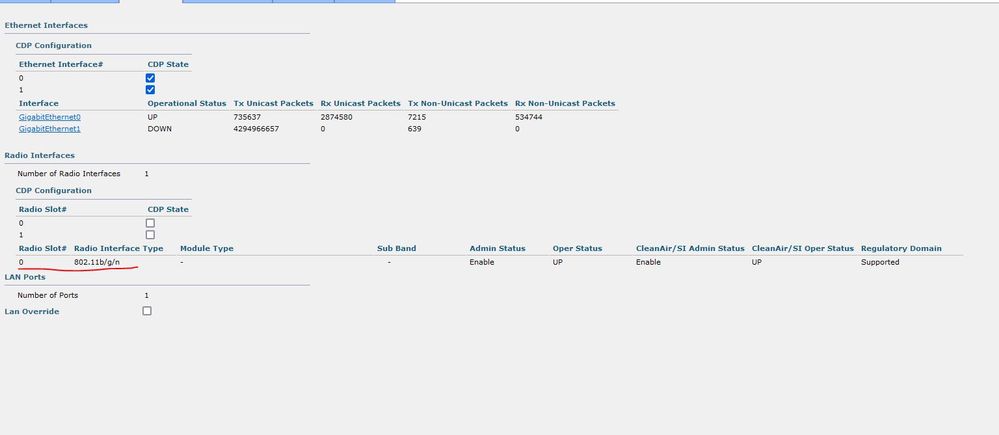
OK, I thought all the time that giga1 is the 5GHz band and giga 0 is 2,4!!
I checked again on WLC and could not find the 802.11a/n/ac interface!?
Maybe it is faulty AP, i will try to change cables.
- Mark as New
- Bookmark
- Subscribe
- Mute
- Subscribe to RSS Feed
- Permalink
- Report Inappropriate Content
03-14-2023 03:43 AM - edited 03-14-2023 03:48 AM
Fair enough - simple mistake. Gig 0 is the ethernet port. Gig 1 is the AUX port (second ethernet port).
2.4GHz radio is Dot11Radio0 on the AP and 5GHz radio is Dot11Radio1 on the AP.
The WLC shows the radios as Slot 0 and Slot 1.
So if slot 1 was there and has disappeared then the radio has probably died. That will show in the AP logs after power on.
Changing cables won't help with the missing radio. You can try power cycling the AP but most likely your only option is replacing the hardware. That AP is still covered under Limited Lifetime Hardware Warranty:
https://www.cisco.com/c/en/us/products/collateral/wireless/aironet-2700-series-access-point/eos-eol-notice-c51-740711.html
https://www.cisco.com/c/en/us/products/warranties/warranty-doc-c99-740619.html
https://www.cisco.com/c/en/us/products/warranty-listing.html
https://connectthedots.cisco.com/connectdots/serviceWarrantyFinderRequest?fl=sf#. lookup part number then Warranty tab
Please click Helpful if this post helped you and Accept as Solution (drop down menu at top right of this reply) if this answered your query.
------------------------------
TAC recommended codes for AireOS WLC's and TAC recommended codes for 9800 WLC's
Best Practices for AireOS WLC's, Best Practices for 9800 WLC's and Cisco Wireless compatibility matrix
Check your 9800 WLC config with Wireless Config Analyzer using "show tech wireless" output or "config paging disable" then "show run-config" output on AireOS and use Wireless Debug Analyzer to analyze your WLC client debugs
Field Notice: FN63942 APs and WLCs Fail to Create CAPWAP Connections Due to Certificate Expiration
Field Notice: FN72424 Later Versions of WiFi 6 APs Fail to Join WLC - Software Upgrade Required
Field Notice: FN72524 IOS APs stuck in downloading state after 4 Dec 2022 due to Certificate Expired
- Fixed in 8.10.196.0, latest 9800 releases, 8.5.182.12 (8.5.182.13 for 3504) and 8.5.182.109 (IRCM, 8.5.182.111 for 3504)
Field Notice: FN70479 AP Fails to Join or Joins with 1 Radio due to Country Mismatch, RMA needed
Field Notice: FN74383 APs Running 17.12.4/5/6/6a May Run Out of Flash Space Preventing Upgrades
How to avoid boot loop due to corrupted image on Wave 2 and Catalyst 11ax Access Points (CSCvx32806)
Field Notice: FN74035 - Wave2 APs DFS May Not Detect Radar After Channel Availability Check Time
Leo's list of bugs affecting 2800/3800/4800/1560 APs
Default AP console baud rate from 17.12.x is 115200 - introduced by CSCwe88390
- Mark as New
- Bookmark
- Subscribe
- Mute
- Subscribe to RSS Feed
- Permalink
- Report Inappropriate Content
03-14-2023 04:03 AM
I got this from logs:
*Mar 13 10:20:30.723: %LINEPROTO-5-UPDOWN: Line protocol on Interface BVI1, changed state to up
*Mar 13 10:20:30.723: %LINK-6-UPDOWN: Interface Dot11Radio0, changed state to up
*Mar 13 10:20:30.723: %SSH-5-ENABLED: SSH 2.0 has been enabled
*Mar 13 10:20:32.067: %LINEPROTO-5-UPDOWN: Line protocol on Interface Dot11Radio0, changed state to down
*Mar 13 10:20:32.071: %DOT11-5-EXPECTED_RADIO_RESET: Restarting Radio interface Dot11Radio0 due to the reason code 10set_radio_pwr_mode: bad radio unit# 1
I think this log as you said indicates a faulty AP?! Should i do RMA this unit or it is too old to do that? Is there anything that can be done to fix it?
- Mark as New
- Bookmark
- Subscribe
- Mute
- Subscribe to RSS Feed
- Permalink
- Report Inappropriate Content
03-14-2023 04:50 AM
Yes that confirms failed hardware on 5GHz radio.
The AP hardware is still supported. If you have it on contract - RMA as normal via TAC. If you don't have it on contract then read the warranty info I provided above - can still be RMA but just takes longer and you have to follow the warranty process. You must send in the faulty AP (after raising RMA) and then they will send the replacement within 10 days of receiving the faulty part.
Please click Helpful if this post helped you and Accept as Solution (drop down menu at top right of this reply) if this answered your query.
------------------------------
TAC recommended codes for AireOS WLC's and TAC recommended codes for 9800 WLC's
Best Practices for AireOS WLC's, Best Practices for 9800 WLC's and Cisco Wireless compatibility matrix
Check your 9800 WLC config with Wireless Config Analyzer using "show tech wireless" output or "config paging disable" then "show run-config" output on AireOS and use Wireless Debug Analyzer to analyze your WLC client debugs
Field Notice: FN63942 APs and WLCs Fail to Create CAPWAP Connections Due to Certificate Expiration
Field Notice: FN72424 Later Versions of WiFi 6 APs Fail to Join WLC - Software Upgrade Required
Field Notice: FN72524 IOS APs stuck in downloading state after 4 Dec 2022 due to Certificate Expired
- Fixed in 8.10.196.0, latest 9800 releases, 8.5.182.12 (8.5.182.13 for 3504) and 8.5.182.109 (IRCM, 8.5.182.111 for 3504)
Field Notice: FN70479 AP Fails to Join or Joins with 1 Radio due to Country Mismatch, RMA needed
Field Notice: FN74383 APs Running 17.12.4/5/6/6a May Run Out of Flash Space Preventing Upgrades
How to avoid boot loop due to corrupted image on Wave 2 and Catalyst 11ax Access Points (CSCvx32806)
Field Notice: FN74035 - Wave2 APs DFS May Not Detect Radar After Channel Availability Check Time
Leo's list of bugs affecting 2800/3800/4800/1560 APs
Default AP console baud rate from 17.12.x is 115200 - introduced by CSCwe88390

Discover and save your favorite ideas. Come back to expert answers, step-by-step guides, recent topics, and more.
New here? Get started with these tips. How to use Community New member guide
