- Cisco Community
- Technology and Support
- Networking
- Wireless
- Re: Access Point C9115 cannot ping own interface
- Subscribe to RSS Feed
- Mark Topic as New
- Mark Topic as Read
- Float this Topic for Current User
- Bookmark
- Subscribe
- Mute
- Printer Friendly Page
Access Point C9115 cannot ping own interface


- Mark as New
- Bookmark
- Subscribe
- Mute
- Subscribe to RSS Feed
- Permalink
- Report Inappropriate Content
10-17-2023 05:55 AM
Hello everybody, I am a University student, my colleagues and I need to work with Cisco Access Points (embedded and lightweight).
We figured out that the first step should be to upgrade the firmware of our AP (it's currently in version 16.12).
I seem to have a problem on mine, i cannot ping the AP with my client or on itself (using the serial console).
I connected the AP to a PoE switch and connected the serial port to my Linux client.
I wrote this simple configuration:
en conf t interface gigabitEthernet 0 ip address 10.2.201.16 255.255.255.0 no shut exit ip default-gateway 10.2.201.1 |
After that, I cannot ping it with my client and I can't even ping its own interface in the serial terminal.
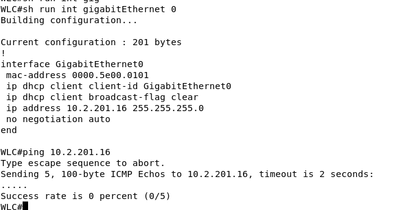
I would be happy to hear any piece of advice or help, we only are a group of students and we are no experts.
I apologize if i have made mistakes and if my post is in the wrong forum category.
I also want to add that yesterday, I began to write a post like this one but for unknown reason it started to ping and i could even access the GUI (of course I added the remaining commands of configuration needed). I started to update it through a TFTP server but the update failed because it couldn't download the second file apparently.
I then tried to reopen the GUI but, again, I couldn't ping the AP and it couldn't ping itself.
It has been multiple times that it does this to me, I tried to reset the AP using the reset button and also with the command:
| wireless ewc-ap factory-reset |
The switch that I use has only 2 Linux VM clients and the AP.
The Access Point is a C9115AXI-E, my colleagues and I all have the same ones.


- Mark as New
- Bookmark
- Subscribe
- Mute
- Subscribe to RSS Feed
- Permalink
- Report Inappropriate Content
10-17-2023 07:17 AM
not seen this issue before install many EWC cat 9K - make sure you have EWC firmware - post complete boot log here
follow below guide :
=====️ Preenayamo Vasudevam ️=====
***** Rate All Helpful Responses *****
- Mark as New
- Bookmark
- Subscribe
- Mute
- Subscribe to RSS Feed
- Permalink
- Report Inappropriate Content
10-18-2023 06:12 AM
- Mark as New
- Bookmark
- Subscribe
- Mute
- Subscribe to RSS Feed
- Permalink
- Report Inappropriate Content
10-18-2023 06:19 AM


- Mark as New
- Bookmark
- Subscribe
- Mute
- Subscribe to RSS Feed
- Permalink
- Report Inappropriate Content
10-18-2023 06:56 AM
I wouldn't obsess about the self-ping because there are some scenarios where that won't work - just make sure it can ping the default gateway.
Note that I believe "ip routing" is enabled by default on EWC so your "ip default-gateway" will be ignored.
You need to configure a static route instead. (ip route )
Try changing interface gigabitEthernet 0 to "negotiation auto"
16.12.4a is very old so don't try to upgrade directly to latest.
First upgrade to https://software.cisco.com/download/home/286322352/type/286323077/release/16.12.8
Then https://software.cisco.com/download/home/286322352/type/286323077/release/17.3.8
Then https://software.cisco.com/download/home/286322352/type/286323077/release/17.9.4
Please click Helpful if this post helped you and Accept as Solution if this answered your query.
------------------------------
TAC recommended codes for AireOS WLC's and TAC recommended codes for 9800 WLC's
Best Practices for AireOS WLC's, Best Practices for 9800 WLC's and Cisco Wireless compatibility matrix
Check your 9800 WLC config with Wireless Config Analyzer using "show tech wireless" output or "config paging disable" then "show run-config" output on AireOS and use Wireless Debug Analyzer to analyze your WLC client debugs
Field Notice: FN63942 APs and WLCs Fail to Create CAPWAP Connections Due to Certificate Expiration
Field Notice: FN72424 Later Versions of WiFi 6 APs Fail to Join WLC - Software Upgrade Required
Field Notice: FN72524 IOS APs stuck in downloading state after 4 Dec 2022 due to Certificate Expired
- Fixed in 8.10.196.0, latest 9800 releases, 8.5.182.12 (8.5.182.13 for 3504) and 8.5.182.109 (IRCM, 8.5.182.111 for 3504)
Field Notice: FN70479 AP Fails to Join or Joins with 1 Radio due to Country Mismatch, RMA needed
Field Notice: FN74383 APs Running 17.12.4/5/6/6a May Run Out of Flash Space Preventing Upgrades
How to avoid boot loop due to corrupted image on Wave 2 and Catalyst 11ax Access Points (CSCvx32806)
Field Notice: FN74035 - Wave2 APs DFS May Not Detect Radar After Channel Availability Check Time
Leo's list of bugs affecting 2800/3800/4800/1560 APs
Default AP console baud rate from 17.12.x is 115200 - introduced by CSCwe88390
- Mark as New
- Bookmark
- Subscribe
- Mute
- Subscribe to RSS Feed
- Permalink
- Report Inappropriate Content
10-25-2023 02:37 AM
The thing is that technically I don't have a default gateway since there is only my Virtual Machine and the AP. I can't connect the internet access because the university has controllers and the AP tries to get some configurations.
Right now i can ping myself but cannot ping my Virtual Machine, I don't understand why sometimes I can ping myself, sometimes not. It pinged my VM once and I even could access the GUI but it did that only once, with the same configuration.
- Mark as New
- Bookmark
- Subscribe
- Mute
- Subscribe to RSS Feed
- Permalink
- Report Inappropriate Content
10-25-2023 08:14 AM
Yes gateway is only required to get out of the local subnet.
But the default config usually includes a default route without any next hop IP which can cause unpredictable behaviour. You should remove that and replace it with a valid route if needed.
Please click Helpful if this post helped you and Accept as Solution if this answered your query.
------------------------------
TAC recommended codes for AireOS WLC's and TAC recommended codes for 9800 WLC's
Best Practices for AireOS WLC's, Best Practices for 9800 WLC's and Cisco Wireless compatibility matrix
Check your 9800 WLC config with Wireless Config Analyzer using "show tech wireless" output or "config paging disable" then "show run-config" output on AireOS and use Wireless Debug Analyzer to analyze your WLC client debugs
Field Notice: FN63942 APs and WLCs Fail to Create CAPWAP Connections Due to Certificate Expiration
Field Notice: FN72424 Later Versions of WiFi 6 APs Fail to Join WLC - Software Upgrade Required
Field Notice: FN72524 IOS APs stuck in downloading state after 4 Dec 2022 due to Certificate Expired
- Fixed in 8.10.196.0, latest 9800 releases, 8.5.182.12 (8.5.182.13 for 3504) and 8.5.182.109 (IRCM, 8.5.182.111 for 3504)
Field Notice: FN70479 AP Fails to Join or Joins with 1 Radio due to Country Mismatch, RMA needed
Field Notice: FN74383 APs Running 17.12.4/5/6/6a May Run Out of Flash Space Preventing Upgrades
How to avoid boot loop due to corrupted image on Wave 2 and Catalyst 11ax Access Points (CSCvx32806)
Field Notice: FN74035 - Wave2 APs DFS May Not Detect Radar After Channel Availability Check Time
Leo's list of bugs affecting 2800/3800/4800/1560 APs
Default AP console baud rate from 17.12.x is 115200 - introduced by CSCwe88390
- Mark as New
- Bookmark
- Subscribe
- Mute
- Subscribe to RSS Feed
- Permalink
- Report Inappropriate Content
10-25-2023 02:39 AM
I also have this weird error when i use "write", it says:

I'm not sure but I think I didn't have this error on the one time where it worked.
- Mark as New
- Bookmark
- Subscribe
- Mute
- Subscribe to RSS Feed
- Permalink
- Report Inappropriate Content
10-25-2023 08:17 AM
Never seen that before - might be time to do "erase /all nvram:" and "erase /all non-default" then reload and configure from fresh?
Please click Helpful if this post helped you and Accept as Solution if this answered your query.
------------------------------
TAC recommended codes for AireOS WLC's and TAC recommended codes for 9800 WLC's
Best Practices for AireOS WLC's, Best Practices for 9800 WLC's and Cisco Wireless compatibility matrix
Check your 9800 WLC config with Wireless Config Analyzer using "show tech wireless" output or "config paging disable" then "show run-config" output on AireOS and use Wireless Debug Analyzer to analyze your WLC client debugs
Field Notice: FN63942 APs and WLCs Fail to Create CAPWAP Connections Due to Certificate Expiration
Field Notice: FN72424 Later Versions of WiFi 6 APs Fail to Join WLC - Software Upgrade Required
Field Notice: FN72524 IOS APs stuck in downloading state after 4 Dec 2022 due to Certificate Expired
- Fixed in 8.10.196.0, latest 9800 releases, 8.5.182.12 (8.5.182.13 for 3504) and 8.5.182.109 (IRCM, 8.5.182.111 for 3504)
Field Notice: FN70479 AP Fails to Join or Joins with 1 Radio due to Country Mismatch, RMA needed
Field Notice: FN74383 APs Running 17.12.4/5/6/6a May Run Out of Flash Space Preventing Upgrades
How to avoid boot loop due to corrupted image on Wave 2 and Catalyst 11ax Access Points (CSCvx32806)
Field Notice: FN74035 - Wave2 APs DFS May Not Detect Radar After Channel Availability Check Time
Leo's list of bugs affecting 2800/3800/4800/1560 APs
Default AP console baud rate from 17.12.x is 115200 - introduced by CSCwe88390

- Mark as New
- Bookmark
- Subscribe
- Mute
- Subscribe to RSS Feed
- Permalink
- Report Inappropriate Content
10-26-2023 06:52 AM
when I reset it, I used the button method and the command "wireless ewc-ap factory-reset".
Today I did "erase /all nvram:" and "erase /all non-default" then a "reload" but at the end it does the same problem.
I realized that when it starts with a fresh config, I could go into the SSID "CiscoAirProvision-0780" (0780 being my AP not my colleagues).
I could get a webpage by going to "mywifi.cisco.com", login then configuring what it asks. In the console it shows that it indeed gave the interface an ip address:

After configuring that, it says that the page on mywifi.cisco.com won't be accessible as it should be.
The CiscoAirProvision-0780 SSID disappear.
The weird part after that is when I pinged that mangment address with my virtual machine, it sometimes worked sometimes didn't:

4 sent with 3 received then 4 sent 2 received then 4 sent 0 received.
- Mark as New
- Bookmark
- Subscribe
- Mute
- Subscribe to RSS Feed
- Permalink
- Report Inappropriate Content
10-26-2023 11:05 AM
Use debugs and packet captures on both sides to try to understand why it isn't working.
If you still don't make any progress you might have faulty hardware so open a TAC case for Cisco to assist.
Please click Helpful if this post helped you and Accept as Solution if this answered your query.
------------------------------
TAC recommended codes for AireOS WLC's and TAC recommended codes for 9800 WLC's
Best Practices for AireOS WLC's, Best Practices for 9800 WLC's and Cisco Wireless compatibility matrix
Check your 9800 WLC config with Wireless Config Analyzer using "show tech wireless" output or "config paging disable" then "show run-config" output on AireOS and use Wireless Debug Analyzer to analyze your WLC client debugs
Field Notice: FN63942 APs and WLCs Fail to Create CAPWAP Connections Due to Certificate Expiration
Field Notice: FN72424 Later Versions of WiFi 6 APs Fail to Join WLC - Software Upgrade Required
Field Notice: FN72524 IOS APs stuck in downloading state after 4 Dec 2022 due to Certificate Expired
- Fixed in 8.10.196.0, latest 9800 releases, 8.5.182.12 (8.5.182.13 for 3504) and 8.5.182.109 (IRCM, 8.5.182.111 for 3504)
Field Notice: FN70479 AP Fails to Join or Joins with 1 Radio due to Country Mismatch, RMA needed
Field Notice: FN74383 APs Running 17.12.4/5/6/6a May Run Out of Flash Space Preventing Upgrades
How to avoid boot loop due to corrupted image on Wave 2 and Catalyst 11ax Access Points (CSCvx32806)
Field Notice: FN74035 - Wave2 APs DFS May Not Detect Radar After Channel Availability Check Time
Leo's list of bugs affecting 2800/3800/4800/1560 APs
Default AP console baud rate from 17.12.x is 115200 - introduced by CSCwe88390

Discover and save your favorite ideas. Come back to expert answers, step-by-step guides, recent topics, and more.
New here? Get started with these tips. How to use Community New member guide
