Introduction
If you've been asked to design a Cisco Spaces deployment, you've probably realized something quickly: this isn't just another wireless feature you toggle on. Cisco Spaces is a cloud platform that turns your existing Wi-Fi network into a sensor fabric — and the quality of what comes out of it depends almost entirely on how you design the wireless network underneath. AP density, AP placement, BLE coverage, the connection method to the cloud, the licensing tier, and the use case you're solving for all interact with each other.
This guide walks through the design principles, sizing decisions, and AP placement geometry you need to plan a Cisco Spaces deployment that actually works on day one. It's aimed at network architects and pre-sales engineers who already know wireless and want to understand how Spaces overlays on top of it.
What is Cisco Spaces?
Cisco Spaces is a cloud-delivered platform that ingests data from your wireless infrastructure (Catalyst 9800 controllers, Meraki MR access points, Catalyst switches, Webex devices) and turns it into indoor location, occupancy, and IoT outcomes. It's the evolution of MSE → CMX → DNA Spaces, now consolidated under a single brand.
In practice, Cisco Spaces does six things: locates Wi-Fi clients and BLE assets indoors, measures occupancy and behavior in real time and historically, onboards guests via captive portal and OpenRoaming, acts as an IoT gateway for BLE/Zigbee/Thread devices, runs rules and engagements (notifications, integrations with Webex/ServiceNow/Teams), and exposes everything through APIs for downstream systems.
Connection Methods
There are two ways to get data from your wireless network to the Cisco Spaces cloud: the Cisco Spaces Connector or Direct Connect from the Catalyst 9800.
1. Cisco Spaces Connector (Recommended)
The Connector is a free virtual machine that aggregates data from your wireless controllers and forwards it to the cloud. One Connector handles up to 16 WLCs and supports the full Spaces feature set — Captive Portal, IoT Services, Hyperlocation, FastLocate, OpenRoaming, Asset Locator, and the rule engines for Right Now and Engagements. Communication to the cloud is outbound HTTPS only — no inbound rules required on your firewall.
This is the deployment model for any production network. If you're designing for a real customer, you're using the Connector.
2. Direct Connect (9800 → Cloud)
The Catalyst 9800 can register directly with Spaces using the NMSP cloud-service, bypassing the Connector entirely. This sounds attractive — fewer moving parts — but it has a hard scale limit and a much-reduced feature set.
Direct Connect is positioned for proof-of-concept deployments and very small environments — typically up to 50 clients. There's no Captive Portal, no IoT Services, no OpenRoaming, no Hyperlocation. Use it for labs, EWC (Embedded Wireless Controller), Mobility Express, or quick demos.
Don't design production deployments around Direct Connect.
Meraki Networks
Meraki MR access points connect to Spaces directly through a cloud-to-cloud integration in the Meraki dashboard — no Connector required. The integration is enabled per Meraki network. Spaces ingests presence and location data and, with newer architecture, raw measurement data via MQTT for cloud-side X/Y compute.
Comparison
| Aspect |
Spaces Connector |
Direct Connect (9800) |
Meraki Cloud-to-Cloud |
| Recommended scale |
Up to 16 WLCs per Connector |
< 50 clients (PoC only) |
Per Meraki org |
| Captive Portal |
Yes |
No |
Yes |
| IoT Services / BLE Gateway |
Yes |
No |
Yes (MR with BLE) |
| OpenRoaming / RadSec |
Yes |
No |
Yes |
| Hyperlocation / FastLocate |
Yes |
No |
N/A |
| Asset Locator |
Yes |
Limited |
Yes |
| HA Model |
VIP-paired or Active/Active |
WLC HA-SSO only |
Meraki cloud HA |
| Outbound from network |
Single egress (Connector → cloud) |
Each WLC opens HTTPS |
Meraki cloud handles |
Connector Sizing
The Connector ships as an OVA (and Hyper-V VHDX, Nutanix, Azure, AWS AMI) in three sizes. Pick the size based on the number of APs you're aggregating, the services you'll run, and whether you'll be doing IoT/BLE in addition to location.
VM Hardware
| OVA Type |
vCPU |
RAM |
Storage |
Recommended For |
| Standard |
2 |
4 GB |
60 GB / 120 GB |
Location-only, small-medium deployments |
| Advanced 1 |
4 |
8 GB |
60 GB / 120 GB |
Location-only large, or location + light IoT |
| Advanced 2 |
8 |
16 GB |
60 GB / 120 GB |
Location + IoT combined, large enterprise |
Connector 3 requires an x86-64-v2 CPU (SSE3, SSE4_1, SSE4_2, SSSE3) running on ESXi 7.0/8.0/9.0, Hyper-V, Nutanix AHV, Azure (AVS or native), or AWS AMI.
Capacity per Connector
| Connector Type |
Use Case |
Max APs |
Client / Tag Count |
Outgoing Message Rate |
| Standard |
Location only |
9,000 |
90,000 (clients + RFIDs + rogues) |
21K NMSP msg/s |
| Advanced 1 |
Location only |
15,000 |
150,000 |
38K NMSP msg/s |
| Advanced 1 |
IoT only |
3,000 |
150,000 BLE tags |
25K BLE msg/s |
| Advanced 1 |
Location + IoT |
12,000 (2K IoT + 10K location) |
100K clients + 20K BLE tags |
17K NMSP + 120K BLE msg/s |
| Advanced 2 |
Location only |
25,000 |
250,000 |
44K NMSP msg/s |
| Advanced 2 |
IoT only |
4,500 |
220,000 BLE tags |
40K BLE msg/s |
| Advanced 2 |
Location + IoT |
18,000 (3K IoT + 15K location) |
150K clients + 30K BLE tags |
38K NMSP + 170K BLE msg/s |
The numbers above are ceilings!!! Real-world capacity is reduced by host CPU type, network latency to the cloud, and whether IoT MAC-prefix filtering is enabled. For deployments with significant BLE volume, consider deploying a dedicated Advanced-2 Connector for IoT and a separate Standard or Advanced-1 for location — isolating the IoT message firehose protects location accuracy at scale.
Bandwidth and Network Requirements
Minimum 4 Mbps Connector → Cloud (covers ~5,000 APs / 60,000 clients with headroom)
DNS reachable
NTP required — clock skew breaks NMSP TLS and gRPC certs
HTTP/HTTPS proxy supported
High Availability
The Connector supports two HA models:
| Model |
Behavior |
When to Use |
| VIP-Paired (Active/Standby) |
Two instances on the same L2/VLAN sharing a VIP via Keepalived/VRRP |
Required for IoT Service HA, hotspot-cert continuity, captive portal |
| Active-Active |
Both Connectors connect to all WLCs and forward to the cloud; cloud de-duplicates |
Location-only deployments where load distribution matters more than feature continuity |
Choose VIP-Paired if you have IoT Services or captive portal in scope. Active-Active is fine for pure location deployments. Maximum two tokens per Connector pair — adding a third causes hotspot certificate issuance to fail.
Firewall Ports
All cloud communication is Connector-initiated outbound. No inbound from the internet to the Connector is required.
Connector → Cloud (Outbound)
| Port / Protocol |
Destination |
Purpose |
| TCP 443 (HTTPS) |
Regional Spaces endpoints |
Telemetry, control plane, app data |
| UDP/TCP 53 |
DNS server |
Name resolution |
| UDP 123 |
NTP server |
Time sync (mandatory) |
Regional endpoints:
US: connector.dnaspaces.io / connect.ciscospaces.io
EU: connector.dnaspaces.eu / connect.ciscospaces.eu
Singapore: connector.ciscospaces.sg / connect.ciscospaces.sg
WLC ↔ Connector (Internal)
| Port / Protocol |
Direction |
Purpose |
| TCP 16113 (NMSP) |
WLC → Connector |
Location telemetry over TLS |
| TCP 830 (NETCONF/SSH) |
Connector → 9800 |
Configuration push, model-driven telemetry |
| TCP 8004 (TDL) |
9800 → Connector |
Streaming telemetry |
| TCP 22 (SSH) |
Connector → WLC |
Optional management |
AP ↔ Connector (For FastLocate / IoT / Hyperlocation)
| Port / Protocol |
Direction |
Purpose |
| UDP 2003 |
AP → Connector |
FastLocate RSSI streams |
| TCP 8000 (gRPC) |
AP → Connector |
IoT BLE gateway |
| TCP 8443 |
Connector → AP |
IOx app install |
| TCP 443 |
Connector → AP |
REST API |
Captive Portal / OpenRoaming
| Port / Protocol |
Purpose |
| TCP/UDP 1812, 1813 |
RADIUS auth/accounting |
| TCP/UDP 2083 (RadSec) |
OpenRoaming federated auth |
| TCP 443 |
Splash page assets (region-specific Spaces IPs) |
Wireless Design for Location
This is where Spaces deployments succeed or fail. You can have the right Connector, the right license, and the right cloud configuration — but if the wireless underneath isn't designed for location, the platform produces noise instead of intelligence. This section is the longest in the guide because it deserves to be.
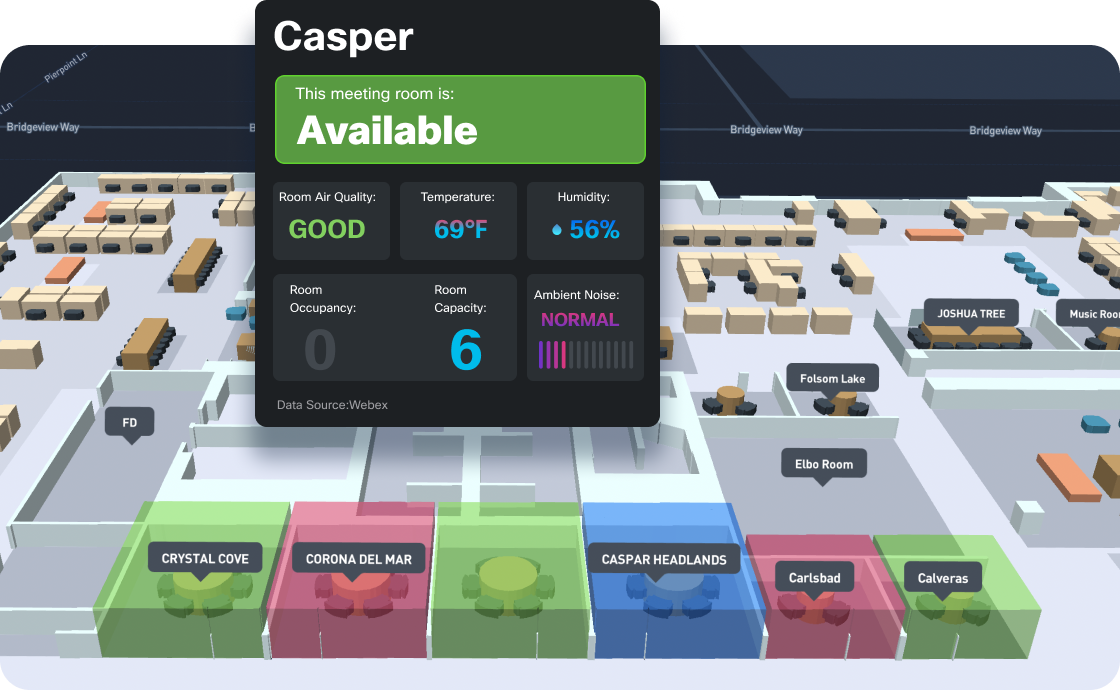
Indoor location accuracy depends on AP density and placement geometry
1. The Foundation Rule
For Cisco Spaces to compute an accurate position for any device — Wi-Fi client or BLE tag — three conditions must be true simultaneously:
At least three APs hear the device at –75 dBm or better! Below this signal level, RSSI becomes unreliable; the math behind trilateration breaks down with weak signals. A single AP at –90 dBm contributes more error than information.
The device is inside the convex hull of those three (or more) APs! A convex hull is the smallest polygon connecting your APs. If a device is outside the polygon — for example, in a corner room when all three APs are in the building's center — there's no triangulation, only extrapolation, and accuracy collapses.
The APs are accurately placed on the Spaces floor map! The location engine compares measured RSSI to expected RSSI based on AP coordinates. An AP placed 5 meters off on the map produces a 5-meter location error for every device near it.
This is why "we have great Wi-Fi coverage, why isn't location working?" is one of the most common Spaces support tickets. Coverage is not the same as location!!! Coverage means one AP can serve a client. Location means three or more APs can simultaneously hear a client well enough to triangulate. These are very different design requirements.
2. Three Design Classes
Cisco's design framework for location-capable wireless networks splits into three classes — A, B, and C — each progressively denser and more capable. Pick the class that matches your use case, then design to it.
Design A — Connectivity-Led
This is a standard wireless design optimized for data throughput. APs are spaced ~12 m (40 ft) apart, placed centrally in coverage zones, no perimeter reinforcement. It produces excellent connectivity, but for Spaces it only delivers presence-based outcomes — building-level and floor-level occupancy, behavior metrics, basic Right Now widgets.
Don't expect zone-level location accuracy with Design A. You won't get it. Devices near the perimeter walls will be heard by only one or two APs, fail the convex hull test, and either show up at the wrong location or not at all. If you tell a customer they're getting Design A and then promise them asset tracking, you're going to have a difficult conversation in three months.
Use Design A when: Spaces is a lightweight overlay for occupancy reporting only, the WLAN was already designed for connectivity and you can't justify additional APs, or the use case truly is presence-only (e.g., "how many people came into the building today").
Design B — RTLS / Standard Location
This is the workhorse design for most Spaces deployments. AP spacing remains ~12 m, but you add perimeter APs along all exterior walls and around major obstacles (elevator shafts, atriums, large structural elements). The result is roughly 1.4× more APs than Design A — a 60 m × 60 m floor goes from ~25 APs to ~36.
The perimeter APs solve the convex hull problem. Now devices anywhere on the floor are surrounded by APs on all sides, and trilateration works at the walls and corners as well as in the center. You'll get X/Y location accuracy in the 5–10 meter range with RSSI, and 3–5 meters with FastLocate.
Use Design B when: the customer needs zone-level occupancy (Space Utilization, Right Now per zone), basic asset tracking with BLE tags (room or area-level — "the laptop is in the IT lab"), real-time captive portal triggering tied to specific zones, or marketing/engagement rules that fire when devices enter/leave defined areas.
Design C — Advanced Location / High Accuracy
This is the design for use cases that require room-level or sub-room accuracy. AP spacing tightens to ~10 m (33 ft), perimeter coverage is mandatory, and the convex hull is enforced everywhere on the floor. AP count is roughly 1.9× Design A — that 60 m × 60 m floor now needs ~49 APs.
With Design C, you can deliver: high-precision asset tracking ("the ventilator is in Room 312, not on the third floor"), AP-only BLE wayfinding (no floor beacons required), zone-level occupancy with very small zones (individual meeting rooms, bays, alcoves), and Hyperlocation-grade accuracy when paired with Hyperlocation hardware.
Use Design C when: asset tracking has a clinical, financial, or operational SLA (hospital equipment, manufacturing tools, retail high-value inventory), wayfinding through a mobile app needs to deliver turn-by-turn navigation, or you're solving for high-density occupancy analytics in venues with many small rooms.
Density Comparison Table
| Design Class |
AP Spacing |
Perimeter APs |
Coverage per AP |
Density Multiplier |
Typical Use |
| A — Connectivity |
~12 m / 40 ft |
No |
~150 m² |
1.0× |
Presence, behavior, basic occupancy |
| B — RTLS |
~12 m / 40 ft |
Yes |
~100 m² |
1.4× |
Zone occupancy, asset tracking, captive portal triggers |
| C — Advanced |
~10 m / 33 ft |
Yes (convex hull enforced) |
~75 m² |
1.9× |
Room-level accuracy, wayfinding, high-precision RTLS |
Worked Examples by Venue
The math is straightforward once you know your floor area and design class. Below are realistic examples for each major venue type.
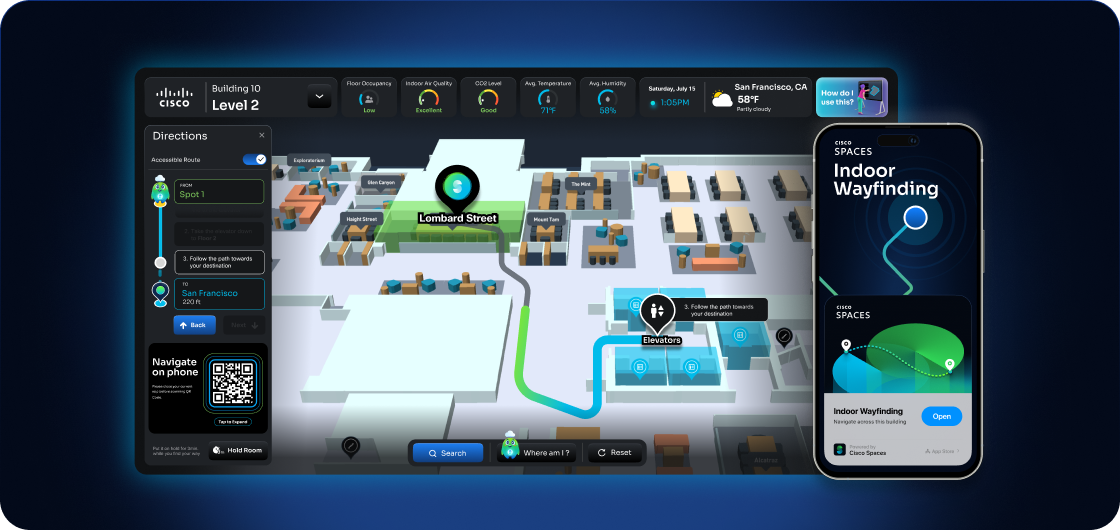
Real-world venues drive different design class decisions
Office / Corporate HQ — 60 m × 60 m floor (3,600 m²)
A typical open-plan office floor with meeting rooms around the perimeter, 2.7–3.0 m drop ceilings, drywall partitions.
| Design |
AP Count |
Outcome |
| A |
~25 APs |
Floor-level occupancy, Behavior Metrics, OpenRoaming |
| B |
~36 APs |
Zone occupancy per neighborhood, hot-desking via Smart Workspaces, room-level Right Now |
| C |
~49 APs |
Per-meeting-room occupancy, individual desk presence, BLE wayfinding |
For corporate hybrid-work deployments, Design B is the sweet spot. It supports hot-desking, room booking integration with Webex, Space Utilization analytics, and reasonable asset tracking for laptops/tags — without the cost overhead of Design C. Save Design C for executive floors or labs where you genuinely need per-room precision.
Hospital — 80 m × 40 m floor (3,200 m²)
A clinical floor with patient rooms along corridors, nurse stations, treatment rooms. Ceilings often higher (3.5–4.0 m), more concrete and metal in walls (X-ray shielding, medical gas piping), heavy RF interference.
| Design |
AP Count |
Outcome |
| A |
~22 APs |
Not recommended for hospitals — won't support asset tracking |
| B |
~32 APs |
Bed-level zone tracking, ward occupancy, basic asset visibility |
| C |
~44 APs |
Room-level asset tracking (ventilators, infusion pumps, beds), staff duress, patient flow analytics |
Hospitals almost always require Design C. The use cases — locating expensive shared equipment, demonstrating regulatory compliance for asset tracking, supporting patient flow analytics, and meeting clinical workflow SLAs — depend on accuracy. Add to this the RF challenges (concrete walls, medical equipment interference, metal carts everywhere) and Design B often degrades to Design A in practice. Plan for Design C and validate with a predictive survey.
Airport Gate / Concourse — 200 m × 80 m open area (16,000 m²)
Large open spaces, very high ceilings (8–15 m), reflective surfaces (glass, polished floors), seasonal occupancy spikes (10–50× variation).
| Design |
AP Count |
Outcome |
| A |
~107 APs |
Gate-level presence, dwell-time analytics |
| B |
~150 APs |
Zone occupancy (security line, gate seating, retail concessions), captive portal targeting per zone |
| C |
~213 APs |
Per-seat-cluster occupancy, advanced wayfinding from check-in to gate |
Airports introduce a special challenge: ceiling height. APs mounted at 8–10 m have very different propagation than the standard 2.7 m office model the AP datasheets assume. Coverage radius increases (more area per AP), but RSSI dynamic range compresses (the difference between –40 dBm and –70 dBm shrinks at distance), reducing trilateration accuracy. Design B with directional or down-tilt antennas often produces better location results than Design C with standard omnis at high mount points. Consider Cisco APs with internal antennas designed for high-ceiling deployment, or external-antenna APs paired with appropriate antenna selection.
Hospitality / Hotel — 50 m × 20 m floor (1,000 m²)
Guest room corridors with rooms on both sides, lobbies and meeting spaces on ground floors.
| Design |
AP Count |
Outcome |
| A |
~7 APs |
Floor-level occupancy, OpenRoaming for guest onboarding |
| B |
~10 APs |
Per-corridor zone presence, captive portal with branded engagement, behavior metrics |
| C |
~13 APs |
Per-room presence (where corridor APs can hear into rooms) |
Hotel guest floors are usually Design A or B. True per-room location through guest room walls is unreliable — drywall passes RF reasonably, but bathroom plumbing, mirror backings, and metal door frames disrupt it room-to-room. The realistic outcome is corridor-zone presence plus excellent OpenRoaming for guest onboarding. For lobby areas, conference floors, and ballrooms, design those specifically as Design B or C — they're high-value engagement zones, not corridors.
Retail / Mall — 100 m × 60 m floor (6,000 m²)
Open retail floor with department zones, fitting rooms, checkout, displays. Mostly drywall, some concrete columns.
| Design |
AP Count |
Outcome |
| A |
~40 APs |
Store-level footfall, dwell time, Behavior Metrics |
| B |
~57 APs |
Department-zone analytics, captive portal with location-based offers, customer journey |
| C |
~80 APs |
Aisle-level analytics, advanced wayfinding, fitting-room dwell time |
Retail typically lands at Design B, with Design C reserved for flagship stores or anchor tenants where the marketing-team ROI justifies the AP density. Be careful with Design A in retail — Behavior Metrics can show meaningful trends but the absolute counts are unreliable for reporting to a CFO. If the customer is making merchandising decisions on Spaces data, you need Design B at minimum.
Warehouse / Manufacturing — 150 m × 80 m floor (12,000 m²)
Large open spaces, high ceilings (6–10 m), metal racking, forklift traffic, RF-noisy industrial equipment.
| Design |
AP Count |
Outcome |
| A |
~80 APs |
Zone-level worker presence (very rough) |
| B |
~115 APs |
Aisle-level asset tracking, worker safety, equipment visibility |
| C |
~160 APs |
Pallet-level asset tracking, real-time WIP visibility, integration with WMS |
Warehouses and manufacturing floors are similar to airports in that high ceilings change the RF propagation model. Add the rack effect — metal shelving creates RF canyons where signals bounce along aisles but don't propagate across them — and AP placement becomes critical. Mount APs in aisle centers, not above racks, or accept that you'll have an aisle-by-aisle location grid. Design B with careful aisle-centric placement often outperforms Design C with naïve grid placement.
Special Design Considerations
Ceiling Height
Standard AP datasheets assume 2.7–3.0 m ceilings. Above 5 m, coverage radius grows but trilateration accuracy shrinks. Design for the highest ceilings in your venue separately — don't use a single density model across an office floor and a 12-meter atrium.
Wall Materials
Drywall: ~3 dB attenuation per wall — minor, manageable
Cinder block: ~5–10 dB — plan for it
Concrete with rebar: ~15–20 dB — design as if walls are opaque
Metal partitions / cleanrooms: ~30+ dB — treat each space as RF-isolated, design separately
Open Space vs. Partitioned
Open spaces (warehouses, atriums, lobbies) need lower density per square meter than partitioned spaces (offices, hospitals, hotels) — but they need APs in the open volume, not at the perimeter. Don't only mount APs on perimeter walls in a 30 m × 30 m open lobby — RF will coverage-cover but not location-cover.
BLE vs. Wi-Fi Coverage
BLE has ~1/3 the range of Wi-Fi at similar transmit powers. If you're using AP-based BLE for asset tracking, you need denser AP placement than what Wi-Fi alone would require. Design B Wi-Fi with the same APs becomes Design C BLE in practice. Plan for this in mixed-use deployments — or supplement with floor beacons in corridors and large rooms.
AP Model Recommendations
Cisco's recommended AP families for Spaces deployments today:
| AP Family |
Best For |
Key Capabilities |
| Catalyst 9136 / 9166 (Wi-Fi 6E/7) |
High-density office, enterprise |
Wi-Fi 6E/7, BLE 5, IoT IOx, FastLocate, AI/RRM |
| Catalyst 9164 (Wi-Fi 6E) |
Standard enterprise, hospitality |
Wi-Fi 6E, BLE 5, IoT IOx, indoor environments |
| Catalyst 9162 (Wi-Fi 6E) |
Branch, smaller deployments |
Wi-Fi 6E, BLE, lower port count |
| Catalyst 9130 (Wi-Fi 6) |
Established Wi-Fi 6 deployments |
Wi-Fi 6, BLE 5, IoT IOx, Hyperlocation module support |
| Catalyst 9120 (Wi-Fi 6) |
Mid-tier offices |
Wi-Fi 6, BLE 5, IoT IOx |
| Meraki CW9162 / CW9164 / CW9166 |
Cloud-managed Meraki deployments |
Wi-Fi 6E, BLE, MQTT location |
| Meraki MR46 / MR56 / MR57 |
Cloud-managed Wi-Fi 6 |
BLE, location, Spaces integration |
Avoid for IoT/BLE deployments: 9105, 9115, 9117, 1815, 1840, and the older 4800. They're functional for Wi-Fi but not recommended for BLE-based asset tracking — their BLE radios or IOx capability has limitations.
For Hyperlocation (sub-meter accuracy via Angle of Arrival), legacy 3700/3800/4800 with the Hyperlocation antenna module remain the deployment option, with 9130 supporting newer Hyperlocation methods. For UWB-based location (sub-meter without specialized AoA modules), look to the latest Cisco UWB-capable AP and tag combinations — this is the direction the platform is heading.
Site Tags Are Mandatory
On the Catalyst 9800, every AP feeding location data into Spaces must be assigned to a custom site tag!!! The default site tag (default-site-tag) does not generate ranging data for Spaces. This is the single most common reason "all my APs are on the controller, why are they not in Spaces?" — they're in the default site tag.
Build a site tag per location (per building or per floor depending on size), assign every AP to one, and verify before going live.
Calibration and Validation
After deployment, validate accuracy before handing over to operations:
Use the Spaces Location Accuracy Test tool (Detect & Locate → Location Accuracy)
Define 10–20 reference points on each floor map
Walk a known device (phone or tag) to each point, log the reported X/Y vs. actual
Calculate mean error in meters
Target: ≤10 m for RSSI, ≤5 m for FastLocate, ≤1 m for Hyperlocation/UWB
If accuracy is poor, the corrective levers in priority order are: add perimeter APs → increase density toward Design B/C → fix AP placement on the map → add Inclusion/Exclusion zones → enable FastLocate → upgrade to Hyperlocation hardware.
Choosing the Right App for the Outcome
Cisco Spaces is a portfolio, not a single app. Map the customer's business outcome to the right app, then size and design accordingly.
| Business Need |
Spaces App |
Type |
| How many people are in Building 7 right now? |
Right Now |
Real-time |
| How is the campus utilized this quarter? |
Space Utilization |
Historical |
| Where is my client/laptop/phone right now? |
Detect & Locate (SEE) |
Real-time |
| Show me where this device went yesterday |
Detect & Locate (ACT) |
Historical + API |
| Track 5,000 BLE asset tags with battery telemetry |
Asset Locator + IoT Services |
Both |
| Manage BLE floor beacons and 3rd-party sensors |
IoT Services / IoT Explorer |
Both |
| Onboard guests with a branded splash page |
Captive Portal + Engagements |
Real-time |
| Send a Webex notification when density > 80% |
Density Rules / Engagements |
Real-time |
| Hot-desking and room booking with Webex devices |
Smart Workspaces |
Both |
| Indoor wayfinding via mobile app |
Indoor Navigation SDK + AI Maps |
Real-time |
| Federate Wi-Fi onboarding across venues |
OpenRoaming |
Real-time |
| Stream raw events to my data lake / Splunk |
Firehose API / Meta API |
Real-time |
Real-Time vs. Historical — A Critical Distinction
Right Now counts associated devices (not probing) over the last vertical-defined window: Workspace and Education verticals use 8–10 hour sessions; Retail uses 3 hours. The number you see is "associated devices in the last N hours" — this is close to a true headcount in workspaces (everyone's badged in and connected) but a rough proxy in retail (many visitors don't connect at all).
Space Utilization is historical only and only available for Workspaces and Education verticals. For retail/healthcare, you'd use Behavior Metrics + Right Now instead.
Behavior Metrics uses associated user IDs as a proxy for actual visitor counts. In workspaces this correlates strongly with badge data; in retail with low connection rates it's good for trends but limited for absolute numbers. Set this expectation in pre-sales conversations to avoid surprises later.
Conclusion
A successful Cisco Spaces design is fundamentally a wireless design problem with a cloud platform attached. The Connector sizing, license tier, and app selection are mostly mechanical decisions — the real design work is in AP density, placement, and validation.
Pick the design class that matches the use case (A for connectivity-led, B for standard location and zone analytics, C for high-precision asset tracking and wayfinding), validate with a predictive survey, build out perimeter APs to satisfy the convex hull rule, assign every AP to a custom site tag, and walk-test before handover. Get those things right, and Spaces becomes the platform the customer expected. Get them wrong, and no amount of cloud configuration will save the deployment.
Need to Size Your Deployment?
Two configurators are available to help validate your design before you order hardware:
- Official Cisco Spaces sizing calculator — available through your Cisco account team or partner portal
- Planning a Cisco Spaces deployment or still deciding? Try the free https://spaces.mihajlov.nl/ I built for a first sizing estimate, with the calculation behind every number.